
Choosing the right AM4 server motherboard is important. It affects how well your home lab or small business server works in 2025. Some top models are ASRock Rack X570D4U, ASUS Pro WS X570-ACE, MSI B550M PRO-VDH WIFI, and Gigabyte X570 Aorus Ultra. These motherboards have strong features. Important stats include ECC RAM support, socket compatibility, quiet operation, and upgradeability. These help users build a server that fits their needs. Every buyer should think about how the motherboard will work for them. It could be for storage, virtualization, or streaming.
Key Takeaways
Make sure the socket matches before you buy a motherboard. This helps your CPU fit and lets you upgrade later.
Think about how much RAM you need and if it has ECC support. ECC RAM stops data mistakes and makes your server work better.
Look at storage choices like SATA and M.2 slots. More choices help you manage data and get it faster.
Check the network features. Fast LAN and Wi-Fi make your server work well and give you more options.
Get ready for upgrades in the future. Pick a motherboard with enough slots for new tech when you need it.
Key stats for AM4 server motherboards
Socket compatibility
Socket compatibility tells you which CPUs fit the motherboard. The AM4 socket is used for Ryzen processors. You need to check the socket before you buy a motherboard. This makes sure your server can use the CPU you want. It also lets you upgrade later if needed. The table below shows which chipsets work with different Ryzen generations:
Chipset | Compatible Processors |
|---|---|
X570 | Ryzen 1000, 2000, 3000, 4000, 5000 |
B550 | Ryzen 3000, 4000, 5000 |
A520 | Ryzen 3000, 4000, 5000 |
X470 | Ryzen 1000, 2000, 3000, 4000, 5000 |
B450 | Ryzen 2000, 3000, 4000, 5000 |
X370 | Ryzen 2000, 3000 (with BIOS update) |
B350 | Ryzen 2000, 3000 (with BIOS update) |
A320 | Ryzen 1000, 2000, 3000 (with BIOS update) |
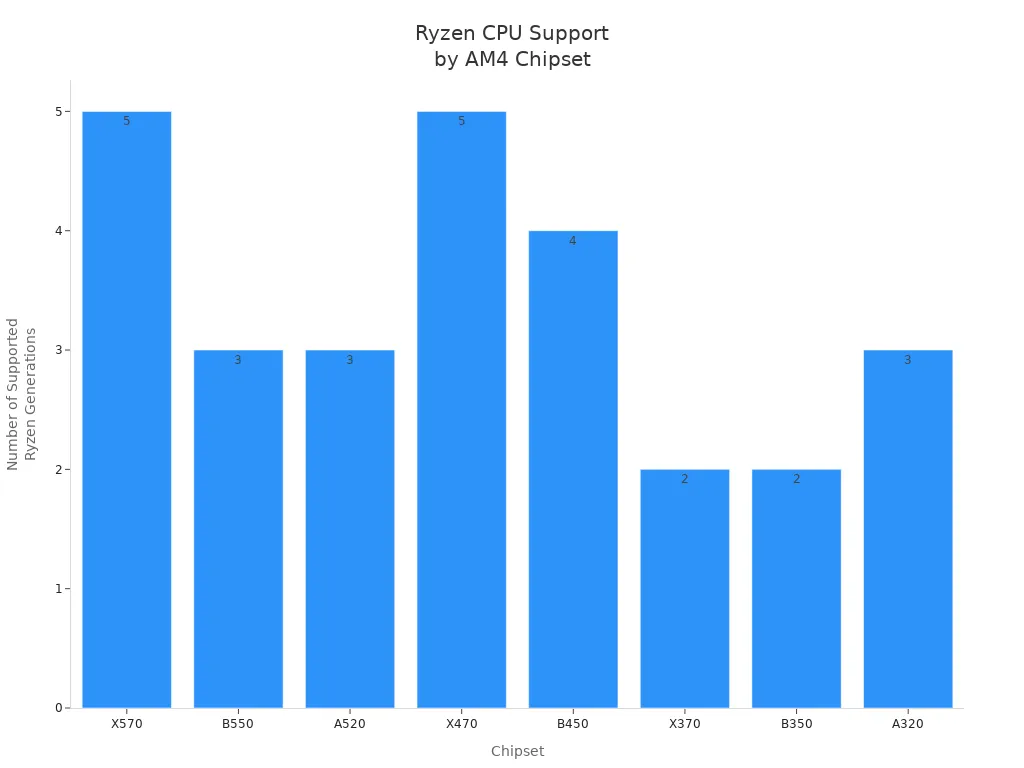
You should always check socket compatibility. This helps you avoid problems when you want to upgrade your CPU.
CPU support
The socket on an AM4 motherboard decides which Ryzen CPUs you can use. Most AM4 boards work with many different CPUs. You can pick a simple CPU or a powerful one. This helps you choose the right CPU for your server. For example, a file server might use a basic Ryzen. A server for virtualization needs a strong multi-core chip.
RAM capacity and ECC support
RAM capacity shows how many jobs your server can do at once. ECC RAM helps stop data errors. Many AM4 server motherboards support ECC RAM, but not all work the same way. Most boards use ECC RAM at 2933 MHz. Only a few, like some ASRock boards, use DDR4 3200 ECC RAM.
Servers usually use ECC RAM at 2933 MHz.
DDR4 3200 ECC RAM is only on a few boards.
The table below explains ECC RAM support and what it means:
Aspect | Description |
|---|---|
ECC Functionality | Some ECC features work, but not all are fully used. |
Impact on Stability | If ECC is not complete, reliability is lower. |
Error Detection | Windows finds hardware problems but does not fix all errors. |
Single-bit Error Handling | It is not clear if single-bit errors are fixed. |
Future Improvements | ECC support might get better in the future. |
Storage options (SATA, M.2, NVMe)
Storage options decide how much data your server can keep and how fast it gets files. AM4 motherboards often have many SATA ports for hard drives and SSDs. Many also have M.2 slots for NVMe drives, which are faster. More storage options help your server hold big databases and lots of media.
Network connectivity (LAN, Wi-Fi)
Network connectivity is very important for servers. Most AM4 boards have Gigabit LAN ports for fast wired internet. Some boards also have Wi-Fi. This is good if you cannot use cables. The table below compares network features:
Motherboard Model | LAN Speed | Wi-Fi Support |
|---|---|---|
X470 AORUS GAMING 5 WIFI | Intel GbE LAN | Intel® 11ac 2×2 WAVE2 WIFI (up to 1.73Gbps) |
Expansion slots
Expansion slots let you add more things to your server. Common slots are PCIe x16 for graphics cards or RAID controllers. Some boards split the main slot into smaller lanes for more devices. The table below shows common setups:
Feature | Description |
|---|---|
Expansion Slot | PCIe 3.0 x16 (splits to x4/x4/x4/x4) |
M.2 Slots | Two M.2 slots |
USB Ports | Two USB 3.1 Gen 1 ports |
Power delivery and reliability
Power delivery helps your server run well when it is busy. Good motherboards use things like Core Boost Technology and IR Digital PWM. These features keep the server running smoothly and stop crashes. Server-grade PCBs and thermal solutions keep parts cool and make them last longer.
Feature | Impact on Performance |
|---|---|
Core Boost Technology | Keeps the server stable when busy |
Server-grade PCB | Better PCIe 4.0 speed and stability |
IR Digital PWM | Smooth running in tough situations |
Advanced thermal solutions | Good temperatures, longer life |
Tip: Always check the socket and RAM support before you buy a server motherboard. This makes sure your system works now and in the future.
Best AM4 server motherboards 2025
ASRock Rack X570D4U – Virtualization and home lab
The ASRock Rack X570D4U is a top choice for virtualization and home labs. It is small and fits easily in rackmount cases. It works with new AMD Ryzen processors. These CPUs are strong and handle tough server jobs. The board has eight SATA ports. You can connect many drives for lots of storage. It has Gigabit Ethernet for steady networking. The HDMI output helps you see video and fix problems.
Specification | Details |
|---|---|
Chipset | |
CPU Socket | AM4 |
Form Factor | Micro ATX (9.6″ x 9.6″) |
Memory | 32 GB DDR4 SDRAM maximum; 4 x DIMM slots |
Storage | 8 x SATA Interfaces |
Networking | Gigabit Ethernet |
CPU Support | AMD Ryzen 5000 Series Desktop Processors |
Key features:
Small size fits most server racks.
Eight SATA ports for lots of storage.
ECC memory keeps data safe.
BMC lets you manage the server from far away.
Pros | Cons |
|---|---|
Chipset may get too hot | |
Dual 10GbE networking | Only two USB 3.0 ports |
BMC for remote management |
This board works well for virtualization and home labs. It is a good deal for people who want safe storage and remote control. Some users may need better cooling for the chipset.
ASUS Pro WS X570-ACE – Small business server
The ASUS Pro WS X570-ACE is great for small business servers. It has three PCIe 4.0 x16 slots for more cards and jobs. ECC memory support helps keep the server running right. ASUS Control Center Express helps IT staff manage things easily. Fast storage like M.2 and U.2 makes data move quickly. Strong power and cooling keep the server steady.
Feature | Description |
|---|---|
PCIe Slots | Three PCIe 4.0 x16 slots (3-way x8/x8/x8) |
ECC Memory | Supported for reliable server operation |
Management Software | ASUS Control Center Express for IT management |
Storage | Up to 64Gbps M.2 & 32Gbps U.2 |
Cooling | Ultra-efficient VRM and active PCH heatsinks |
Power Solution | 12+2 IR3555 power stages for stable delivery |
Good for small businesses that need strong and safe servers.
Has fast storage and networking choices.
Works well for important business jobs.
Pros:
Three PCIe 4.0 slots for more cards.
ECC memory support is strong.
Good management and cooling features.
Cons:
Costs more than basic boards.
Big ATX size may not fit small cases.
This am4 server motherboard is stable and easy to manage. It is a smart pick for small businesses.
Gigabyte X570 Aorus Ultra – Expandability
The Gigabyte X570 Aorus Ultra is for users who want lots of upgrades. It can use many GPUs and storage devices. This makes it a best motherboard for people who want to grow their server. It has three PCIe 4.0 x16 slots and three M.2 slots for fast NVMe storage. The board has strong power delivery for steady work. Good cooling keeps the system safe.
Can use up to three graphics or expansion cards.
Three M.2 slots for fast storage.
Advanced cooling keeps things running well.
Strong power delivery for steady work.
Pros:
Easy to upgrade in the future.
Great storage and PCIe choices.
Works well for tough jobs.
Cons:
Costs more than simple boards.
Big size may not fit all cases.
This am4 server motherboard is good for people who want a strong and flexible server.
MSI B550M PRO-VDH WIFI – Compact home server
The MSI B550M PRO-VDH WIFI is a small choice for home servers. Its Micro ATX size fits tiny cases. This is good for places with little space. The board works with Ryzen 3000, 4000, and 5000 CPUs. It does well for sharing files and streaming media. Built-in Wi-Fi and Gigabit LAN give you many ways to connect. Four SATA ports and an M.2 slot let you add more storage.
Micro ATX size fits small builds.
Has Wi-Fi and Gigabit LAN.
ECC memory keeps data safe.
Good price for home users.
Pros:
Small size is easy to install.
Works well for home server jobs.
Reliable networking and storage.
Cons:
Not as many upgrades as bigger boards.
Fewer SATA and M.2 slots.
This best motherboard is a smart pick for home users who want a simple and safe server.
ASUS Prime B660I-AX – Balanced performance
The ASUS Prime B660I-AX gives balanced performance for users who want good features and speed. Its Mini-ITX size fits very small cases. This is great for tiny server builds. The board works with new Ryzen CPUs and DDR4 memory. It does well for most server jobs. It has Wi-Fi 6 and 2.5Gb LAN for fast connections. Two M.2 slots give you flexible storage.
Mini-ITX size for tiny builds.
Wi-Fi 6 and 2.5Gb LAN for fast networking.
Two M.2 slots for quick storage.
ECC memory keeps things reliable.
Pros:
Good price for the features.
Modern networking and storage.
Fits in small cases.
Cons:
Not many upgrades because of small size.
Fewer RAM slots than big boards.
This am4 server motherboard is a good deal for people who want strong and balanced performance in a small space.
Gigabyte B760I Aorus Pro DDR5 – Upgradeability
The Gigabyte B760I Aorus Pro DDR5 is great for upgrades. It uses DDR5 memory for faster speeds and better efficiency. The Mini-ITX size is good for small builds. PCIe 5.0 support means you can use new devices later. The board has two M.2 slots and 2.5Gb LAN for quick storage and networking. It is a best motherboard for people who want to keep their server ready for the future.
DDR5 memory for fast performance.
PCIe 5.0 for new upgrades.
Two M.2 slots and 2.5Gb LAN.
Mini-ITX size for small builds.
Pros:
Easy to upgrade with new hardware.
Fast memory and storage support.
Small and efficient design.
Cons:
Costs more because of new features.
Not many expansion slots.
This am4 server motherboard is a smart pick for users who want their server to stay up to date.
How to choose the best motherboard for your server
Picking the right motherboard for your server is important. You need to know what you want your server to do. Different servers need different things. For example, a file server, virtualization, media server, or business server all have special needs. This guide helps you match motherboard stats to your server job. It makes sure your server will work well, last long, and can grow later.
Match stats to server roles
Each server job needs its own set of features. First, write down what you need your server to do. Then, check if the motherboard has those features. Here are some steps to help you pick the best one:
Define the server role: Decide if your server will store files, run virtual machines, stream media, or help with business work.
Check CPU and RAM compatibility: Make sure the motherboard works with your CPU and memory. If you need ECC RAM, check for that too.
Review storage options: See if there are enough SATA, M.2, or NVMe slots for your storage now and later.
Assess network connectivity: Make sure the board has the right LAN speed. If you need Wi-Fi, check for that as well.
Evaluate expansion and upgrade paths: Look at how many PCIe slots there are and if it supports new tech.
Balance budget and performance: Pick a board that does what you need but does not cost too much.
Plan for future-proofing: Choose a motherboard that lets you upgrade later.
Tip: Always check if the motherboard, CPU, and memory work together before you buy. This helps you avoid mistakes and keeps your server running well.
File server needs
A file server should be reliable and stable. It must handle data well. Pick motherboards with strong parts and ECC memory support. The table below shows what matters most for a file server:
Feature | Description |
|---|---|
Reliability and Stability | Strong parts and good testing keep the server stable when busy. |
Scalability | Lets you add more CPUs, memory, or storage as you grow. |
Memory Configuration | ECC memory support and enough slots for lots of RAM. |
Network Connectivity | Fast Ethernet ports for quick and smooth file transfers. |
Management Features | BMCs help you fix problems from far away. |
Storage Capabilities | Many storage choices like SATA, SAS, NVMe, and RAID. |
Power Efficiency | Uses less power and saves money over time. |
A file server works best with ECC RAM, lots of storage ports, and fast network ports. BMCs help you fix problems without being there. Power efficiency saves money in the long run.
Virtualization requirements
Virtualization servers run many virtual machines at once. They need CPUs with lots of cores, lots of memory, and good support for virtualization. Pick motherboards that work with multi-core Ryzen CPUs and ECC RAM. Enough PCIe slots let you add network or storage cards. Good power delivery keeps the server steady when it is busy.
Pick a motherboard that works with CPUs with many cores.
Make sure it supports ECC memory for safe data.
Get boards with enough PCIe slots for upgrades.
Look for strong power delivery to keep things stable.
Note: Virtualization servers may need BIOS updates to work with new CPUs and memory.
Media server considerations
A media server needs to handle big files, stream fast, and serve many users. The motherboard should work with new CPUs and memory. Fast storage and network ports are important. The table below shows what to look for in a media server:
Specification | Details |
|---|---|
Processor Support | Works with AMD Ryzen 5000/4000/3000 Series |
Memory Configuration | Dual Channel DDR4 ECC/Non-ECC UDIMM, 4 slots |
Networking Capabilities | Two 1Gb/s LAN ports with Intel I210-AT |
Storage Interfaces | Six SATA ports and one M.2 slot |
PCIe Expansion Slots | Two PCIe Gen4 x16 and x4 |
Form Factor | microATX |
Socket | One AM4 |
Chipset | AMD B550 |
RAID Support | RAID 0/1/10 |
OS Compatibility | Windows 10 and Windows 11 |
A media server needs quick storage, two LAN ports, and RAID for safety. Pick a motherboard with enough SATA and M.2 slots for your media files. Make sure it works with the newest operating systems for smooth streaming.
Small business priorities
Small business servers need to be reliable, fast, and easy to manage. ECC memory and business CPUs are important. Look for motherboards with strong network ports, remote management, and flexible storage.
Key things for small business servers are:
Reliable work with ECC RAM and steady power.
More than one network port for backup and speed.
Tools like BMCs for fixing problems from far away.
Storage and PCIe slots you can add to later.
Works with business software and operating systems.
Callout: Small businesses should pick motherboards with long support and warranty. This keeps the server working and protects your money.
When you match motherboard features to your server job, you get a system that works now and can grow later. Compatibility, reliability, and upgrade options are always most important for any server.
Common concerns and future-proofing
Compatibility with Ryzen CPUs and ECC RAM
Many people wonder if their AM4 server motherboard works with different Ryzen CPUs and ECC RAM. This depends on the exact CPU and motherboard you pick. Some motherboards say they support ECC RAM, but error reporting might not always work right. For example, some users saw that the ASRock X570 Taichi did not show ECC errors, even though it said it could. This can make the server less reliable over time. Always check the official CPU and RAM list before you buy a motherboard.
ECC RAM support can change with the CPU and motherboard.
Some boards might not show ECC errors correctly.
Always check ECC and CPU compatibility before you buy.
BIOS updates and support
BIOS updates help motherboards work with new CPUs and fix bugs. Good server motherboards get regular BIOS updates from the maker. These updates can make the system more stable and add new features. Some boards, like Asrock and MSI, have had problems with BIOS updates before. Users should check how often the brand gives updates and how easy they are to install. Keeping the BIOS updated helps the server stay safe and work well.
Tip: Before you buy, visit the motherboard support page to see the newest BIOS updates and support notes.
Warranty and manufacturer reliability
Warranty and how much you trust the maker matter for any server build. Different brands give different support and warranty terms. The table below shows how top server motherboard brands compare:
Manufacturer | Warranty Terms | |
|---|---|---|
Asus | High | Premium prices, features vary |
Asrock | Quirky | BIOS update issues |
MSI | Moderate | BIOS update issues |
No-name brands | Low | Unknown quality |
Asus motherboards are often very reliable and have strong warranty terms. Asrock and MSI are good choices but may have some BIOS update problems. No-name brands might not be as good and may have less support. Always pick a trusted brand for better quality and support.
Upgrade paths and expansion
Future-proofing means picking a motherboard that can grow with your needs. Different chipsets work with different CPUs and features. The table below shows common chipsets and their upgrade options:
Chipset | CPU Compatibility | Features |
|---|---|---|
X570 | Ryzen 1000 to 5000 | PCIe 4.0, dual-channel DDR4, overclocking |
B550 | Ryzen 3000 to 5000 | PCIe 4.0, dual-channel DDR4, overclocking |
X470 | Ryzen 1000 to 5000 | Dual-channel DDR4, overclocking |
B450 | Ryzen 1000 to 5000 | Dual-channel DDR4, overclocking |
Pick a motherboard with enough PCIe slots, RAM slots, and storage options. This lets your server add new parts later. Choosing the right chipset helps your server last for many years.
Note: A future-proof server motherboard gives you more value and flexibility as technology changes.
Picking the right AM4 server motherboard means you must check if the CPU works with it, how much memory it can use, and what tools help you manage it. The table below shows the most important things to look for:
Specification/Feature | Description |
|---|---|
CPU Compatibility | Works with the processor you need |
Memory Capacity | Can use enough RAM for your server jobs |
Form Factor Options | Fits in your space and lets you add more parts |
Notable Features | Makes your server faster and more reliable |
Management Tools | Makes setup and fixing problems easier |
Top choices like the ASRock Rack X570D4U are good for home labs. MSI and ASUS boards are better for small businesses. People building servers should care about how well the board works, if it can grow, and if you can upgrade it later. When you pick features that match your server’s job, your server will work well and last a long time.
FAQ
What is ECC RAM, and why does a server need it?
ECC RAM means Error-Correcting Code memory. It finds and fixes mistakes in data. Servers use ECC RAM to keep data safe. This helps stop crashes and problems. Many AM4 server motherboards work with ECC RAM. This makes servers more reliable.
Can users upgrade CPUs on AM4 server motherboards?
Most AM4 server motherboards let you upgrade CPUs. They work with many Ryzen generations. Always check the CPU list for your motherboard. Update the BIOS if you need to. This helps the new CPU work right.
How many drives can an AM4 server motherboard support?
The number of drives depends on the motherboard. Some boards have up to eight SATA ports. Many also have more than one M.2 slot. Check the specs to see how many drives you can use. Make sure it fits your storage needs.
Do AM4 server motherboards support remote management?
Some AM4 server motherboards have BMC for remote management. For example, the ASRock Rack X570D4U has this feature. BMC lets you watch and control your server from far away. This makes fixing problems easier.
Is Wi-Fi necessary for a home server?
Most home servers do not need Wi-Fi. Wired LAN is faster and more stable. Some motherboards have Wi-Fi for more choices. Pick what works best for your network at home.