
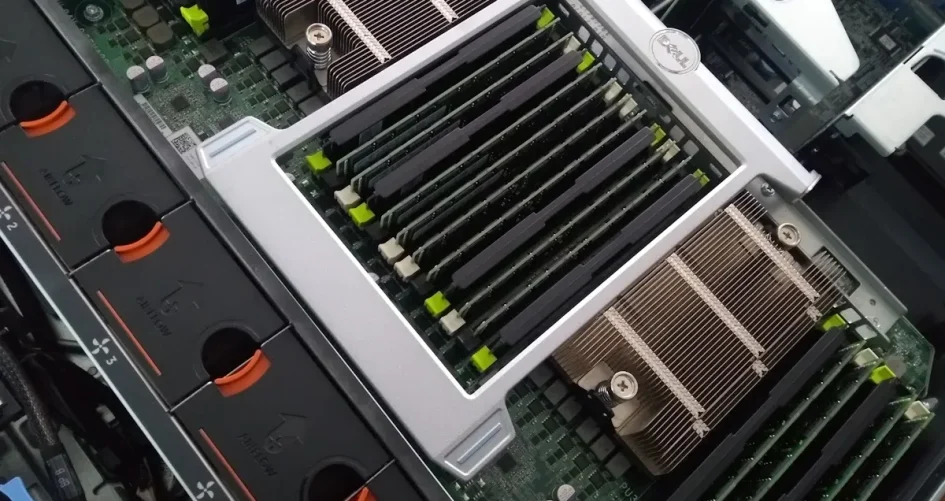
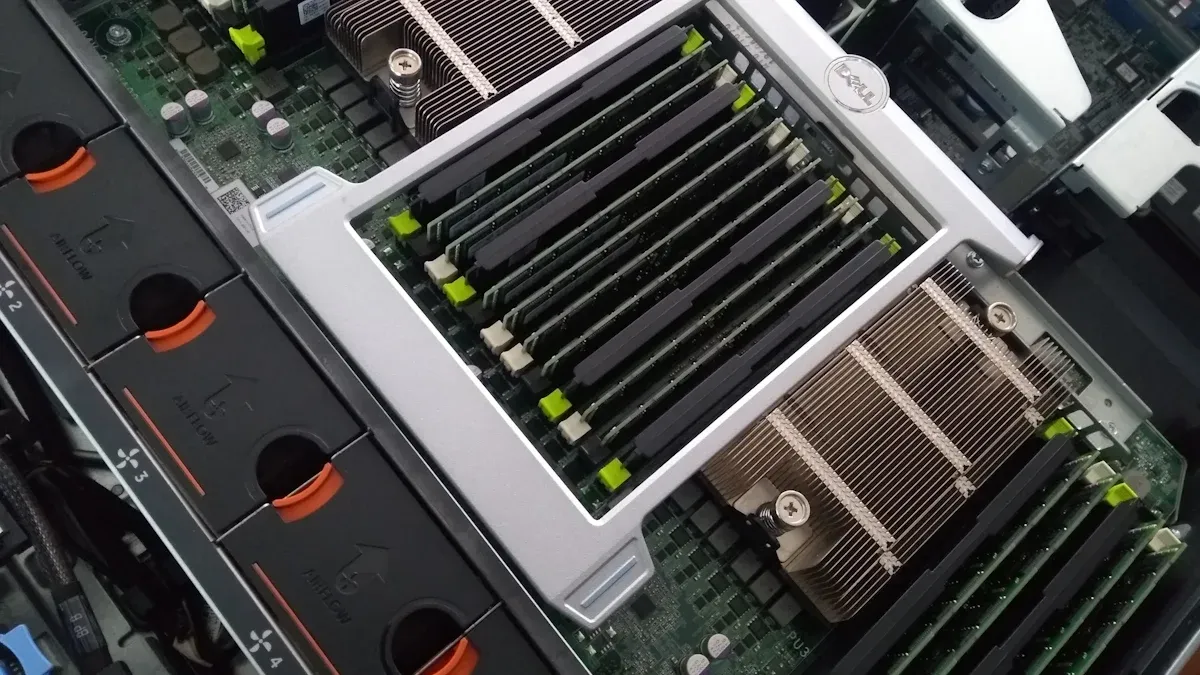
هل تبحث عن أفضل اللوحات الأم للخوادم هذا العام؟ يمكنك العثور على أفضل الخيارات مثل XTT 11DPI-N من sz-xtt وSupermicro وASUS وASRock. هذه العلامات التجارية من أفضل العلامات التجارية. يحتاج كل خادم إلى أشياء مختلفة، لذا يجب عليك مطابقة ميزات مثل ذاكرة ECC, و NICs المتعددة، والإدارة عن بُعد، وفتحات PCIe في إعداداتك. انظر إلى هذا الجدول لمعرفة كيف تساعد هذه الميزات في الأداء والموثوقية والنمو:
الميزة | التأثير على الأداء والموثوقية وقابلية التوسع |
|---|---|
ذاكرة ECC | يكتشف أخطاء الذاكرة ويصلحها من أجل موثوقية أفضل. |
مراكز تعريف وطنية متعددة | يجعل الشبكة أسرع ويوفر نسخة احتياطية في حال فشل أحدها. |
إدارة IPMI | تساعدك على مراقبة الأنظمة والتحكم فيها بسهولة وأمان. |
فتحات PCIe | يتيح لك إضافة الأجهزة وترقيتها أثناء نموك. |
قبل أن تختار، فكر في كيفية استخدامك للخادم الخاص بك. قد يكون لمركز البيانات أو المحاكاة الافتراضية أو NAS أو مختبر منزلي. سيساعدك هذا في اختيار اللوحة الأم المناسبة لما تحتاجه.
الوجبات الرئيسية
اختر اللوحة الأم التي تناسب احتياجات الخادم الخاص بك. ابحث عن أشياء مثل ذاكرة ECC، والمزيد من بطاقات NIC، وفتحات PCIe. تساعد هذه الميزات خادمك على العمل بشكل أسرع.
يمكن للوحة الأم XTT 11DPI-N استخدام معالجي Intel Xeon. وهي تدعم ما يصل إلى 4 تيرابايت من ذاكرة ECC. وهذا يجعلها جيدة للمهام الكبيرة.
تدوم اللوحات الأم Supermicro لفترة طويلة وتعمل بشكل جيد. وهي اختيار جيد لمراكز البيانات وخوادم الأعمال.
لتصميمات NAS، اختر اللوحات الأم التي تحتوي على الكثير من منافذ SATA. تأكد من أنها دعم ذاكرة ECC. يحافظ ذلك على أمان بياناتك ويساعد على نقل الملفات بسرعة.
تحقق دائماً من أن أجزائك تعمل معاً قبل أن تبدأ. تأكد من تطابق اللوحة الأم مع وحدة المعالجة المركزية والذاكرة. هذا يساعدك على تجنب المشاكل عند الإعداد.
أفضل اللوحات الأم للخوادم 2025
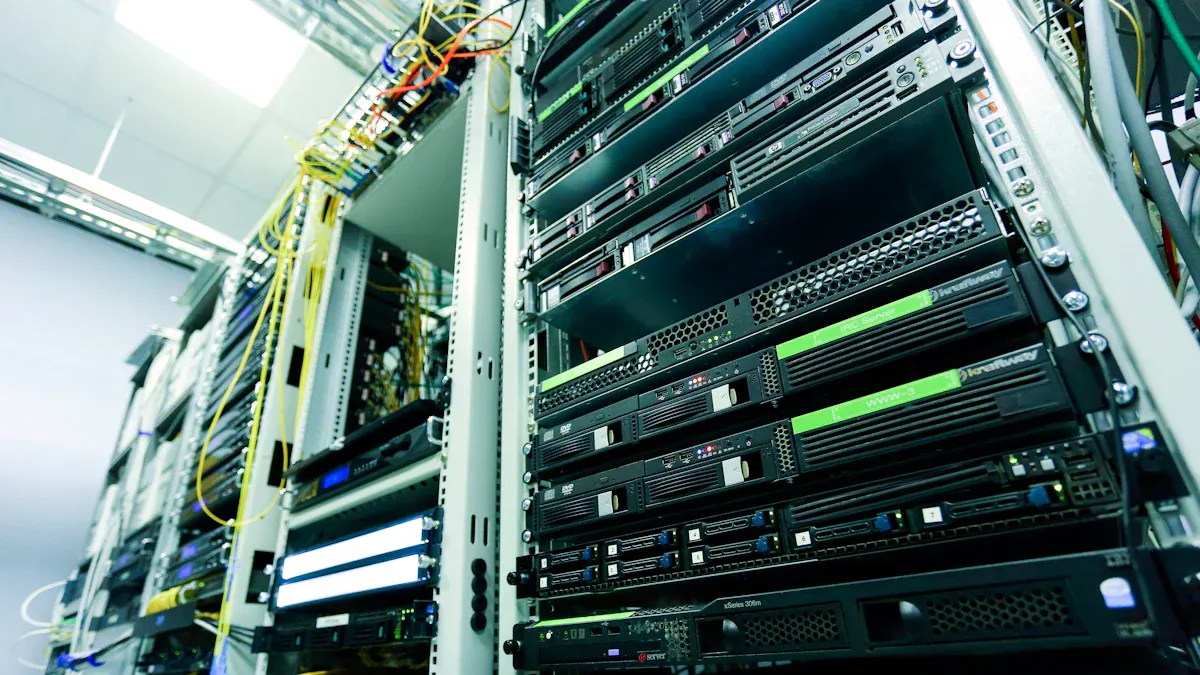
نظرة عامة على XTT 11DPI-N
إذا كنت ترغب في الحصول على خادم قوي لخادمك، فإن اللوحة الأم XTT 11DPI-N من sz-xtt تبرز هذا العام. تدعم هذه اللوحة الأم للخادم معالجات Intel Xeon Scalable-SP المزدوجة، مما يعني أنك ستحصل على أداء من الدرجة الأولى لأعباء العمل الثقيلة. ويمكنك تحميل ما يصل إلى 4 تيرابايت من ذاكرة DDR4 ECC، لذا تعمل حتى أكثر التطبيقات المتعطشة للذاكرة بسلاسة. تتيح لك فتحات PCIe 3.0 الست إضافة بطاقات إضافية للرسومات أو التخزين أو الشبكات. وبفضل 14 منفذ SATA 3.0، يمكنك إنشاء مصفوفات تخزين ضخمة وإعداد RAID لسلامة البيانات. يمنحك نظام ASPEED 2500 BMC المدمج إدارة عن بُعد ومراقبة في الوقت الفعلي، مما يسهل الحفاظ على سلامة نظامك. إذا قمت بتشغيل مركز البيانات, أو الخدمة السحابية أو تطبيق المؤسسة، تمنحك هذه اللوحة الأم الموثوقية وقابلية التوسع التي تحتاج إليها. يمكنك معرفة المزيد عن XTT 11DPI-N على صفحة المنتج sz-xtt.
أفضل اللوحات الأم سوبرميكرو
تتمتع Supermicro بسمعة قوية في بناء اللوحات الأم للخوادم الموثوقة. يثق العديد من محترفي تكنولوجيا المعلومات في Supermicro لمراكز البيانات وخوادم الأعمال الخاصة بهم. واحدة من أفضل اللوحات الأم من سوبرميكرو هذا العام هي اللوحة الأم Supermicro MBD-X12DPG-QT6. يدعم هذا الطراز معالجات Intel Xeon Scalable المزدوجة ويحتوي على ثماني فتحات DDR4 DIMM للكثير من الذاكرة. يمكنك الحصول على سبع فتحات PCIe 4.0، مما يعني أنه يمكنك إضافة بطاقات تخزين أو بطاقات شبكة عالية السرعة. كما تتضمن اللوحة أيضاً شبكة LAN مدمجة 10GbE وشبكة IPMI متقدمة للإدارة عن بُعد.
تُعرف طرازات اللوحة الأم للخوادم من سوبر مايكرو مثل X12DPG-QT6 بثباتها ودعمها طويل الأمد. إذا كنت تريد أن ترى كيف تقارن سوبرمايكرو بالعلامات التجارية الأخرى، راجع هذا الجدول:
العلامة التجارية | درجة الضمان القانوني | معدل العائد |
|---|---|---|
سوبرمايكرو | 3 | 7.2 |
ASUS | 2.7 | 4.8 |
أس روك | 2.8 | 5.9 |
إن زد إكس تي إكس تي | 4.3 | 7.4 |
بيوستار | 4.6 | 8.8 |
يمكنك أيضاً رؤية الاختلافات في هذا الرسم البياني:
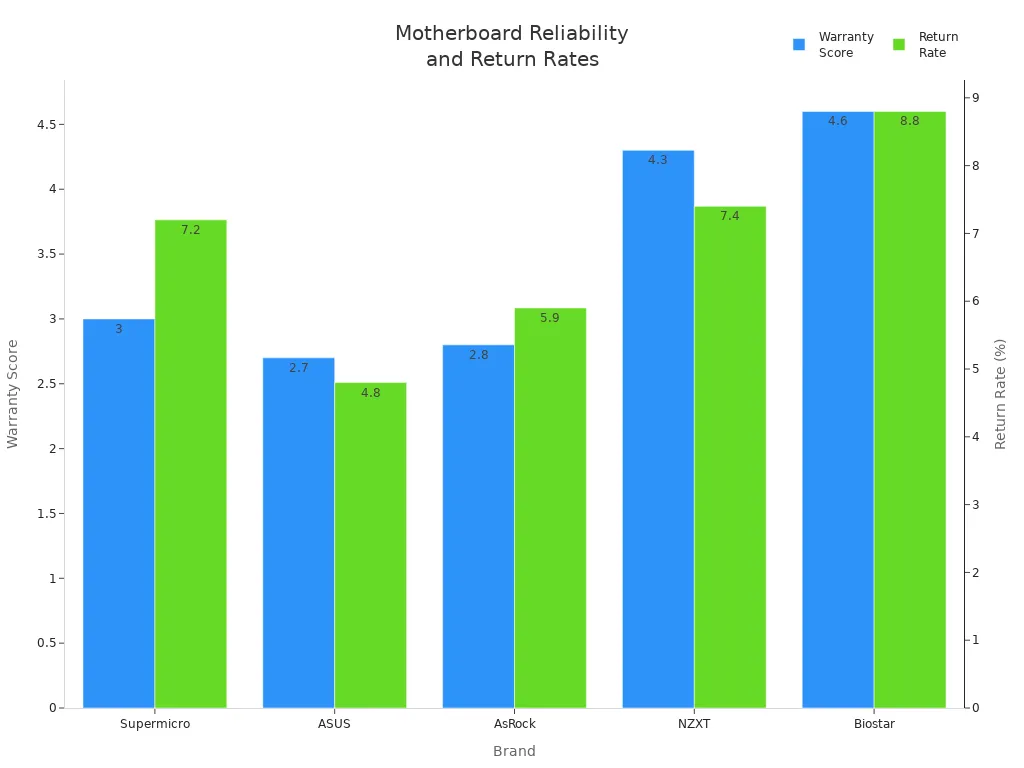
إذا كنت تريد خادماً يعمل على مدار الساعة طوال أيام الأسبوع مع القليل من الوقت الضائع، فإن سوبر مايكرو هو الاختيار الذكي. يختار العديد من المستخدمين أفضل اللوحات الأم من سوبر مايكرو لموثوقيتها ودعمها القوي.
أفضل اختيارات ASUS و ASRock
تقدم كل من ASUS و ASRock لوحات أم رائعة للخوادم لتلبية الاحتياجات المختلفة. تعد لوحة ASUS Pro WS W790-ACE من اللوحات الأم ASUS Pro WS W790-ACE المفضلة لمحطات العمل والخوادم التي تحتاج إلى الكثير من الطاقة. تدعم اللوحة وحدات المعالجة المركزية Intel Xeon W-3400 و W-2400، وتحصل على ثماني فتحات DDR5 DIMM للذاكرة السريعة. وتحتوي اللوحة على خمس فتحات PCIe 5.0، بحيث يمكنك إضافة أحدث بطاقات التوسعة. يمكنك أيضًا الحصول على شبكة LAN مزدوجة 10GbE وإدارة متقدمة عن بُعد.
ASRock Rack Rack X570D4U-2L2T هو خيار آخر من أفضل الخيارات، خاصة إذا كنت تريد خادمًا صغير الحجم. تدعم هذه اللوحة معالجات AMD Ryzen وذاكرة ECC. تحتوي على منفذي LAN 10GbE وأربعة فتحات DDR4 DIMM. يمكنك استخدامه لخوادم الشركات الصغيرة أو المختبرات المنزلية.
عندما تقارن بين ASUS و ASRock، قد تلاحظ بعض الاختلافات في الضمان ومعدلات الإرجاع:
العلامة التجارية | معدل العائد | |
|---|---|---|
ASUS | 8 | 4.8 |
ASRock | 3 | 5.9 |
غالبًا ما تكون لوحات ASUS أكثر تكلفة، ولكنك تحصل على ضمان أطول في المعالجة. تمنحك ASRock دعمًا أسرع ونسبة سعر إلى أداء جيدة. تصنع كلتا العلامتين التجاريتين لوحات أم قوية للخوادم لمختلف الميزانيات والاحتياجات.
أفضل لوحة أم لـ NAS
إذا كنت ترغب في إنشاء خادم NAS (تخزين متصل بالشبكة)، فأنت بحاجة إلى لوحة أم تدعم الكثير من محركات الأقراص وتحتوي على ميزات لسلامة البيانات. تُعد ASRock Rack Rack X570D4DU-2L2T أفضل اختيار لبناء NAS. فهي تمنحك الكثير من منافذ SATA، ودعم ذاكرة ECC، وشبكة LAN مزدوجة 10GbE لنقل الملفات بسرعة.
عندما تختار أفضل لوحة أم لـ NAS، ابحث عن هذه الميزات:
الميزة | الشرح |
|---|---|
أقراص صلبة من فئة الخادم | تتعامل هذه الأقراص مع بيانات أكثر وتدوم لفترة أطول من محركات الأقراص المكتبية. |
تجنب أقراص USB | يمكن أن يسبب USB مشاكل مثل انقطاع الاتصال أو بطء السرعة. |
ذاكرة الوصول العشوائي (RAM) ECC | جيدة للخوادم الاحترافية، ولكنها ليست ضرورية دائماً لشبكة NAS المنزلية. |
توافق RAID | استخدم الأقراص الصلبة CMR لتحسين أداء RAID. |
قابلية الترقية | تتيح لك الخوادم المنزلية ترقية الأجزاء بسهولة أكبر من صناديق NAS مسبقة الصنع. |
نصيحة: إذا قمت ببناء شبكة NAS الخاصة بك، يمكنك ترقية التخزين والذاكرة مع تزايد احتياجاتك. يمنحك هذا مرونة أكثر من شراء شبكة NAS جاهزة.
تمنحك اللوحات الأم للخوادم مثل ASRock Rack Rack X570D4DU-2L2T أو XTT 11DPI-N الأدوات اللازمة لإنشاء شبكة NAS سريعة وموثوقة لمنزلك أو مكتبك.
معايير اختيار اللوحة الأم للخادم
قد يبدو لك اختيار اللوحة الأم المناسبة للخادم أمراً مربكاً، ولكن يمكنك تقسيمها إلى بضع خطوات بسيطة. لنلقِ نظرة على أكثر الأمور أهمية عند اختيار اللوحة الأم التالية.
عامل الشكل والتوافق
أولاً، تحقق من عامل الشكل. هذا يخبرك ما إذا كانت اللوحة الأم ستلائم علبة الخادم الخاص بك. تستخدم معظم اللوحات الأم للخوادم اللوحة الأم مقاس 19 بوصة قياسي. يعمل هذا الحجم مع العديد من الرفوف والحالات، بحيث يمكنك مزج ومطابقة الأجزاء من ماركات مختلفة. إليك نظرة سريعة:
عامل الشكل | الوصف | تأثير التوافق |
|---|---|---|
خادم قياسي مقاس 19 بوصة | تستخدم على نطاق واسع للخوادم | تعمل مع معظم الرفوف والملحقات |
إذا كنت تستخدم حاوية صناعية مقاس 19 بوصة، فستحصل على عرض تركيب يبلغ 482.6 مم. وهذا يضمن ملاءمة معداتك مع معدات الشركات الأخرى.
دعم وحدة المعالجة المركزية والذاكرة
بعد ذلك، فكّر في وحدة المعالجة المركزية والذاكرة. تدعم بعض اللوحات الأم معالجات قوية تصل إلى 28 نواة. يمكنك العثور على لوحات تتعامل مع ما يصل إلى 12 تيرابايت من الذاكرة لكل معالج، باستخدام وحدات الذاكرة المدمجة REG DDR4 DIMMs مع ECC لمزيد من الأمان. إليك جدول لمساعدتك في المقارنة:
نوع مقبس وحدة المعالجة المركزية | سعة الذاكرة |
|---|---|
P4 / LGA4189 | ما يصل إلى 12 تيرابايت لكل وحدة معالجة مركزية |
زيون جولد 6526Y | حتى 4 تيرابايت |
نصيحة: إذا كنت تشغّل قواعد بيانات كبيرة أو الكثير من الأجهزة الافتراضية، فاختر لوحة ذات ذاكرة عالية الدعم.
خيارات التوسعة والتخزين
تريد مساحة للنمو. ابحث عن فتحات PCIe للبطاقات الإضافية والكثير من خيارات التخزين. تحتوي بعض اللوحات على فتحات PCIe من الجيل الخامس لوحدات معالجة الرسومات وبطاقات الشبكة السريعة. قد ترى ميزات مثل:
الميزة | التفاصيل |
|---|---|
فتحات PCIe | فتحات متعددة من الجيل الخامس لوحدات معالجة الرسومات (GPU) وNICs وغيرها |
خيارات التخزين | فتحات التبديل السريع لمحركات أقراص NVMe/SATA/SAS، بالإضافة إلى فتحات M.2 للتخزين السريع |
إذا كنت تخطط لإضافة المزيد من محركات الأقراص أو ترقية شبكتك، فتأكد من أن لوحتك تحتوي على فتحات كافية.
ميزات الإدارة عن بُعد
تساعدك أدوات الإدارة عن بُعد في التحكم في الخادم الخاص بك من أي مكان. تتيح لك ميزات مثل IPMI أو BMC مراقبة الأجهزة أو إعادة التشغيل أو إصلاح المشاكل دون التواجد في غرفة الخادم. هذا يوفر عليك الوقت ويحافظ على تشغيل الخادم الخاص بك بسلاسة.
ملاحظة: تقدم العلامات التجارية مثل sz-xtt لوحات أم مزودة بإدارة قوية عن بُعد، بحيث يمكنك دائمًا مراقبة نظامك. يمكنك الاطلاع على اللوحة الأم للخادم XTT 11DPI-N على سبيل المثال.
عندما تطابق هذه المعايير مع احتياجاتك، ستحصل على خادم يناسب مساحتك ويتحمل عبء العمل لديك ويتطور معك.
اللوحات الأم للخوادم حسب حالة الاستخدام
الأداء العالي ومركز البيانات
أنت تريد أن يعمل مركز البيانات الخاص بك بسرعة ويبقى موثوقاً. تمنحك اللوحات الأم مثل اللوحة الأم XTT 11DPI-N من sz-xtt دعم Intel Xeon المزدوج وسعة ذاكرة ضخمة. تعمل هذه اللوحة بشكل جيد للمهام عالية الأداء، مثل قواعد البيانات الكبيرة أو الحوسبة العلمية. يمكنك أيضاً الحصول على ميزات قوية للإدارة عن بُعد.
إن بنية DC-MHS من تشينبرو تساعدك على بناء أنظمة مرنة. فهي تستخدم تصميمًا معياريًا، بحيث يمكنك تبديل الأجزاء ومواكبة المعايير الجديدة. اللوحات الأم MiTAC مع معالجات Intel Xeon 6 P-core تعامل مع أعباء العمل الثقيلة واجعل مركز بياناتك جاهزاً لعام 2025.
إليك نظرة على معايير الأداء للوحات الأم لمركز البيانات:
نوع المعيار | عدد السجلات | المنصة |
|---|---|---|
مقبس واحد | 167 | AMD EPYC 7002 |
مقبس مزدوج | 46 | AMD EPYC 7002 |
إجمالي السجلات | 683 | Intel & AMD |
SPEC CPU 2017 | الريادة | Intel & AMD |
المحاكاة الافتراضية والسحابة
إذا كنت تخطط لإعداد افتراضي، فأنت بحاجة إلى لوحة أم تدعم الكثير من الأجهزة الافتراضية. تريد أداءً عاليًا وتخزينًا مرنًا. تتيح لك اللوحة الأم XTT 11DPI-N تشغيل العديد من الأجهزة الافتراضية مع ذاكرة ECC تصل سعتها إلى 4 تيرابايت وست فتحات PCIe.
توفر اللوحات الأم للمحاكاة الافتراضية سرعات عالية للشبكة، مثل 10/25/100 جيجابت/ثانية إيثرنت 10/25/100 جيجابت/ثانية. يساعد ذلك أحمال العمل السحابية على نقل البيانات بسرعة. يمكنك أيضًا الحصول على شبكات RDMA المحسّنة لوقت استجابة منخفض.
فيما يلي الميزات التي يجب البحث عنها:
تتيح لك البيئات الافتراضية استخدام أجهزتك بشكل أفضل.
تحافظ الخوادم القوية على تشغيل أجهزتك الافتراضية بسلاسة.
تخزين مرن يجعل من السهل إضافة محركات أقراص أو تغييرها.
تساعدك اتصالات الشبكة المحسّنة على توسيع نطاقها.
تحافظ التصاميم الزائدة عن الحاجة على تشغيل السحابة الخاصة بك، حتى في حالة فشل شيء ما.
حلول NAS والتخزين
بناء NAS يعني أنك تحتاج إلى الكثير من التخزين وسلامة البيانات. يمنحك ASRock Rack Rack X570D4D4U-2L2T ثمانية منافذ SATA وذاكرة ECC. يمكنك الحصول على شبكة LAN مزدوجة 10GbE لمشاركة الملفات بسرعة.
يعمل XTT 11DPI-N أيضًا بشكل جيد مع NAS. يمكنك توصيل ما يصل إلى 14 محرك أقراص وإعداد RAID للنسخ الاحتياطي.
نصيحة: اختر لوحة أم مزودة بذاكرة وصول عشوائي (ECC) ودعم RAID للحفاظ على أمان ملفاتك.
مختبر الميزانية والمختبر المنزلي
تريد خادماً للتعلم أو المشاريع الصغيرة. تساعدك اللوحات الأم ذات الميزانية المحدودة على توفير المال مع الحصول على ميزات جيدة.
إليك جدول يقارن بين الخيارات الشائعة:
اللوحة الأم | المقبس/مجموعة الشرائح | فورمفاكتور | منافذ SATA | فتحات NVMe | الربط الشبكي | دعم شركة ECC | مثالية لـ |
|---|---|---|---|---|---|---|---|
أسوس برايم B450M-A II | AM4 | mATX | 6x | 1x | 1 جيجابت | نعم | التخزين، Docker، بليكس |
ASRock Rack Rack X570D4U | AM4 | mATX | 8x | 2x | 2 × 1 جيجابت | نعم | IPMI، التخزين، الاستخدام الاحترافي |
غيغابايت b550i Aorus pro ax | AM4 | ميني آي تي إكس | 4x | 2x | 2.5 جيجابت | نعم | تصميمات صغيرة الحجم مدمجة |
أسوس Tuf gaming b650-plus wifi من أسوس للألعاب b650-plus | AM5 | mATX | 4x | 3x | 2.5 جيجابت | نعم | الآلة الافتراضية, حوض السفن, الشبكات |
غيغابايت b650i ax | AM5 | ميني آي تي إكس | 6x | 3x | 2.5 جيجابت | لا يوجد | تخزين ضخم مدمج الحجم صغير الحجم |
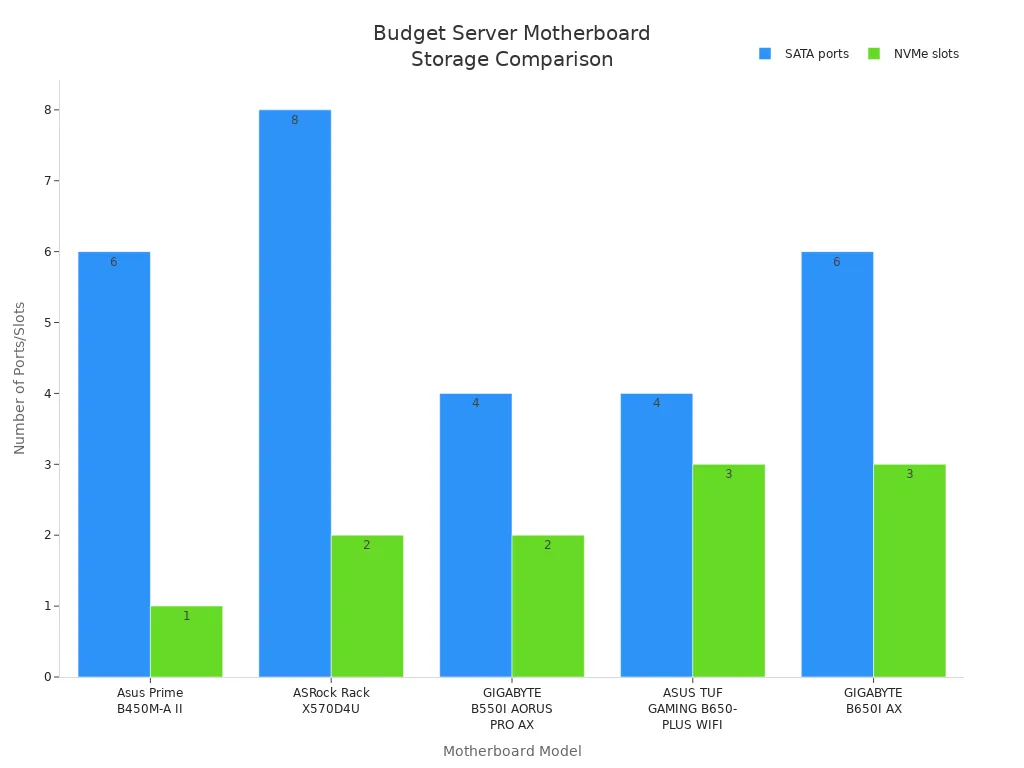
تستخدم بعض اللوحات طاقة أكبر أو تحتوي على عدد أقل من المنافذ. على سبيل المثال، فإن ASRock B660M Pro RS يوفر الطاقة ولكنه يتخلى عن منفذي SATA. تحتاج إلى الموازنة بين الطاقة والتخزين والسعر لمختبرك المنزلي.
ملحوظة: إذا كنت تريد المزيد من المعلومات حول XTT 11DPI-N، راجع صفحة منتج sz-xtt.
مقارنة اللوحة الأم لخادم سوبرميكرو الخادم
جدول الميزات
عندما تختار لوحة أم لخادمك، فأنت تريد أن تعرف ما يمكن لكل منها القيام به. لدى Supermicro العديد من الخيارات، لذا دعنا نلقي نظرة على بعض الميزات المهمة. يوضح الجدول أدناه ما تقدمه اللوحة الأم Supermicro H13 Hyper-U ولوحات AMD EPYC الأخرى:
الميزة | H13 هايبر يو | ميزات AMD EPYC العامة |
|---|---|---|
دعم المعالج | الجيل الرابع من AMD EPYC من AMD EPYC (ما يصل إلى 128 نواة) | أعلى كثافة نواة في معالجات x86 |
كثافة الحامل | كثافة رف عالية للتركيبات المدمجة | مصممة لأعباء العمل السحابية الأصلية |
سعة الذاكرة | ما يصل إلى 12 قناة DDR5، و24 وحدة DIMM، و24 وحدة DIMM | رائعة للتطبيقات ذات الذاكرة الثقيلة |
كفاءة التبريد | تبريد محسّن لعمر أطول | تصميمات موفرة للطاقة |
خيارات التخزين | 12x 3.5 بوصة أو 24x 2.5 بوصة خلجان محرك أقراص مقاس 3.5 بوصة | إعدادات تخزين مرنة |
كفاءة التكلفة | توفير في ترخيص البرمجيات | فعالة من حيث التكلفة لمشغلي السحابة |
اللوحات الأم لخوادم Supermicro مثل H13 Hyper-U يمنحك الكثير من الطاقة والذاكرة. يمكنك أيضاً إعداد التخزين بطرق مختلفة. تساعدك هذه الميزات على بناء خادم يناسب احتياجاتك. لا يهم إذا كنت تدير مركز بيانات أو خدمة سحابية.
نصيحة: هل تريد رؤية المزيد من اللوحات الأم للخوادم؟ تحقق من sz-xtt اللوحة الأم للخادم XTT 11DPI-N. هذه اللوحة سريعة وسهلة الإدارة من مكان بعيد.
الأداء والموثوقية
تهتم Supermicro كثيراً بصنع لوحات أم تدوم طويلاً وتعمل بشكل جيد. يمكن للوحاتها التعامل مع المهام الكبيرة دون إبطاء. يمكن للوحة الأم H13 Hyper-U استخدام ما يصل إلى 128 نواة، حتى تتمكن من القيام بالعديد من المهام في وقت واحد. تعني كثافة الحامل العالية أنه يمكنك وضع المزيد من الخوادم في مساحة أقل. يساعد التبريد الأفضل على بقاء أجزائك آمنة وتدوم لفترة أطول.
يمكنك اختيار محركات أقراص كبيرة مقاس 3.5 بوصة أو الكثير من محركات الأقراص مقاس 2.5 بوصة للتخزين. يتيح لك ذلك اختيار بيانات سريعة أو مساحة كبيرة. تستخدم اللوحات الأم من سوبر مايكرو طاقة أقل، لذا يمكنك توفير المال على فواتير الطاقة.
إذا كنت تريد خادماً يعمل طوال الليل والنهار ويحافظ على أمان بياناتك، فإن سوبر مايكرو هو اختيار جيد. العديد من العاملين في مجال تكنولوجيا المعلومات يثقون في سوبر مايكرو لأن لوحاتها تدوم طويلاً. يمكنك بناء خادم ينمو مع عملك ويتعامل مع العمل الشاق كل يوم.
نصائح للشراء والتركيب والصيانة
من أين تشتري أفضل لوحة أم
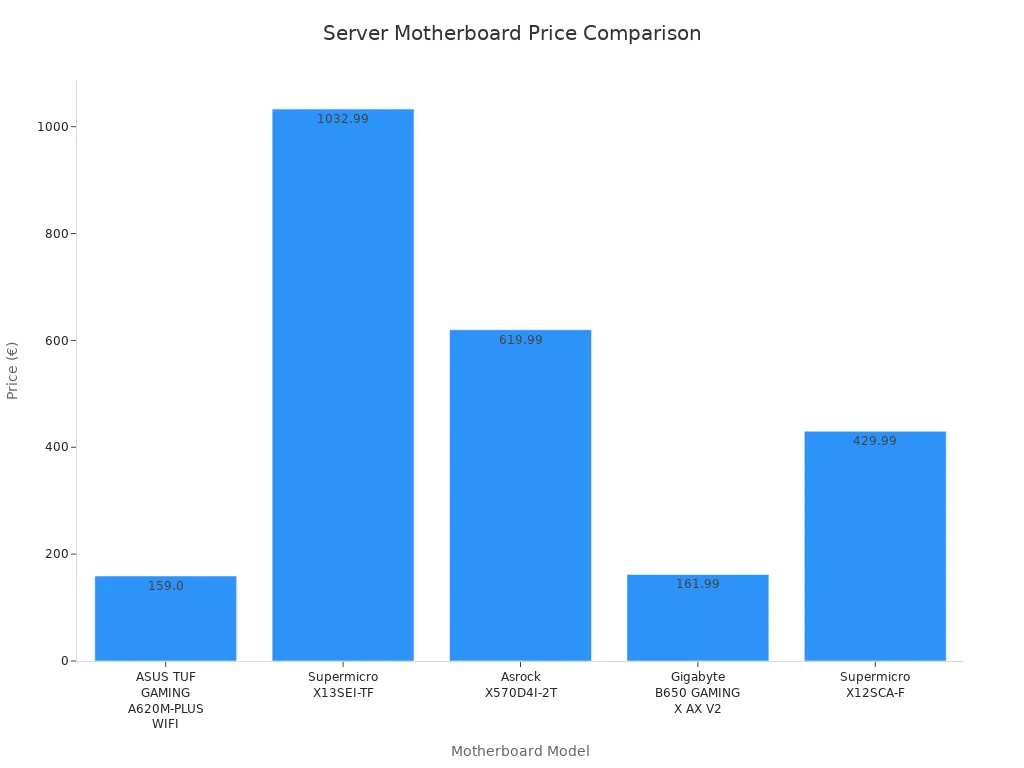
يجب عليك شراء اللوحة الأم للخادم من بائع موثوق. المتاجر الإلكترونية مثل Octo24 لديها العديد من الخيارات. يمكنك الاطلاع على الأسعار وأوقات الشحن قبل الشراء. يمكنك أيضاً مقارنة الميزات للعثور على ما تحتاج إليه. إليك بعض اللوحات الأم الشهيرة:
اللوحة الأم | السعر | وقت الشحن |
|---|---|---|
159,00 € | في المخزون، 2-4 أيام | |
1.032,99 € | في المخزون، 2-4 أيام | |
619,99 € | 1 أسبوع | |
Gigabyte B650 GAMING X AX V2 من Gigabyte B650 GAMING X AX V2 | 161,99 € | في المخزون، 2-4 أيام |
429,99 € | في المخزون، 2-4 أيام |
إذا كنت تريد لوحة أم قوية، انظر إلى لوحة sz-xtt اللوحة الأم للخادم XTT 11DPI-N. يتم شحن Sz-xtt بسرعة ويساعد في حل المشاكل التقنية. وهذا يجعلها جيدة للمبتدئين والخبراء.
أفضل ممارسات التثبيت
إعداد اللوحة الأم للخادم الخاص بك بسيط إذا اتبعت الخطوات. تحقق دائماً مما إذا كانت أجزاؤك تعمل معاً قبل البدء. تحدث العديد من المشاكل عندما لا تتناسب اللوحة الأم مع وحدة المعالجة المركزية أو الذاكرة. إليك الأخطاء التي يجب عليك تجنبها:
وصف الخطأ | التأثير |
|---|---|
فحوصات توافق الأجهزة | 42% من الإعدادات الفاشلة تأتي من عدم التحقق من متطلبات النظام أو إصدارات BIOS. |
إنشاء نسخة احتياطية | فقدان البيانات أثناء عمليات الترقية هي الشكوى الأولى. |
إدارة التقسيم | تتسبب تخطيطات الأقراص السيئة في 18% من مكالمات استكشاف الأخطاء وإصلاحها. |
تحديثات برنامج التشغيل | تؤدي برامج التشغيل القديمة إلى أعطال وأجهزة مفقودة. |
توثيق التغييرات | تؤدي كلمات المرور المفقودة والملاحظات المفقودة إلى إبطاء عمليات الإصلاح. |
التحقق اليدوي من التقسيم | أكثر من 60% من طلبات استعادة البيانات ناتجة عن التهيئة العرضية. |
اختيار نظام الملفات | تعمل أنظمة الملفات الخاطئة على إبطاء الخادم الخاص بك. |
تخصيص قسم الاسترداد | 38% من المستخدمين يواجهون تعطلاً بسبب فقدان أقسام الاسترداد. |
نصيحة: قم بعمل نسخة احتياطية قبل التثبيت أو الترقية. اكتب التغييرات التي تجريها. تحقق مرة أخرى من أقسام القرص الخاص بك.
الصيانة واستكشاف الأعطال وإصلاحها
للحفاظ على عمل الخادم الخاص بك، تحتاج إلى الرعاية المنتظمة. راقب معداتك وقم بتنظيف الغبار بشكل متكرر. تأكد من ثبات مصدر الطاقة لديك. إذا كان خادمك قديمًا، فكر في شراء خادم جديد.
تحقق من الخادم الخاص بك في كثير من الأحيان للعثور على المشاكل في وقت مبكر.
تنظيف الغبار من المراوح وفتحات تهوية لإيقاف السخونة الزائدة.
استخدم مصدر طاقة ثابت لحماية الخادم الخاص بك.
استبدل الخوادم القديمة قبل أن تتعطل.
إذا تعطّل شيء ما، يمكنك إصلاحه بشكل أسرع إذا كنت تعرف ما الذي يجب التحقق منه. ركز على هذه الأشياء:
التفاصيل | الأهمية | |
|---|---|---|
ذاكرة الوصول العشوائي | الشركة المصنعة، أرقام الطراز، سرعات الذاكرة | يساعد في العثور على مشكلات التوافق |
مراجعات البرامج الثابتة | إصدارات محددة | يحل السلوك الغريب |
تواريخ مراجعة الأجهزة | تحديث التواريخ | مفيد لفحوصات الضمان |
الظروف البيئية | موقع الحامل، ومناطق التبريد | تسريع عملية البحث عن الأعطال |
استخدم واجهة الويب IPMI للتحقق من حالة وحدة المعالجة المركزية والسجلات.
انظر إلى سجلات النظام لمعرفة سبب تعطل الخادم لديك.
انتبه إلى طرازي Supermicro X10 و X11 للأدوات الخاصة.
ملاحظة: يساعدك الاحتفاظ بسجلات جيدة وفحص الخادم الخاص بك في كثير من الأحيان على تجنب التوقف عن العمل. هذا يحافظ على تشغيل خادمك بشكل جيد.
إن اختيار اللوحة الأم المناسبة للخادم أمر مهم لنظامك. فهي تساعد خادمك على العمل بشكل أسرع وتجعله أكثر موثوقية. اختيار DDR5 بذاكرة ECC5 مع ذاكرة ECC تمنحك سرعة وأماناً أفضل. يمكنك استخدام الجداول والنصائح الواردة في هذا الدليل لاتخاذ خيار جيد. إذا لم تكن متأكدًا مما يجب القيام به، فاطلب المساعدة من البائعين أو محترفي تكنولوجيا المعلومات. يمكنهم مساعدتك في التخطيط واختيار الأجهزة المناسبة.
الوصف | |
|---|---|
تحليل المتطلبات | فهي تساعدك في العثور على المشاكل والاحتياجات في نظامك. |
تقييم التكنولوجيا | تتعرف على المنتجات الجديدة وما هو الأفضل منها. |
تخطيط المشاريع | تحصل على نصائح لإعداد المشروع وبدء تشغيله بسهولة. |
إدارة البنية التحتية | فهي تساعدك في اختيار الشبكات والأجهزة. |
افحص خادمك كثيرًا وحدثه للحفاظ على قوته. إذا كنت تريد خادمًا يعمل بشكل جيد، انظر إلى sz-xtt اللوحة الأم للخادم XTT 11DPI-N.
الأسئلة الشائعة
ما الذي يجعل XTT 11DPI-N خيارًا جيدًا للخوادم؟
يمكنك الحصول على أداء قوي مع دعم Intel Xeon المزدوج، وذاكرة ECC تصل إلى 4 تيرابايت، وست فتحات PCIe. يوفر XTT 11DPI-N من sz-xtt أيضًا إدارة قوية عن بُعد. تعرّف على المزيد هنا.
هل يمكنني تركيب اللوحة الأم للخادم بنفسي؟
نعم، يمكنك ذلك! فقط تحقق من توافق وحدة المعالجة المركزية والذاكرة والحالة أولاً. اتبع التعليمات الواردة في الدليل. إذا كنت بحاجة إلى مساعدة، يمكن لفريق دعم sz-xtt إرشادك.
كيف تعمل الإدارة عن بُعد على هذه اللوحات الأم؟
تتيح لك الإدارة عن بُعد مراقبة خادمك والتحكم فيه من أي مكان. يمكنك استخدام أدوات مثل IPMI أو BMC. يحتوي XTT 11DPI-N على ASPEED 2500 BMC لسهولة فحص النظام والتحديثات.
هل من السهل ترقية التخزين أو الذاكرة لاحقاً؟
يمكنك ترقية التخزين والذاكرة على معظم اللوحات الأم للخوادم. يمنحك XTT 11DPI-N 14 منفذ SATA وفتحات ذاكرة مرنة. ما عليك سوى إضافة محركات أقراص أو ذاكرة وصول عشوائي جديدة عندما تحتاج إلى المزيد من الطاقة.
لماذا يجب أن أختار sz-xtt لتلبية احتياجات خادمي؟
تمتلك Sz-xtt أكثر من عشر سنوات من الخبرة في مجال تكنولوجيا الخوادم. تحصل على توصيل سريع، ومنتجات موثوقة، ودعم ودود. تحقق من اللوحة الأم للخادم XTT 11DPI-N للحصول على أفضل أداء.


