
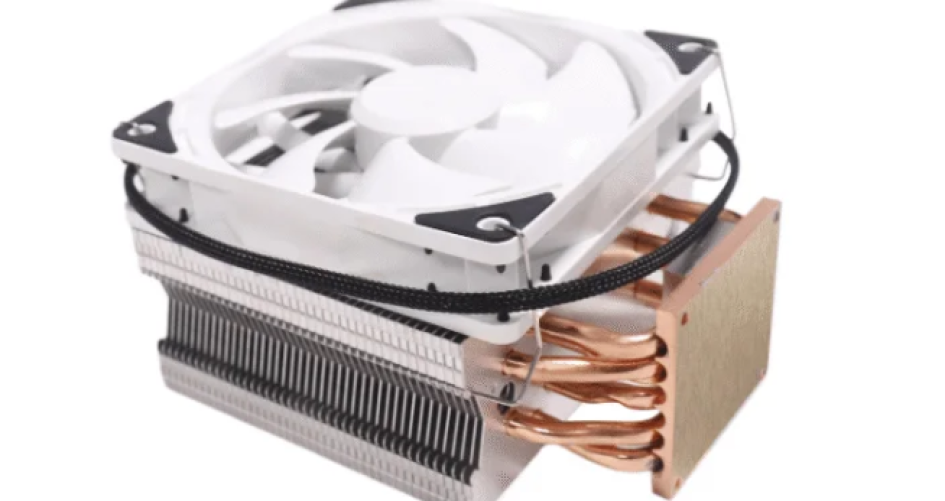
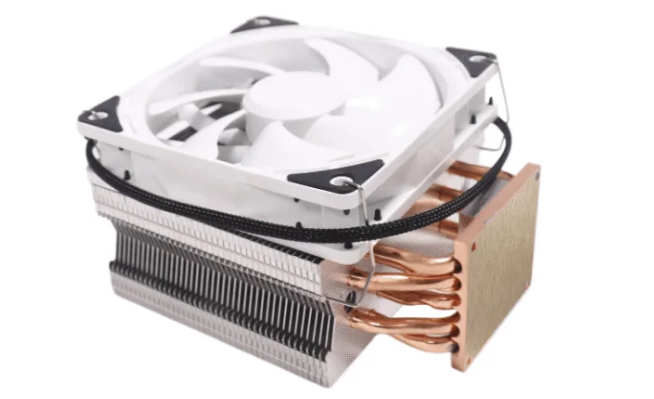
Air and liquid CPU coolers are designed to cool processors using distinct methods. The best CPU cooler for air cooling utilizes fans and heatsinks, while liquid coolers employ pumps, radiators, and coolant. There are many myths surrounding which type of cooler is superior. According to a report, the top three manufacturers of liquid coolers hold over 40% of the market share. North America is the leading producer of liquid coolers. Choosing the best CPU cooler is crucial to prevent overheating and ensure optimal computer performance. Reputable brands like sz-xtt offer a variety of options to suit everyone’s needs.
Key Takeaways
Air coolers have fans and metal fins. They move heat away from the CPU. These coolers are simple and work well.
Liquid coolers use pumps and radiators. They have special fluid to move heat. They cool better when you do hard tasks.
Air cooling costs less and is easy to set up. Liquid cooling is better for overclocking and strong computers.
You should clean dust and check for leaks often. This helps both air and liquid coolers work well.
Pick air or liquid cooling based on your money, what you need, and what you like.
Best CPU Cooler: Air vs Liquid
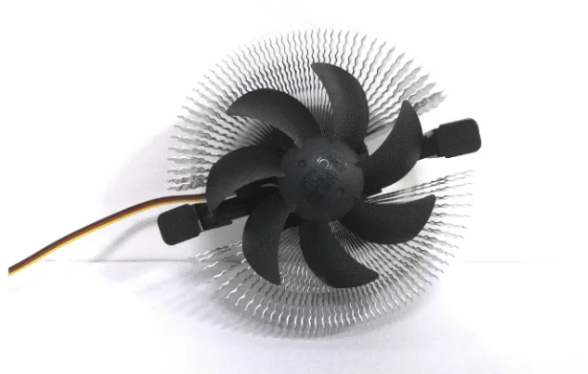
How Air Cooling Works
Air cooling keeps the CPU safe from getting too hot. The CPU gets warm when you use your computer. A baseplate sits on top of the CPU. It is made from copper or aluminum. Thermal paste fills tiny spaces between the CPU and baseplate. This helps heat move faster. Heatpipes connect the baseplate to the heatsink. The heatsink has thin metal fins. These fins spread heat into the air. A fan blows cool air over the fins. This carries heat away from the CPU. Most air coolers use copper because it moves heat better. Some use aluminum instead. The way the cooler is built and the materials matter.
Heatpipes touch the CPU for direct cooling.
Copper bases move heat better than aluminum.
The heatsink takes in heat and the fan blows air.
The size and shape of the heatsink and fan matter.
Air coolers have a baseplate, heatpipes, heatsink, and fan. These parts work together to move heat into the air. The heatsink sits above the motherboard. The fan blows air across the fins. Air cooling is easy to use and works well. Many people pick air cooling because it lasts a long time.
How Liquid Cooling Works
Liquid cooling uses a different way to keep the CPU cool. The CPU gets hot when you use it. A water block sits on top of the CPU. It takes in heat from the CPU. Liquid flows through the water block and picks up heat. A pump moves the hot liquid to a radiator. The radiator has fans that blow air over it. This cools the liquid down. The cooled liquid goes back to the water block. This cycle keeps repeating.
The CPU makes heat.
The water block takes heat from the CPU.
Liquid flows through the water block and carries heat.
A pump sends the hot liquid to the radiator.
Fans cool the liquid in the radiator.
The cooled liquid goes back to the water block.
Liquid coolers use special materials to work better. Some coolants are water, glycol mixes, or synthetic oils. These fluids move heat well and do not conduct electricity. Many systems use chemicals to stop rust and germs. Some liquid coolers use special fluids for extra safety. The type of coolant changes how well the aio cooler works.
Key Differences
Air cooling and liquid cooling are different in how they work and perform. Air cooling uses metal and fans to move heat into the air. Liquid cooling uses fluid and radiators to take heat away from the CPU. Each type has good and bad points.
Aspect | Air Coolers | Liquid Coolers |
|---|---|---|
Heat Transfer Method | Uses a heatsink and fan system to dissipate heat into the air. | Utilizes a coolant that absorbs heat and transfers it to a radiator for cooling. |
Components | Comprises a baseplate, heat pipes, heatsink, and fan. | Consists of a waterblock, coolant, radiator, and fans. |
Cooling Efficiency | Relies on air circulation and thermal conduction through metal. | Achieves better heat transfer through liquid, allowing for more efficient cooling. |
Space Utilization | Heatsink design can take up more space on the motherboard. | Can be more compact, freeing up space for other components like RAM. |
Aspect | Air Coolers | Liquid Coolers |
|---|---|---|
Cost | $40–60 for quality models | $130–180 for reliable aio cooler |
Installation Complexity | Quick installation under 10 minutes | Requires careful planning and setup |
Performance | 240–280W without throttling | 10–15°C cooler at high loads |
Lifespan | Can last a decade with maintenance | Limited by pump wear and coolant issues |
Liquid coolers use water or other fluids that hold a lot of heat. This helps keep the CPU cooler, even when working hard. The radiator in a liquid cooler has a big surface area. This helps get rid of more heat. Air cooling uses airflow and metal to move heat. It can be less good when the CPU works hard.
Tip: Air cooling is easier to set up and costs less. Liquid cooling can handle more heat and is better for overclocking.
Some people think liquid cooling always uses water. Some aio coolers use fluids that do not conduct electricity. New aio coolers have safety features to stop leaks. Air cooling is popular because it is simple and needs little care. Liquid cooling works better for tough jobs but needs more attention.
Both air cooling and liquid cooling are used in computers today. People should pick a cooler based on what they need, how much money they have, and their skill level. The right aio cooler keeps the CPU safe and working well.
Cooling Performance Comparison
Efficiency and Thermal Results
How well a CPU cooler works depends on its cooling efficiency. Air cooling uses fans and metal fins to take heat away from the processor. Liquid cooling uses a pump, tubes, and a radiator with special fluid to move heat. Both types try to keep the CPU cool, but they do it in different ways.
Recent tests show that air and liquid coolers can surprise people. The Thermalright Phantom Spirit 120 SE is a top air cooler. It did better than some 240mm all-in-one liquid coolers in both easy and hard tasks. This means air cooling can sometimes be better than liquid cooling, even when the CPU is working hard.
Cooler Type | Performance in Light Workloads | Performance in Heavy Workloads |
|---|---|---|
Thermalright Phantom Spirit 120 SE | Outperformed several 240mm AIOs | Outperformed several 240mm AIOs |
Lab tests give more details about how coolers work. Single-phase immersion cooling does better than air cooling when things get really hot. Air cooling has trouble in places with lots of computers. Liquid cooling, especially immersion types, handles heat better and saves energy. How fast the cooling water moves also changes how well it works. These results show why good cooling is important for today’s computers.
Noise Levels
Noise is important for people who want a quiet computer. Air coolers are usually quieter because their fans move air gently over the heatsink. The way air coolers are built helps keep them quiet. Liquid coolers often make more noise. The pump and tight radiator fins add extra sound. Fan speed and how hot the CPU gets can also change how loud it is.
AIO coolers are usually louder than air coolers because of the pump and radiator fins.
Air coolers are quieter because of their design.
Noise can change with fan speed and how much heat there is.
The ML360R RGB AIO was the best AIO tested, but it was not quieter than a big air cooler.
People who want a silent PC often pick air cooling. They see that air coolers stay quiet when the computer is resting or working hard. Liquid cooling can cool better, but it may not be best for people who dislike noise.
Overclocking Suitability
Overclocking makes the CPU run faster than normal. This creates more heat, so the cooler must work harder. Liquid coolers handle overclocking better than air coolers. They move heat away fast and keep the CPU cool. This stops the CPU from slowing down to avoid getting too hot.
For powerful CPUs made for overclocking, all-in-one liquid cooling is the best pick. Liquid cooling does better than most air coolers in these cases. People who want higher speeds and a stable computer choose liquid cooling. It lets them overclock more and keeps things cool. Air cooling can work for small overclocks, but it may not do well with lots of heat.
Tip: If you want to overclock your CPU, liquid cooling is the best choice. If you do not overclock, air cooling may be enough.
Installation and Maintenance
Installation Ease
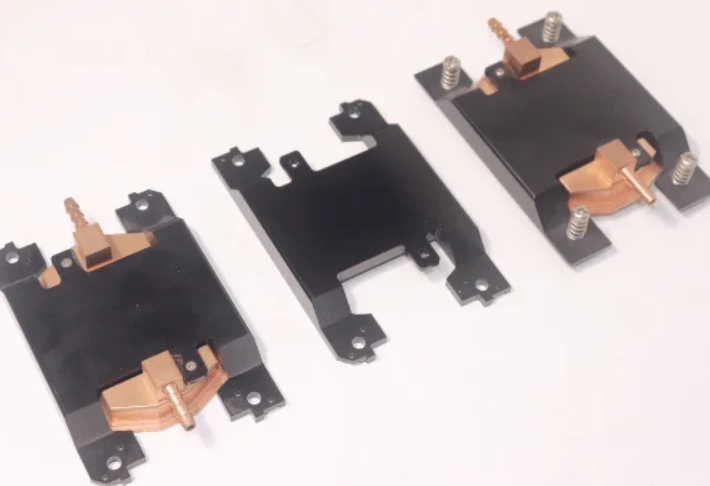
Putting in a CPU cooler can seem hard for some people. Air coolers are usually simple to install. Most people just put the heatsink and fan on the motherboard. Bigger air coolers might need more steps because they are heavy or large. You have to make sure the cooler fits in your case. It should not block the memory slots.
Liquid coolers take more time to set up. The radiator and pump must go in the right places. You need to line up the backplate and pump the right way. Thermal paste must cover the CPU so it does not get too hot. You also need to keep cables neat for both types of coolers. Good cable management helps the cooler work better and keeps the case tidy.
Tip: Most guides say there are three main problems:
Lining up the backplate and pump.
Putting on thermal paste the right way.
Keeping cables neat and out of the way.
Maintenance Needs
Air coolers do not need much care. Most people just clean dust off the fans and heatsink. Dust can stop air from moving and make cooling worse. Big air coolers may have large fans, so cleaning is important.
Liquid coolers need more work. You should check the coolant level and look for leaks. Cleaning dust from the radiator and fans helps air move well. Some companies say to change the coolant after a while. Watching the pump helps stop the system from getting too hot.
Look at coolant levels and check for leaks.
Clean dust off fans and radiators.
Change coolant when the company says to.
Watch the pump to stop problems.
Taking care of your cooler keeps the CPU safe and helps it last longer. Both air and liquid coolers need care, but air coolers are usually easier to look after.
Cost and Value
Upfront Price
People often look at the upfront price when choosing a CPU cooler. Air cooling usually fits most budgets. Many air coolers cost between $20 and $100. Liquid cooling can be more expensive. All-in-one liquid coolers range from $80 to $200 or more. Custom liquid cooling setups can reach $300 to $1,000. The table below shows the price ranges for each type:
Cooler Type | Price Range |
|---|---|
Air Cooling | $20–100 |
Liquid Cooling | $80–200+ (AIOs) |
$300–1,000+ (custom loops) |
People with a small budget often pick air cooling. Those who want advanced cooling may spend more for liquid options. The upfront cost can change based on brand, size, and extra features. Shoppers should check their budget before buying a cooler.
Long-Term Value
Long-term value matters for anyone who wants their computer to last. Air coolers offer lower cost over time. They need less maintenance and rarely break. Most users clean dust off the fans and heatsink. Liquid cooling systems cost more to own. They need regular cleaning, coolant changes, and careful checks for leaks. Pumps and radiators can fail, which adds to the cost.
Liquid cooling systems often cost between $150 to $500.
Air coolers usually cost around $30.
Liquid coolers need more maintenance, such as cleaning radiators and replacing coolant.
Air coolers are more reliable and need less upkeep.
Liquid cooling has a higher risk of pump failure and leaks.
Air coolers last longer and work well for most budgets.
People who want simple cooling and low cost often choose air. Those who want top cooling and do not mind extra cost may pick liquid. The best choice depends on the user’s budget and how much maintenance they want to do.
Myths and Facts
Liquid Is Always Better
Many people believe that a liquid cooling solution always outperforms air. This is not true for every situation. Air coolers can be easier and cheaper to use, especially for parts like RAM that do not need extreme cooling. Liquid cooling increases the thermal mass, so it takes longer to reach a steady temperature. This does not always mean better cooling. In some cases, air and liquid coolers perform the same, especially in the 140w-150w power range. High-end air coolers can match the performance of 240mm liquid coolers. Some users prefer air because it has fewer parts that can fail.
Air coolers are simple and reliable.
Liquid cooling works well for heavy loads but is not always the best cpu cooler for every user.
Both types can keep a CPU safe in many systems.
Air Coolers Are Outdated
Some think air cooling is old-fashioned. This is not correct. Air coolers use surface area to move heat away from the CPU. Many modern air coolers can handle gaming and streaming. They also last a long time and need little care. Air cooling remains a top choice for people who want a quiet and simple setup. The best cpu cooler for many users is still an air model.
Liquid Coolers Leak
People worry that liquid coolers leak often. Recent studies show that leaks are rare. The table below shows the chance of failure each year:
Cooling System Type | Annual Failure Probability |
|---|---|
Liquid CPU Coolers | 6.8% |
High-end Air Coolers | 0.4% |
Liquid coolers have a higher risk, but most users never see a leak. Air coolers almost never fail this way. Users should check their system often to stay safe.
Brand Insights: sz-xtt
The sz-xtt brand offers many choices for those seeking the best cpu cooler. Their product range includes air and liquid models for different needs. These coolers fit many case sizes and work well for gaming or streaming. The XTT-16 model supports overclocking and handles high power. Many users like sz-xtt coolers because they are easy to install and reliable. People looking for a trusted cpu cooler can find a good option from sz-xtt.
Choosing the Right Cooler
When to Choose Air Cooling
Air cooling is a good pick for many people. It is simple and works well. It does not cost as much as liquid cooling. There are fewer parts that can break. Many gamers use air cooling in their computers. Office workers and people at home also like it. It is easy to put in and take care of. Schools and labs use air cooling because it is quick to set up.
Here is a table that shows who gets the most from air cooling:
User Type | Benefits of Air CPU Coolers |
|---|---|
Gaming PCs | Keeps processors cool for long gaming times. |
Office and Home Computing | Saves money and works well for daily jobs. |
Workstations | Strong cooling for things like video editing. |
Data Centers & Servers | Simple and needs little care in less busy places. |
Educational and Research Labs | Easy to install and cheap for lots of computers. |
Tip: Air cooling is great for people who want a quiet, cheap, and steady computer.
When to Choose Liquid Cooling
Liquid cooling is best for people who need more power. It can handle lots of heat from tough jobs. Many people like liquid cooling because it is quiet and looks cool. It is good for those who want their computer to work very hard. It is also nice for people who want a stylish computer.
The table below shows when liquid cooling is the better pick:
Scenario | Liquid Cooling Benefits | Air Cooling Limitations |
|---|---|---|
Overclocking | Keeps things cooler when working extra hard. | Can’t cool as much as liquid cooling. |
CPU-intensive tasks | Quieter and keeps temperatures lower. | Can get loud and not cool as well. |
Aesthetics | Looks modern and neat. | Has a plain look. |
Note: Liquid cooling needs careful setup and regular checks, but it works best for big jobs.
Picking air or liquid cooling depends on price, how easy it is to use, how much cooling you need, noise, and style. People should choose what fits their computer and what they like best.
Air and liquid CPU coolers work in different ways to keep processors cool. Air coolers have fans and metal fins that move heat away. Liquid coolers use pumps, radiators, and special fluid to carry heat. Air cooling is good for simple computers and makes less noise. Liquid cooling is better for hard jobs and when you want to overclock. Both kinds help computers work better.
For good results, people should check trusted brands like sz-xtt when choosing a CPU cooler.
FAQ
What is the main difference between air and liquid CPU coolers?
Air coolers use fans and metal fins to move heat away from the CPU. Liquid coolers use pumps, tubes, and radiators with special fluid to carry heat. Each type has unique parts and cooling methods.
Do liquid coolers always perform better than air coolers?
No. High-end air coolers can match or beat some liquid coolers in many cases. Performance depends on the cooler’s design, the CPU’s heat output, and the user’s needs.
Are liquid coolers more likely to leak?
Liquid coolers have a small risk of leaks. Most modern models use strong seals and safe fluids. Leaks are rare, but users should check their systems often for safety.
How often should users clean their CPU cooler?
Users should clean air coolers every few months to remove dust. Liquid coolers need dust removal from radiators and fans. Regular checks help both types work well.
Which cooler type is easier to install?
Most users find air coolers easier to install. Air coolers have fewer parts and fit quickly. Liquid coolers need careful placement of the radiator and pump, which takes more time.


