Anyone who works with servers knows they must stay on. Power supply problems can cause servers to stop working. This can hurt how a company works and its reputation. More than half of big outages are from power issues. Power outages cause 43% of major server problems. Picking a server power supply with Power Factor Correction helps. Strong warranties and short-circuit protection are also important. Many servers need to work all day and night. A reliable power supply is not just nice to have. It is something you must have. If you are not sure, ask an expert for help. This can help you make the right choice.
Key Takeaways
Figure out how much power your server needs. Add up the total wattage. Use the tables to pick the right size for your server.
Think about what you might add to your server later. Plan for more hardware and extra power needs. This helps you avoid problems and saves money in the future.
Spend about 10% of your budget on a good power supply. This can stop your server from breaking down. It also keeps your server running all the time.
Pick power supplies with high efficiency, like Gold or Platinum. These use less energy and make less heat. This can help you save money over time.
Buy from brands people trust and look at warranty choices. Good support can help you fix problems fast and save money.
Assessing Server Power Supply Needs
Calculating Power Requirements
To pick the right server power supply, you need to know how much power your server uses. Servers have parts like CPUs, memory, storage drives, and network cards. Each part needs electricity. People sometimes forget to add up all the power each part uses. You also need to think about how much the server will be used. One easy way to find the total power is to check the rack type and use a table.
Rack Type | Base Consumption (W) | Utilization Factor | Adjusted Power (W) | Safety Margin | Required Capacity (W) |
|---|---|---|---|---|---|
Small Office Rack | 690 | 0.7 | 483 | 1.3 | 700 |
Medium Business Rack | 4480 | 0.75 | 3360 | 1.25 | 4500 |
Enterprise Data Center Rack | 10280 | 0.8 | 8224 | 1.2 | 10000 |
This table helps you figure out the right wattage. First, find the base consumption. Then, multiply by the utilization factor. Next, add a safety margin. The last number is the required capacity. Picking a server power supply with enough wattage helps your server work well.
Planning for Future Growth
Servers change as companies grow. New hardware gets added, like more drives or faster processors. Workloads get bigger, such as AI or high-performance computing. These changes need more power. Many people do not plan for this. They only look at what the server needs right now. They forget about cooling and backup systems. These can double the power needed.
Adding new hardware means you need more power, especially for high-density computing and AI workloads.
People often miss extra power needs, like cooling and backup, which can double what is needed.
AI and HPC workloads are making power needs go up fast, with cabinets needing up to 150 kW now and maybe 250 to 300 kW soon.
A good plan should include both IT load and extra loads to stop failures and expensive fixes.
Smart planners think ahead. They pick a server power supply that can handle more power later. This stops problems and saves money.
Budgeting for Reliability
Reliability is very important. A good server power supply keeps the server safe from outages and running all day. Experts say you should spend about 10% of your system budget on the power supply. This helps prevent breakdowns and downtime.
There are many models to choose from. Some servers need small 1U units. Others need strong 2U options. There are special models like AC 148 and AC 171G. Each fits different server setups. Common form factors are CRPS, SFX, and ATX. The right model depends on the server’s size and needs.
Tip: Ask experts for help. They can match the right server power supply to your server. They can also give you a quote fast.
A reliable power supply keeps servers working and protects your business. Planning, budgeting, and expert advice make choosing easier.
Efficiency and Certification

80 PLUS Ratings Explained
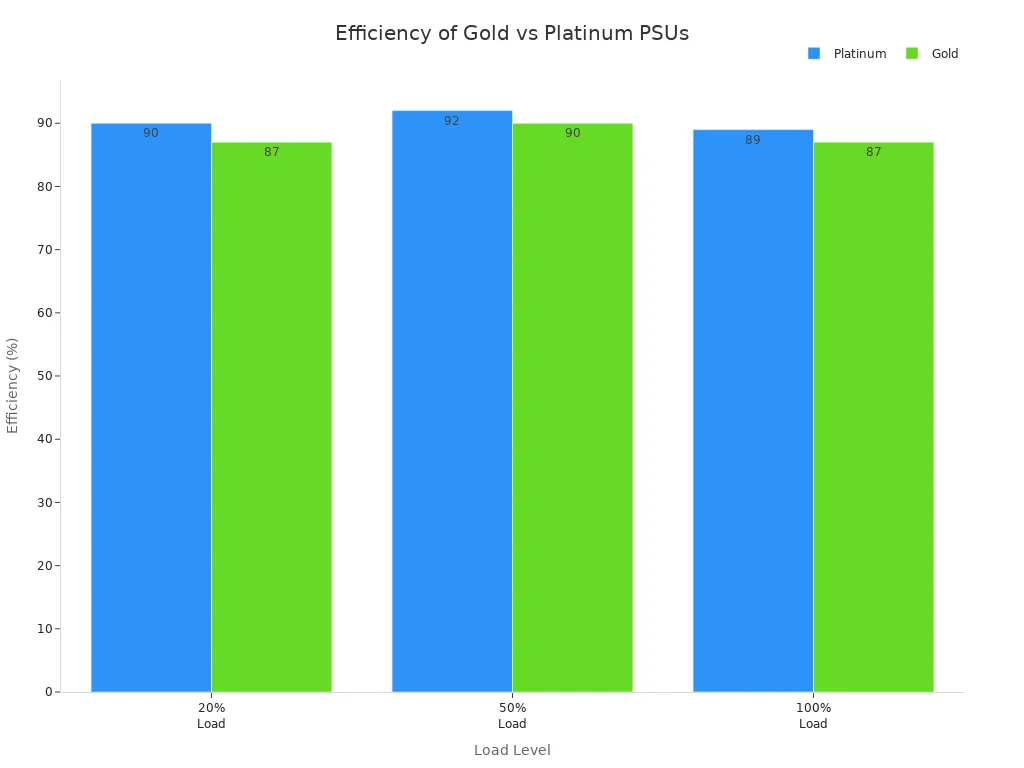
You might see Gold or Platinum labels on power supplies. These show how well the power supply uses electricity. Higher ratings waste less energy. Gold and Platinum are common for servers that run all day. The difference can help save money over time.
Here is a table that shows how much power each rating uses at different loads:
Certification | 20% Load | 50% Load | 100% Load |
|---|---|---|---|
Platinum | 90% | 92% | 89% |
Gold | 87% | 90% | 87% |
Platinum power supplies waste less energy, especially at half load. This means you pay less for electricity and get less heat.
Impact on Energy and Heat
A high-efficiency server power supply saves money and keeps things cool. When it works well, it does not turn extra energy into heat. Less heat means the cooling system does not work as hard. This makes fans and air conditioning cost less to run.
Efficient power supplies waste less energy.
They help servers stay cooler and quieter.
Good efficiency means parts last longer.
Companies spend less fixing or replacing things.
Smart Monitoring Features
Modern power supplies have smart features. These tools help people watch their servers and find problems early. Many have sensors that check voltage, temperature, and load. Some let users see this data from far away. Others send alerts if something is wrong.
Feature | Description |
|---|---|
Smart Power Management | Built-in sensors for remote monitoring of voltage, temperature, and load. |
Remote Intelligent Monitoring | Enables predictive maintenance and load balancing. |
Real-time Information | Provides immediate insights into power usage. |
Mobile Apps and Software | Facilitates easy control and reporting. |
Smart monitoring helps keep servers running smoothly. It lets people fix small problems before they get big.
Redundancy and Reliability Features
Redundant PSU Options
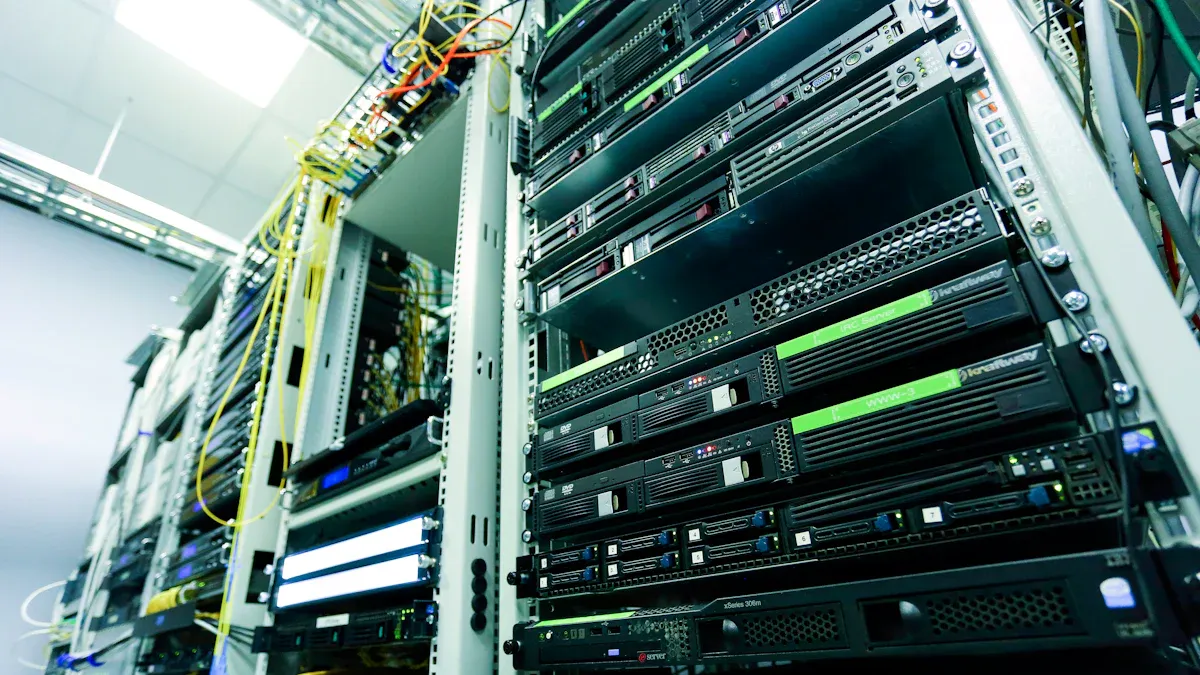
Redundant power supplies are very important for servers. They stop downtime by making sure there is always power. If one power supply fails, another takes over fast. This keeps the server working and protects data. Hospitals and banks need this setup to stay safe. Redundant systems use N+1 or N+N setups. These let backup modules turn on right away if there is a problem. The first cost is higher, but companies save money later. For example, a factory can get back the extra cost in less than two years if it avoids just one hour of downtime each year. Steady power from these systems helps equipment last longer and lowers maintenance costs.
Redundant power supplies keep servers working all the time.
They make systems more reliable and help uptime.
Backup modules turn on quickly during problems.
N+1 and N+N setups help with smooth failover.
Hot-Swap and Protection
Hot-swappable power supply units make fixing servers easier. Technicians can change a broken unit without turning off the server. This is important for places that need servers to work all the time. Hot-swappable modules use special circuits and soft-start tools. These let new power supplies join without causing voltage spikes. This keeps the system safe and steady. No downtime during repairs means better reliability.
Tip: Hot-swappable units keep servers working during repairs. They make fixing things fast and safe.
Noise and Signal Integrity
Noise in the power network can cause trouble. It can mess up signals and cause data errors. These problems affect fast connections and can make servers unstable. Power supply noise is unwanted electrical changes. These can hurt circuits, especially in high-frequency jobs. Bad power networks can bring noise, causing ringing and crosstalk. Unstable power delivery messes up signals and hurts system stability. Picking a server power supply with strong noise and protection features keeps signals clean and servers reliable.
Power integrity is important for good signals.
Noise can cause errors and make things slow.
Stable power keeps the system running well.
Compatibility and Cooling
Form Factor and Connectors
Picking the right form factor makes setup simple. It helps the server work well. Servers come in sizes like 1U and 2U. “U” means unit, and one unit is 1.75 inches tall. Data centers use 1U to fit more servers. They use 2U for more space and upgrades. The table below shows how they are different:
Size | Height (inches) | Advantages | Disadvantages |
|---|---|---|---|
1U | 1.75 | Saves space, fits many servers | Less room for cooling and expansion |
2U | 3.5 | More space for storage and cooling | Uses more rack space |
Check if the server power supply fits the case. Make sure it has the right connectors. The power supply must handle all the parts’ wattage. Redundant power supplies help if something fails. Quality is important, so trusted brands are best.
Cable Management
Good cable management keeps the server tidy and safe. Clear labels and paths make fixing problems easy. Organized cables help air move better and stop overheating. The table below shows best ways to manage cables:
Best Practice | Description |
|---|---|
Clear Routing and Labeling | Makes maintenance faster and easier |
Airflow Management | Keeps equipment cool and safe |
Avoiding Physical Stress | Reduces wear and signal problems |
Regular Inspections | Stops failures before they happen |
Use of Appropriate Tools | Cable ties and conduits keep things tidy |
Plan the cable layout to avoid extra work later. Vertical and horizontal cable managers protect ports from strain. Keep cables away from air intakes for better performance.
Tip: Neat cables help air move and make servers last longer.
Cooling Systems
Cooling systems are important for server reliability. Regular checks keep cooling systems working well. Good airflow setups, like hot aisle and cold aisle, keep temperatures steady. Pick the cooling system based on room size and heat. Enough cooling stops overheating and protects server parts.
Look for power supplies with strong cooling features. Stable voltage and protection also keep the server safe. Cooling and airflow help the server power supply last a long time.
Trusted Brands and Common Mistakes
Choosing Reliable Brands (sz-xtt)
Many people want to know which brands are trustworthy. Good brands make reliable server power supplies and give strong support. Sz-xtt is a trusted brand. They have different models for many needs. Some are for small rooms, others for big data centers. The table below shows some sz-xtt models and their features:
Model | Key Features | Use Case |
|---|---|---|
1200AB-16 S | Modular design, high reliability, energy efficiency, supports many servers | Busy server rooms |
H1U, L1U | Space-saving, modular features, high reliability, fits in tight spaces | Crowded server areas |
H2U, L2U | High performance, modular design, reliable, supports large setups | Large server spaces |
Other brands are also reliable. Super Flower LEADEX PSUs have a low failure rate of 0.47%. Corsair makes the SF1000 Platinum 1000W SFX PSU. People should check these brands and compare how reliable they are before buying.
Tip: Pick brands that are proven to work well and fit your server needs.
Warranty and Support
Warranty and support are important when choosing a server power supply. Good brands give clear warranties and fast help. Sz-xtt offers strong warranty choices and quick support if something breaks. People should check how long the warranty lasts and what it covers. Reliable support helps fix problems fast and keeps servers working.
Here is a simple checklist for warranty and support:
Check how long the warranty lasts and what it covers.
Ask about replacement or repair options.
Find out how fast support answers questions.
Make sure support is easy to contact.
Note: A good warranty and helpful support team can save you time and money.
Mistakes to Avoid
People sometimes make mistakes when picking a server power supply. These mistakes can cause downtime and cost more money. Here are some common problems:
Not planning for power and cooling can cause big trouble in data centers.
Wrong guesses about load and heat can make servers fail.
Not thinking about future needs can cause parts to break early.
Wrong power capacity can lead to using too little or too much power.
Picking the wrong equipment can cause mismatches and overloads.
Ignoring compatibility or efficiency can make equipment fail and cost more for fixes.
Callout: Always plan ahead, check compatibility, and pick efficient models to avoid these problems.
People who avoid these mistakes keep their servers working well and protect their investment.
To pick the best server power supply, first know how much power you need. Think about how your needs might grow in the future. Choose a model that saves energy and works well with your server. Use backup power supplies to keep servers running if one fails. Good brands and strong warranties are important for quality. Buying good hardware means you will fix things less and have fewer problems. Check your server often and use smart tools to watch for trouble. This keeps your servers and data safe.
Making smart choices now helps you avoid problems later.
Step | Action |
|---|---|
1 | Figure out power needs and plan for more use |
2 | Pick a power supply that saves energy |
3 | Make sure it fits and has backup options |
4 | Buy good quality and check it often |
FAQ
What does “1U” or “2U” mean for server power supplies?
“1U” means the power supply fits a server that is 1.75 inches tall. “2U” fits a server that is 3.5 inches tall. These sizes help people pick the right fit for their rack.
How can someone tell if a power supply is efficient?
Look for the 80 PLUS label. Gold and Platinum ratings show high efficiency. These power supplies waste less energy and help servers stay cool.
Why is redundancy important in server power supplies?
Redundancy means the server keeps running if one power supply fails. This helps prevent downtime and protects important data. Many banks and hospitals use redundant setups.
What should someone do if they are unsure about which power supply to choose?
Tip: They can ask an expert for help. Experts can match the right model to their needs and give a fast quote.