

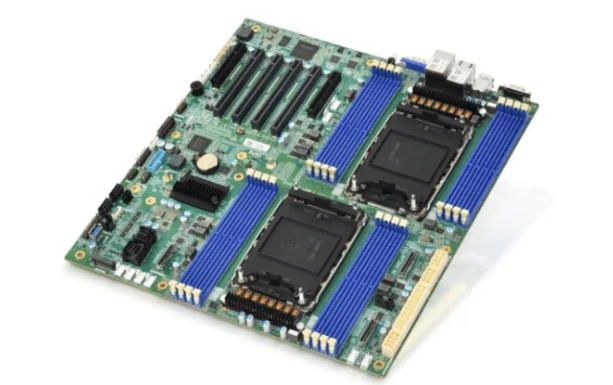
A server pc motherboard helps the system handle hard jobs. Picking the right one makes the computer work better. It also makes upgrades easier. Motherboards come in different sizes for different jobs.
ATX is good for small business servers. It has enough space and memory.
eATX is best for rackmount and strong servers. It has more RAM and PCIe slots.
microATX is used for backup servers. It uses less power.
SSI works for servers with two or more processors. It is for big companies.
Choosing the right size helps the server work well. It also lets you make it bigger if needed.
Key Takeaways
Pick the right motherboard size for your server. ATX works well for small servers. eATX is better for bigger and stronger servers.
Think about what your server will do. Set your goals for how fast it should work. This helps you pick a motherboard that fits your needs.
Plan for future growth. Find motherboards with extra RAM and PCIe slots. This lets you upgrade later as your business gets bigger.
Make sure your CPU and memory will work with the motherboard. Check the socket type and chipset. This helps you avoid problems when you upgrade parts.
Look at how much energy the motherboard uses. A board that uses less power saves money. It also helps the environment.
Define Your Server Needs
Workload Requirements
A server does many jobs. Each job needs different hardware parts. Some servers do easy work. Others handle lots of data. The table below lists common jobs and the hardware they need:
Workload Type | Key Hardware Considerations |
|---|---|
TUFLOW Classic | Needs a strong CPU, fast RAM, and good cache size. |
TUFLOW HPC (CPU) | Uses many CPU cores, needs high RAM and fast CPUs. |
TUFLOW HPC (GPU) | Needs a powerful GPU, many CUDA cores, and fast GPU RAM. |
TUFLOW FV (CPU) | Like HPC (CPU), needs many cores and high RAM. |
TUFLOW FV (GPU) | Like HPC (GPU), needs a strong GPU and fast RAM. |
You should pick a server pc motherboard that fits the job. For example, AI training servers need a motherboard for many GPUs. Servers for simple jobs can use a basic motherboard.
Performance Goals
Performance goals help you pick the right hardware. Some people want fast data work. Others want smooth multitasking. AI training and rendering need special GPU setups. Science work needs hardware that can grow. Big data needs strong memory and network parts. The right motherboard gives enough slots for RAM, CPUs, and GPUs.
Tip: Make clear goals before you buy a motherboard. This saves money and helps your server work for future needs.
Scalability Planning
Scalability means your server can grow later. A good server pc motherboard lets you upgrade easily. Look for extra RAM slots, PCIe slots, and support for more CPUs or GPUs. Planning for growth saves time and money. A scalable motherboard helps your business handle more data and users as it gets bigger.
Server PC Motherboard Compatibility & Features

Picking a server pc motherboard means making sure it works with your parts. You also need to think about upgrades you might want later. Here are the main things to check.
CPU Support
The CPU socket and chipset decide which processors you can use. Some chipsets let you use more cores and memory channels. For example, Intel C620A chipsets can handle up to 40 cores. They support 6 memory channels and up to 8 processor sockets. The table below shows how chipsets change server speed and upgrade choices:
Specification | Details |
|---|---|
Maximum Core Count Supported | Up to 40 |
System Memory Support | 6 channels, Up to DDR4 3200 MT/s (1 DPC), ECC support, 12 DIMMs/socket |
Supported Chipsets | Intel C620A series, Intel QuickAssist Technology |
Number of Processor Sockets | 4 or 8 sockets |
Your server pc motherboard must fit the CPU you want to use. If you want to upgrade later, make sure the motherboard can use newer CPUs. Some brands, like sz-xtt, make motherboards that work with many CPUs for business needs.
Note: Always check the socket type and chipset before you buy. This helps you avoid problems when you upgrade CPUs.
Memory Optimization
The type and size of memory change how fast and stable your server is. ECC RAM is important for servers because it finds and fixes small mistakes. This keeps your data safe and makes your server more stable. ECC RAM is needed in places where data safety matters, like data centers.
ECC RAM finds and fixes single-bit mistakes.
It helps stop crashes and software problems.
It is needed for servers that keep important data.
Different memory setups can change how well your server works. Dual-channel memory can make bandwidth twice as big as single-channel. Using four memory sticks may slow down speed because of sync problems. When you pick a server pc motherboard, look for ECC memory support and flexible memory setups.
Tip: Pick a motherboard that works with the memory type and size you need now and later.
Form Factor & Case Fit
Motherboard size, called form factor, must fit your server case. The most common size is ATX. Smaller boards are microATX and mini-ITX. Bigger boards are E-ATX and XL-ATX, but their sizes can change by brand. E-ATX always has a height of 305mm, but the length can be different. XL-ATX sizes change even more.
ATX is the usual size for most servers.
microATX and mini-ITX fit in smaller cases.
E-ATX and XL-ATX are for bigger, stronger servers.
Always match the motherboard size with the case to stop problems.
Some brands, like sz-xtt, make motherboards for different sizes. This helps people find the right fit for their server cases.
Reminder: Check the case size and motherboard form factor before you buy. This stops installation problems.
Making sure your server pc motherboard matches your parts helps it work better. It also makes upgrades easier. For example, a motherboard that works with error-correcting RAM and has lots of SSD and SATA ports will last longer and handle future needs. Always plan for upgrades when you pick a motherboard.
Expansion & Connectivity

PCIe & Storage Options
Expansion slots help a server add more parts. Storage interfaces decide how fast data moves. PCIe standards show how quickly devices can talk to each other. Newer PCIe versions make things run faster. They help graphics cards, storage drives, and network adapters work better. The table below shows how PCIe 5.0, 6.0, and 7.0 compare:
PCIe Standard | Transfers/s | Bandwidth (x1) | Bandwidth (x4) | Bandwidth (x8) | Bandwidth (x16) |
|---|---|---|---|---|---|
PCIe 5.0 | 32 GT/s | 3.94 GB/s | 15.75 GB/s | 31.5 GB/s | 63.0 GB/s |
PCIe 6.0 | 64 GT/s | 7.53 GB/s | 30.12 GB/s | 60.24 GB/s | 120.47 GB/s |
PCIe 7.0 | 128 GT/s | ca. 16 GB/s | ca. 64 GB/s | ca. 128 GB/s | ca. 256 GB/s |

A server pc motherboard with PCIe 6.0 or PCIe 7.0 can use more devices. It also moves data much faster. This helps servers do hard jobs and get ready for new upgrades.
Storage interfaces also change how fast and big a server can be. Here are the main types:
SATA: Gives basic speed and low wait time. Most motherboards use SATA RAID to keep data safe.
SAS: Used in data centers for hardware RAID. SAS drives connect with host-bus adapters and support many drives. Hardware RAID makes things safer and faster.
NVMe: Plugs right into PCIe slots. NVMe drives are very fast and have low wait time. They are best for jobs that need quick access, but hardware RAID is not common.
Picking the right PCIe and storage lets a server do more jobs. It also helps the server grow as the business gets bigger.
Networking Capabilities
Network speed and being steady are important for servers. New server pc motherboards work with many network cards and speeds. The table below lists some common choices:
Network Card Type | Supported Speeds | Protocols/Features |
|---|---|---|
RJ45 Ethernet Network Cards | 1Gbps to 40Gbps | Standard Ethernet communication, Power over Ethernet |
SFP & SFP+ Network Cards | 10G, 25G, 40G, 100G | Low-latency networking, hot-swappable transceivers |
InfiniBand Network Cards | 40G, 56G, 100G, up to 200Gbps | Ultra-low latency, high throughput, RDMA support |
Servers with SFP+ or InfiniBand cards move data very fast. They can help more people at once. These features are good for cloud computing, AI, and big data. Hot-swappable transceivers make it easy to upgrade. Power over Ethernet lets one cable give both power and data.
Tip: Choose a motherboard with network options that fit your jobs and future needs.
Power Efficiency
How much energy a server uses changes costs and the environment. Some server pc motherboards use less power and save energy. The table below shows models with good energy-saving features:
Motherboard Model | Energy Efficiency Features | Operational Cost Reduction Methods |
|---|---|---|
Intel S1200BTL | Low TDP, efficient power management | Reduces energy consumption, lowering electricity costs |
Intel S1200BTS | Low TDP, efficient power management | Reduces energy consumption, lowering electricity costs |
ASUS Pro WS C246-ACE | Energy-saving capabilities, server-grade IT management software | Centralized management reduces operational costs and improves efficiency |
Some models, like the B860M POWER, use even less power. They can be up to 3% better per watt. Faster work means less energy is needed, which helps nature.
Using less power saves money on bills.
Efficient motherboards stay cooler and last longer.
Energy-saving features help protect the planet.
Note: Always look at energy ratings and power features before you buy a motherboard. This saves money and helps the environment.
Reliability & Management
ECC Memory & Protection
ECC memory helps servers work without problems. It finds small mistakes in data and fixes them. This keeps important data safe. Many server pc motherboards use ECC memory. They also have extra safety features. These features help stop damage and keep servers working.
Feature | Benefit |
|---|---|
ASUS Boot Defender | Protects the boot area from attacks and fixes problems. |
Self-recovering BIOS | Fixes the BIOS with a backup so you do not need new parts. |
Trusted Platform Module (TPM) | Makes data safer and keeps the network and system secure. |
NIST SP 800-193 Compliance | Follows rules to stop bad attacks. |
Anti-moisture Coating | Stops water and rust, so the motherboard lasts longer in wet places. |
Anti-sulfur Resistors | Stops damage from sulfur, so the motherboard works in tough places. |
Overvoltage Protection | Keeps parts safe from high power that could break them. |
A server with these features can work in hard places. It keeps data safe even if something bad happens.
Tip: ECC memory and safety features help servers keep working and protect data.
Remote Management
Remote management lets people control servers from far away. This saves time and helps fix problems fast. Many server motherboards have tools built in. These tools let users check the server’s health, update software, and control power.
Feature | MZ31-AR0 | MZ32-AR0 |
|---|---|---|
Management Controller | AST2500 | AST2500 |
Web Interface | GIGABYTE Management Console | GIGABYTE Management Console |
Dashboard | Yes | Yes |
JAVA Based Serial Over LAN | Yes | Yes |
HTML5 KVM | Yes | Yes |
Sensor Monitor (Voltage, RPM, Temperature) | Yes | Yes |
Remote BIOS/BMC/CPLD Update | Yes | Yes |
User Management | Yes | Yes |
Media Redirection Settings | Yes | Yes |
Power Control | Yes | Yes |
These features help users watch the server’s temperature, fan speed, and voltage. They can restart the server or update its BIOS from anywhere.
Note: Remote management makes it easy to keep servers working and fix problems quickly.
Manufacturer Support
Good help from the maker keeps servers working well. Some brands give long warranties and quick help. They send updates for BIOS and drivers. Good support means less waiting and faster fixes.
Good brands give easy guides and quick answers.
They send updates to fix problems and add new things.
Some brands, like sz-xtt, help businesses and give special support for their server motherboards.
A server works better when the maker helps fix problems. This help keeps the server safe and up to date.
Upgrade Paths & Budget
Upgrade Planning
Planning upgrades helps a server last longer. It also helps it work better. Many people pick a server pc motherboard with extra PCIe slots. They also look for newer PCIe generations. These features let the server add faster graphics cards. They also let it add new storage devices. The table below shows how parts affect growth and speed:
Component | Description |
|---|---|
PCIe Slots | Connect fast parts like graphics cards and storage drives. |
PCIe Generations | Bigger numbers mean faster data and better speed. |
Scalability | More RAM slots and storage choices help the server grow. |
Some motherboards use AI-Trace Technology to make signals better. Others have HyperTune BIOS to make memory faster. These features help upgrades and keep the server working well.
Cost vs. Performance
Balancing cost and speed helps users get good value. High-end motherboards cost more but work faster. They also give more upgrade choices. Cheaper models save money but may not grow much later. Users should look at PCIe slots, memory support, and energy-saving features. Picking a motherboard with good power management can lower bills. It also keeps the server cool.
Tip: Spending a bit more now on a scalable motherboard can save money when you upgrade later.
Decision Checklist
A checklist helps users pick the best motherboard. Here is a simple list to help:
Check CPU socket and chipset match.
Count PCIe slots and check PCIe generation.
Look for ECC memory support.
Match the form factor with the case.
Review energy-saving features.
Confirm remote management options.
Research support and warranty.
Plan for upgrades.
Sz-xtt has many server motherboards for business use. Their products have advanced features and easy upgrades. For more details, users can visit the sz-xtt website.
Picking a strong server PC motherboard takes a few steps. You need to match the CPU and memory you want. Check if you can add more parts later. Think about how you might upgrade in the future. A checklist helps you remember what is important. Sz-xtt makes server motherboards with good features. You can look at sz-xtt server motherboard products for more info. Learning about different models and asking experts helps you pick the best one.
FAQ
What does a server PC motherboard do?
A server PC motherboard connects all parts of the server. It lets the CPU, memory, storage, and network cards work together. The motherboard decides how fast and reliable the server runs.
How does ECC memory help a server?
ECC memory finds and fixes small mistakes in data. This keeps the server running without errors. ECC memory protects important files and helps the server stay stable.
Why should someone choose a scalable motherboard?
A scalable motherboard lets users add more RAM, CPUs, or storage later. This helps the server grow with business needs. Planning for upgrades saves money and time.
What makes sz-xtt server motherboards special?
Sz-xtt builds motherboards for high performance and easy upgrades. Their products support ECC memory, advanced PCIe slots, and remote management. Learn more at sz-xtt server motherboard products.
How can users check if a motherboard fits their server case?
Users should look at the form factor, like ATX or E-ATX. The case must match the motherboard size. Checking the specs before buying helps avoid installation problems.


