The best storage server 48 solutions give great growth, dependability, and speed for today’s businesses. These storage systems help keep work going by stopping expensive breaks and helping with disaster recovery. Companies need strong storage to manage fast data growth and stop problems from old systems. Good storage plans need careful planning for space, thinking about now and the future. Big storage lets groups keep important data safe, lower risks, and stay ahead. Storage technology keeps changing, so IT leaders pick systems that can change with business needs.
Key Takeaways
Pick a storage server that matches what your business needs. Think about things like CPU support, how much memory you can add, and how well storage works.
Get ready for the future by picking servers that can grow with you. Modular systems and cloud options make it easy to handle more data.
Look at vendor support closely. Good support means problems get fixed fast and your system works well. This is very important to keep your business running.
Use high-capacity drives to save money and space. Bigger drives can lower the cost for each terabyte and make things work better.
Test and update your backup systems often. This keeps your data safe and helps you recover quickly if something goes wrong or there is a cyber attack.
Storage Server 48 Comparison Overview
Top Data Storage Servers Table
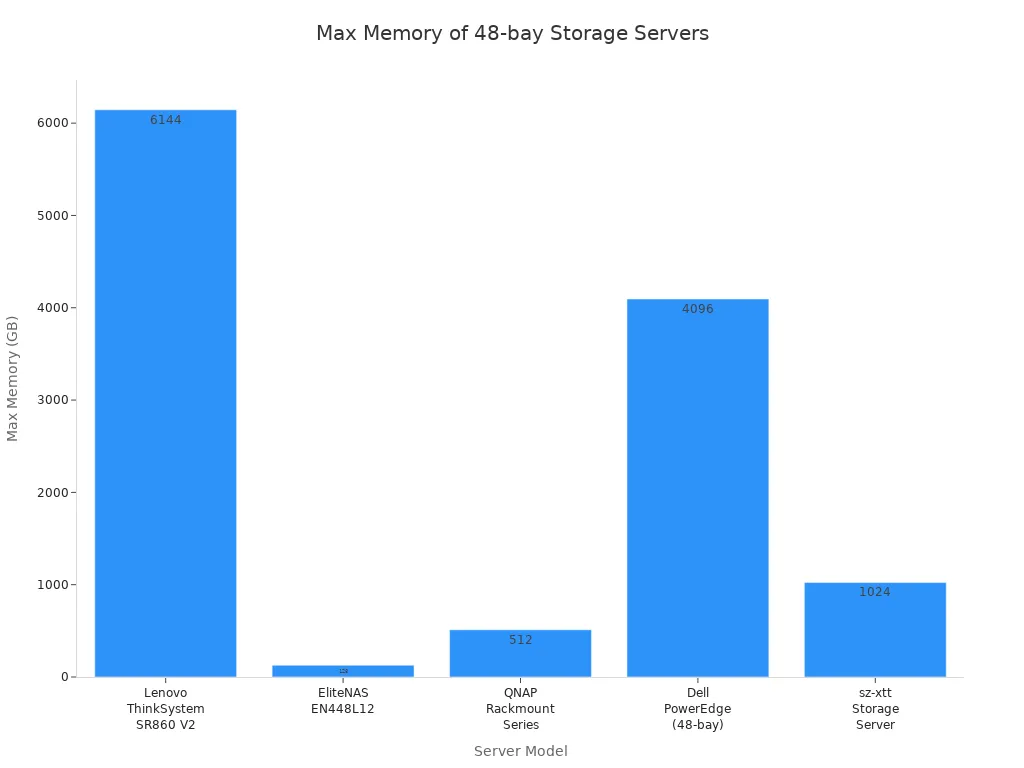
There are many storage server 48 choices for businesses. Each one has special features for different needs. The table below compares top 48-bay data storage servers. It shows important specs, processor types, memory, features, and best uses.
Model | Max Bays | Processor Options | Max Memory | Key Features | Best For | Support/Warranty |
|---|---|---|---|---|---|---|
Lenovo ThinkSystem SR860 V2 | 48 | Up to 4x Intel Xeon | 6TB DDR4 | Hot-swap bays, advanced RAID, energy saving | Data centers, analytics | Lenovo Premier Support |
EliteNAS EN448L12 | 48 | Dual Intel Xeon Silver | 128GB DDR4 | Hardware RAID, top-load, cluster mirroring | Backup, virtualization | 3-year, extended available |
QNAP Rackmount Series | 48 | Intel 8-core | 512GB DDR4 | Qtier auto-tiering, VJBOD expansion | File sharing, backup | 3-year, advanced replace |
Dell PowerEdge (48-bay) | 48 | Intel Xeon Scalable | 4TB DDR4 | Dual PSU, advanced RAID, easy management | Virtualization, database | ProSupport, up to 5 years |
sz-xtt Storage Server | 48 | Intel Xeon/AMD EPYC | 1TB+ DDR4 | High density, energy efficient, flexible | Enterprise storage |
Key Features and Specs
Storage server 48 models have lots of bays and strong parts. Lenovo ThinkSystem SR860 V2 can use up to 6TB DDR4 memory. This makes it great for analytics. Dell PowerEdge has advanced RAID and is easy to manage. QNAP Rackmount Series has auto-tiering and VJBOD expansion for more storage options. EliteNAS EN448L12 is good for backup and virtualization with cluster mirroring. sz-xtt Storage Server is high density and saves energy for big companies.
Best Use Cases
Storage servers with 48 bays help many big businesses. Lenovo ThinkSystem is good for data centers and analytics. EliteNAS EN448L12 works well for backup and virtualization. QNAP Rackmount Series is helpful for file sharing and backup. Dell PowerEdge is best for virtualization and databases. sz-xtt Storage Server is made for large enterprise storage. Each storage server 48 model has different features. IT teams should pick the one that fits their business needs.
Storage Server 48 In-Depth Reviews
sz-xtt Storage Server 48 Review
The sz-xtt brand is well-known in enterprise storage. They give high-density solutions to organizations. These solutions are scalable and reliable. The sz-xtt Storage Server 48 works with big data, analytics, video surveillance, and backup. It lets companies add more storage as they grow. Advanced data protection features help stop data loss. These features keep things running smoothly. IT teams use efficient management tools online. These tools help set up and control the system.
Feature | Description |
|---|---|
Extreme Performance | Handles big data, analytics, video surveillance, backup & recovery |
Flexible Scalability | Works with many drives and can grow bigger |
Advanced Data Protection | Stops data loss and keeps things running, both close by and far away |
Efficient Management | Lets you set up and control it online easily |
High Reliability | Stays working almost all the time |
The sz-xtt Storage Server 48 can use at least 6 drives. It can scale up to 1024 drives per array. Maximum raw capacity is 6PB per array. It connects to 500 SAN hosts. There are 1000 initiator ports. Maximum LUN size is 500TB. You can have up to 2000 LUNs and 32,000 snapshots. The server reaches 2,220,000 IOPS. Read speed is 33,000 MB/s. Write speed is 19,000 MB/s.
Feature | Details |
|---|---|
Min/Max Drives | 6/1024 per array |
Max Raw Capacity | 6PB per array |
Max SAN Hosts | 500 |
Max Initiator Ports | 1000 |
Max LUN Size | 500TB |
Max Number of LUNs | 2000 |
Max Number of Snapshots | 32,000 |
Max IOPS | 2,220,000 |
Max Throughput (Reads) | 33,000 MB/s |
Max Throughput (Writes) | 19,000 MB/s |
The sz-xtt Storage Server 48 gives high reliability and extreme performance. It is good for large companies. These companies need flexible scalability and advanced data protection. IT teams can learn more about sz-xtt Storage Servers, sz-xtt NAS Servers, and sz-xtt SAN Storage for custom solutions.
DELL PowerEdge R750xs Review
The DELL PowerEdge R750xs is a balanced choice for businesses. It gives dependable storage. This server supports lower core counts and 16 DIMM slots. It has less scalability and fewer storage options than the R750 model. The R750xs is good for organizations that want reliable servers. It works well for virtualization and database workloads.
Feature | R750xs | R750 |
|---|---|---|
CPU Support | Lower core counts | Higher core counts |
DIMM Slots | 16 | 32 |
Scalability | Less scalability | More scalability |
Storage Options | Fewer options | More options |
The DELL PowerEdge R750xs gives strong performance for mid-sized companies. It is reliable because of advanced RAID and dual power supply. IT teams use easy management tools. They also get strong support options. This server is good for companies that need steady performance and reliability.
Hitachi VSP E Series Review
The Hitachi VSP E Series gives all-flash NVMe storage. It is made for demanding enterprise applications. The VSP E790 model uses fast processors and scalable cache memory. Storage capacity can grow to many petabytes. The server has low latency and high throughput. This makes it good for important workloads.
Specification | Description |
|---|---|
Model | Hitachi VSP E790 |
Storage Type | All-flash NVMe storage system |
Processor | High-performance processors |
Memory | Scalable cache memory |
Storage Capacity | Scalable up to multiple petabytes |
Performance | Low latency and high throughput |
Connectivity | Fibre Channel, iSCSI |
Data Protection | Snapshots, replication, encryption |
Virtualization | Advanced virtual storage layer |
Power Consumption | Energy-saving technologies |
Management Tools | Real-time monitoring, analytics, automation |
Scalability | Seamless scaling of performance and capacity |
Support and Services | Comprehensive support and maintenance services |
The Hitachi VSP E Series is great in performance and reliability. It fits companies that need advanced virtualization and strong data protection. It also helps with easy scaling. Real-time monitoring and analytics help IT teams manage storage well.
HPE D6020 Review
The HPE D6020 gives flexible storage for businesses. These businesses need high-capacity solutions. This server supports up to 48 drives. It works with HPE ProLiant and BladeSystem servers. It has hardware RAID and hot-swappable bays. The D6020 is good for backup, archiving, and virtualization. IT teams like its reliability and easy expansion. The server gives steady performance and supports future growth.
Supermicro SuperStorage 6049P-E1CR45L Review
The Supermicro SuperStorage 6049P-E1CR45L can change with business needs. IT teams can add more drives or scale-out nodes. This design helps with scalability and future expansion. The server is good for companies that expect data growth. It gives reliable storage infrastructure. Supermicro gives strong performance and reliability for enterprise workloads. IT teams can manage storage well and plan for long-term growth.
Tip: Supermicro SuperStorage 6049P-E1CR45L lets you expand easily. It is a smart pick for businesses with changing storage needs.
NetApp E5760 Review
The NetApp E5760 gives top reliability for enterprise setups. It uses a strong operating system that keeps data safe. NetApp gives technical support, Keystone Support, and community help. Professional and managed services help IT teams use storage better. Training and certification programs build team skills.
Category | Details |
|---|---|
Reliability | Best-in-class reliability with a robust, production-proven OS recognized for data integrity. |
Support | Technical Support, Keystone Support, Communities, Developers, Downloads. |
Services | Support and Success Portfolio, Professional and Managed Services. |
Training and Certification | Team Training, Learning and Skill Paths, Certification, Course Catalog. |
The NetApp E5760 is good for companies that want reliability and strong support. IT teams get many services and training. The server gives steady performance and protects important data.
How to Choose Data Storage Servers for Enterprise

Key Selection Criteria
Picking the right data storage server is important for big companies. People in charge look at many things before they decide. They check CPU and virtualization support. They also look at how much memory can grow, how fast storage works, network options, warranty, price, and ways to upgrade. The table below lists the main things to think about.
Selection Criteria | Description |
|---|---|
CPU and Virtualization | Dual-socket systems with AMD EPYC or Intel Xeon for running multiple VMs. |
Memory Scalability | Large memory (up to 4TB DDR4) and ECC memory for stability and performance. |
Storage Performance | Fast options like NVMe SSDs and hot-swap drive bays for efficient data handling. |
Network Expansion | Multiple fast LAN ports (10GbE/40GbE) and PCIe slots for network adapters. |
Warranty and Support | Comprehensive packages for hardware issues and quick help. |
Pricing and Value | Comparing features and costs to get the best deal. |
Upgrade Paths | Easy upgrades in memory, storage, and network as needs grow. |
High-Capacity Drives and Efficiency
Big drives are very important for company storage. If you switch from a 12TB drive to a 22TB drive, you save money. The cost per terabyte goes down by 36%. You also get 600TB more space. Using factory recertified drives saves even more money. The cost per terabyte drops by another 13%. This means you save 49% in total. Power use stays the same, so electricity costs go down by half. These things help companies get more storage and use less money.
Using 22TB drives gives more space without using more power.
Lower cost per terabyte helps companies save money.
Recertified drives make it even cheaper.
NAS vs. Direct-Attached Storage
Companies must pick between NAS and direct-attached storage. The table below shows how they are different.
Feature | Direct Attached Storage (DAS) | Network Attached Storage (NAS) |
|---|---|---|
Performance | Best performance, low latency | Depends on network speed |
Connectivity | Limited to one host | Supports many users |
Expandability | Limited by connections and drives | Easily scalable with more enclosures |
Data Redundancy | Usually lacks redundancy | Supports RAID for redundancy |
Maintenance | May need more maintenance | User-friendly, less maintenance |
Matching Features to Needs
IT teams pick storage servers that fit their work. For virtualization, they need medium or high IOPS, low wait time, and tiered storage. OLTP databases need high IOPS, very low wait time, and NVMe drives. Data warehouses do better with tiering, erasure coding, and NVMe speed. Companies like WECENT help match hardware to business goals and rules. OEM changes and planning help keep things running.
Budget and Vendor Support
Planning the budget is important for every company. The lowest price for a 48-bay storage server is $2,570. NVMe storage starts at $4,996. Backup servers start at $6,009. CyberStore WSS starts at $6,607. CyberStore ZFS starts at $7,215.

Vendor support can help with setup and management. These services change the total cost and make sure storage works well for the company.
Storage Server 48 Deployment Best Practices
Planning for Growth
IT teams need to think about the future. They look at how much data the company has now. They guess how much it will have later. Teams check if power, computers, and cooling can handle more storage. They look for slow spots in storage controllers and network speed. They test the system to find weak places. Teams watch IOPS, latency, and queue depths to catch problems early. They pick storage that can grow with the company. Modular systems make it easy to add more space. Cloud storage can grow as much as needed. Teams check their storage plans often to keep up with changes.
Infrastructure Integration
It is important for storage to work well with other IT parts. COMPASS JBOD systems help data centers store lots of data. These systems can be set up in many ways. They work with both hybrid media and all-flash setups. This helps systems run faster. The design is simple and easy to expand. This makes it easy to manage.
Feature | Description |
|---|---|
Comprehensive Storage Solutions | COMPASS JBOD systems work with what you already have. |
Flexibility | Many ways to set up for different needs. |
Performance Optimization | Works with hybrid media and flash for better speed and cost. |
Simplicity and Expandability | Easy to manage and add more storage. |
Data Security and Redundancy
Keeping data safe is very important. RAID helps by saving copies of data on many drives. This makes data easier to get and faster to use. RAID controllers protect data if a drive breaks. Extra copies mean one failure does not lose data. Teams make backup plans to stop malware and ransomware. Backup systems must be as safe as main systems. Teams test backups often to make sure they work. These steps help companies recover fast if something goes wrong.
Strategy | Description |
|---|---|
Redundant Storage | RAID saves data on many drives to keep it safe and fast. |
Backup and Recovery Plans | Backups must be strong and safe like the main system. |
Regular Testing of Backups | Teams test backups to make sure they work well. |
Extra copies give better protection.
Testing backups stops problems with bad copies.
Maintenance and Management
Teams must take care of storage servers all the time. They check RAM, RAID, and backups every day. They update software and firmware to keep data safe. Teams plan regular checks for RAM, RAID, and backups. They write down all changes and look at logs for strange things. Staff learn how to manage RAM, RAID, and backups. These steps help keep data centers working well. The guide says to review the system often to make sure it fits the company’s needs.
The storage server 48 models give strong performance and reliability. They can change to fit different needs. Each server helps with virtualization, backup, and fast data transfer. The table below shows main features and best uses:
Server Model | Key Features | Target Use Case |
|---|---|---|
Broadberry CyberStore WSS | Advanced technologies for strong Windows performance | Windows-based environments |
Lenovo ThinkSystem SR630 V2 | Very adaptable for many workloads | Versatile enterprise applications |
Open-E DSS v7 | Complete storage management abilities | Data management solutions |
Bacula Enterprise | Focuses on backup and recovery | Data protection and recovery |
Fibre Channel Storage Servers | Known for fast data transfers | High-speed data transfer requirements |
IT managers should pick servers that match company goals. They need to think about growth and future needs. Planning for virtualization helps use resources well. The table below gives tips for long-term plans:
Aspect | Recommendation |
|---|---|
Scalability | Check if storage and performance can grow. |
Cost Evaluation | Look at both starting and ongoing costs. |
Data Needs | Plan for Growth: Think about your data needs now and later. |
Data Understanding | Know how much data you have and where it is. This is important when choosing storage solutions. |
When picking a storage server, companies must look at specs and vendor support. The list below shows key points:
Checking vendor support is important because hardware support can be tricky and may need local help for fast fixes.
Companies often use support money for spare parts to fix things quickly instead of only using vendor checks.
IT managers say to ask other users in similar companies about vendor support to get honest opinions.
Meeting vendor support staff helps see how skilled and quick they are, which matters for good support.
Comparing vendor service levels is hard because customer ratings are different, but trying online support databases shows how good the service is.
Virtualization is very important in enterprise storage. IT teams use virtualization to make workloads better, improve backup, and help fast data transfer. Virtualization lets companies change as needed. Virtualization also helps use resources well. Virtualization supports growth. Virtualization makes management easier. Virtualization protects data. Virtualization gets companies ready for the future.
IT managers should balance specs and vendor support. They must plan for virtualization and future growth. Picking the right storage server 48 model helps companies stay ahead.
FAQ
What is a NAS and why do enterprises use it?
A nas is a device for storing files on a network. It lets people save and get files from one spot. Enterprises use nas to share files easily and keep backups. Nas helps teams work together and keeps data safe.
How does a NAS differ from direct-attached storage?
A nas connects to a network so many people can use it. Direct-attached storage links to just one computer. Nas lets teams access files from far away. Direct-attached storage is best for one person or small groups.
What are the main benefits of using NAS operating systems?
Nas operating systems have a simple way to manage storage. They let you set who can use files and make snapshots. Nas operating systems help IT teams set up backups and check storage health. These systems make nas easy and safe to use.
Can a NAS use SSDs for better performance?
A nas can use ssd drives to make file access faster. Ssd storage in a nas speeds up moving files and lowers wait times. Many nas operating systems let you use ssd caching. This makes things quicker for busy teams and big files.
How should a business choose the right NAS for its needs?
A business should think about how much storage it needs now and later. It should look at nas operating systems, network speed, and backup choices. The team should pick a nas that works with ssd, has good support, and fits the budget.
Tip: Test nas operating systems before buying. This helps IT teams see if the system works for them.
Nas is good for sharing files, backup, and remote access.
Nas operating systems make managing storage easy.
Ssd drives in a nas make things faster for busy teams.
Feature | Why It Matters for NAS |
|---|---|
Nas operating systems | Easy to set up and manage |
Ssd support | Faster file transfers |
Backup options | Keeps data safe and helps recovery |