
The outlook for 2025 shows fast growth in ai and machine learning. Businesses and researchers need strong solutions for hard ai tasks. The AI Server series is special with models like the 4U AI Server, H6237, and H8230. Top companies like NVIDIA, Intel, and AMD make powerful hardware. Cloud GPU providers like Google, Microsoft, AWS, and Alibaba help with scalable ai use. Picking the right platform changes gpu power, cost, and how users set up personal ai server spaces. Each solution has special strengths for different ai needs.
Principales conclusiones
Personal AI servers, such as the AI Server series, let users manage their own hardware. Users can swap GPU cards to get better speed.
Cloud GPU providers give flexible prices and fast access to strong GPUs. This is good for projects that need to grow quickly.
Picking between personal AI servers and cloud GPU providers depends on your project, your money, and how much control you want over hardware.
Both choices let users use more than one GPU. This helps people finish big AI jobs faster.
Always check prices and security before you choose a provider. This helps you make sure your project needs are met.
Top AI Servers 2025
Leading Personal AI Server Models
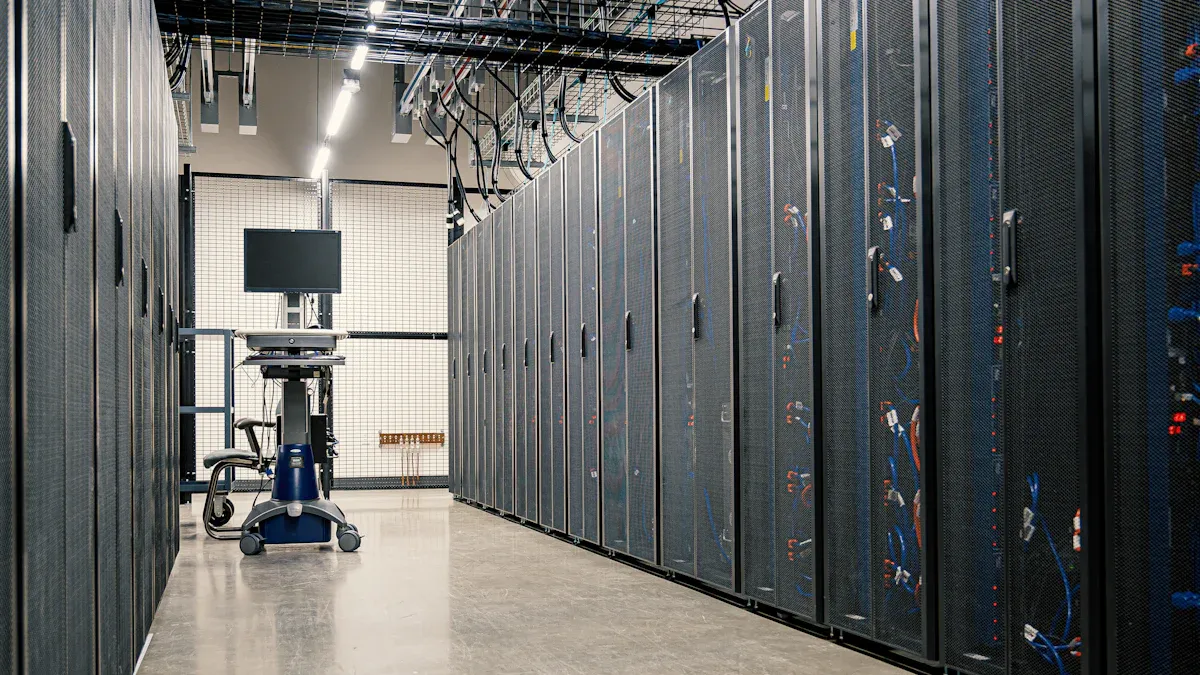
En AI Server series is easy to notice among personal ai servers. These models are the 4U AI Server, H6237, H8230, and H9236. Each server can use more than one gpu unit. This helps people run big ai jobs. The 4U AI Server can fit eight gpu cards. This lets researchers and businesses train large ai models. The TG series, like TG558V3, TG657V2, and TG678V3, can change gpu setups. Users pick the gpu setup that works best for them. The servers use new gpu technology to make ai tasks faster. All the gpus in these servers work together to process data fast. The hardware lets users upgrade gpus quickly. Users can add more gpu cards when their ai projects get bigger. The AI Server series makes it simple to add more gpu power. Many companies use these servers because they trust the gpu performance. The servers help users finish ai projects faster and get better results.
Cloud GPU Providers Overview
Cloud gpu providers let people use strong gpu resources without buying them. These services let users run ai jobs on far-away gpu clusters. Many providers have different gpu types and ways to pay. The table below lists some popular cloud gpu providers for personal ai jobs in 2025.
Proveedor | GPU Types Offered | Pricing Model | Características principales |
|---|---|---|---|
Runpod | A100, H100, H200, MI300X, RTX A4000/A6000 | On-demand, per-second billing | FlashBoot tech, dual Secure/Community Cloud, LLM-ready endpoints |
Hyperstack | H100, A100, L40, RTX A6000/A40 | On-demand, reserved, enterprise contracts | High-performance EU gpu cloud, renewable energy, managed Kubernetes |
Thunder Compute | H100, A100, RTX6000 | On-demand, pay-as-you-go | Ultra-low pricing, instant gpu spin-up, developer tools |
CoreWeave | A100, H100, RTX A5000/A6000 | On-demand, spot instances | HPC-optimized, InfiniBand networking, low-latency provisioning |
Lambda Labs | A100, H100 | On-demand, reserved | Hybrid cloud, pre-configured ML environments, enterprise support |
Cloud gpu providers help users start ai projects fast. Users can pick the gpu type that matches their ai job. The services give instant gpu access and let users pay in different ways. Many providers have advanced gpu networking for quick data transfer. These choices make cloud gpu providers a smart pick for growing ai needs.
Key Features & GPU Performance
GPU Specs and Capabilities
Personal AI servers and cloud GPU providers have many features. These features help them work better for hard AI jobs. The AI Server series is special because it uses advanced GPU setups. It can hold many GPU cards to make AI tasks faster. Each server model checks what the AI framework needs. Then, it gives the right GPU resources to each job. Every program can use all the GPU memory if needed. This makes training and inference go faster. Some servers use smart scheduling, like backfill, to place jobs well. This helps use all the GPU power. Fast deployment means users do not need to change their code. They can start using GPUs for AI right away.
Característica principal | Descripción |
|---|---|
Runtime-aware GPU allocation | Watches the AI framework and gives out GPUs as needed |
Full Memory Access | Lets programs use all the GPU memory |
Advanced Scheduling | Uses backfill and other tricks to place jobs and use GPUs well |
Implementación rápida | Users do not have to change their code |
How well GPUs work depends on a few things. It depends on how many GPU cards there are. It also depends on how much memory they have. The features in the GPU setup matter too. The AI Server series can use up to eight GPU cards. This makes AI tasks run faster. Cloud GPU providers also have strong GPU setups. They let users pick features that fit their AI jobs. These features help users get better results and faster speeds.
Escalabilidad y actualizaciones
Scalability is important for both personal AI servers and cloud GPU providers. Decentralized cloud hosting uses a peer-to-peer system. It connects many devices around the world for GPU power. This way, the system can grow very big. It can use millions of devices. Some features let users rent out their extra GPU cards. This helps meet the high need for AI jobs. Companies build special data centers for AI. These centers use GPUs, TPUs, and fast storage to keep up with growing needs.
The AI Server series makes it easy to upgrade GPU setups. Users can add more GPU cards as their projects get bigger. This helps them get better performance. Cloud GPU providers let users change how many GPUs they use. They can add or remove GPUs based on their needs. This makes sure both types of servers can keep up with AI jobs. They can keep high speeds and strong performance.
Tip: When you plan new AI projects, pick solutions that can grow and have advanced features. This will help you get the best speed and results.
Pricing & Cost Comparison
Personal AI Server Pricing
Personal AI servers have simple pricing. Buyers pay for the hardware first. The price depends on the server model and GPU type. Memory size also changes the price. The AI Server series has many models with different prices. Each server has its own price plan. Some servers have more GPU cards, so they cost more. Security features can make the price go up. Companies can pick extra security for their servers. These choices change the price. Setting up and installing the server adds to the cost. Buyers should look at upgrade prices. Adding GPU cards makes the price higher. Security upgrades also change the price. After buying, the price does not change. Users do not pay every month. The price covers hardware, security, and help. Companies can ask for a special price. The pricing team answers fast. Security help comes with the price. Personal AI server prices help users manage their money. The price plan is easy to follow. The price does not change when you use it. Security is strong with every price plan. The AI Server series has prices for many budgets. The pricing team helps buyers pick the best price. Security experts answer questions about price and safety. Personal AI server prices help buyers feel safe.
Cloud GPU Provider Pricing
Cloud GPU providers use a different price plan. The price depends on how much you use. Users pay for GPU time. The price changes with more GPUs. Security features can make the price higher. Some providers give extra security for more money. The price plan has pay-as-you-go and monthly choices. Users pick the price plan that fits their needs. Cloud GPU provider prices are flexible. The price changes for each project. Security upgrades add to the price. The price plan helps users manage money. Cloud GPU provider prices work for short jobs. The pricing team helps users understand the price. Security help comes with every price plan. Cloud GPU provider prices help users control spending. The price plan is easy to understand. Security stays strong with every price plan. Cloud GPU provider prices fit many needs. The pricing team answers questions about price and safety. Cloud GPU provider prices help users start AI jobs fast.
Note: Always check the price and security before picking a provider. The right price plan helps you save money and keeps your data safe.
Set Up Personal AI Server

Deployment Options
People can set up a personal ai server in two ways. They can use an on-premises server or a cloud GPU provider. On-premises servers give users full control over hardware and gpu use. These servers are good for teams that want privacy. They also help teams manage their own ai inference server. Cloud GPU providers give gpu access from far-away data centers. This choice is flexible and lets users add resources fast. Both ways support multi-gpu setups for big ai jobs. The AI Server series is great for scaling and flexibility. Users can add more gpu cards as they need them. Cloud GPU providers let users change gpu access for each project. Both choices give flexibility for different types of work.
Installation Steps
To set up a personal ai server, users check hardware first. The table below shows what is needed for setup.
Requirement | Especificación |
|---|---|
Sistema operativo | Ubuntu 20.04/22.04, 64 bit |
RAM | 16+ GB (32+ GB recommended) |
Docker | docker.io 20.10.07 or docker-ce 20.10.6 |
GPU Architecture | Nvidia’s Pascal/Turing/Ampere |
GPU Driver Version | 525 |
Additional Packages | build-essential, bison, flex, libelf-dev, dkms, curl, cmake, pip, virtualenv, systemd |
After checking these, users install the operating system and drivers. They set up Docker to run containers. Next, they install the ai inference server software. The AI Server series lets users set up many gpu cards for better speed. Cloud GPU providers make gpu access simple. Users pick the gpu type and start their ai inference server fast. Both ways let users add more resources. On-premises servers let users upgrade hardware. Cloud GPU providers give instant gpu access for new needs. This setup helps users get strong performance and flexibility.
Tip: Always check your hardware before you begin. Good planning helps you set up fast and get steady gpu access.
Cuadro comparativo
Features Side-by-Side
Picking between a personal AI server and a cloud GPU provider is important. You need to look at different features before you choose. The table below shows the main differences. It helps you see what makes each one special.
Aspecto | Personal AI Servers | Cloud GPU Providers |
|---|---|---|
Rendimiento | Limited by hardware and upgrades | High-performance options available |
Pricing | Fixed costs for hardware and maintenance | Variable pricing models (e.g., per-second) |
Deployment | Requires physical setup and maintenance | Flexible deployment options, scalable |
Billing Models | N/A | Per-second vs. hourly billing |
Hidden Costs | N/A | Storage, networking, and support fees |
GPU Options | Limited to owned hardware | Wide range of latest GPUs available |
Personal AI servers, like the AI Server series, let users control their hardware. Users can add more GPU cards to upgrade their servers. This helps them work on bigger AI projects. Cloud GPU providers have many GPU types to pick from. Users pay only for what they use. They can get new hardware right away. This makes it easy to start AI jobs fast.
Consejo: When you compare, check both the first cost and later costs. Think about how much control you want over your hardware and data.
Puntos fuertes y débiles
Personal AI servers and cloud GPU providers each have good and bad points. Each one works best for different needs.
Personal AI Servers:
Puntos fuertes:
Users control all hardware and data.
Pay once for the hardware.
Easy to add more GPU cards.
Good security for private projects.
No extra fees for using it.
Puntos débiles:
Needs space and setup in person.
Upgrades and fixes take time and skill.
Only use the GPUs you own.
Cloud GPU Providers:
Puntos fuertes:
Use the newest GPU models.
Pay for only what you use.
Easy to grow for big projects.
No need to set up or fix hardware.
Start AI jobs from anywhere.
Puntos débiles:
Costs can get high over time.
Extra fees for storage or support.
Less control over where hardware and data are.
Nota: Teams that want privacy and control often pick personal AI servers. Teams that want to grow fast and be flexible pick cloud GPU providers.
When you know these differences, you can pick what is best for your AI project. The best choice depends on your project size, money, and how much control you want.
Solution Profiles
AI Server Series Highlights
The AI Server series is easy to spot in 2025. Many people pick these servers for strong speed and simple upgrades. The company ‘sz-xtt’ uses new technology and gives good help. These servers let businesses and researchers finish hard AI jobs fast.
The AI server market may reach US$298 billion in 2025.
AI servers could make up over 70% of all server value in 2025.
GIGABYTE’s AI servers use special accelerators and cool very well.
Modular X-Series servers are easy to upgrade and save money.
GIGAPOD is a rack cluster made for tough AI work.
CXL helps share resources and makes AI work better on Rack Servers.
The AI Server series from ‘sz-xtt’ can change setups. Users add more GPU cards when they need more power. The servers use new cooling to keep parts safe and working well. Many groups trust ‘sz-xtt’ for AI jobs because help is fast and strong. To learn more about ‘sz-xtt’ and its AI Server, Visite Soluciones de servidores de IA de sz-xtt.
Tip: Picking a modular server lets users save money and upgrade easily when AI jobs get bigger.
Cloud GPU Providers Highlights
Cloud GPU providers give ways to grow for AI jobs. Many companies buy top GPU racks and make special chips for better speed. The table below lists main highlights and differences for top cloud GPU providers in 2025.
Key Highlight/Differentiator | Descripción |
|---|---|
Accelerated AI Investment | Big North American CSPs spend more on AI infrastructure plans. |
Focus on GPU Racks | Money goes to high-end NVIDIA GPU rack solutions. |
Rise of Custom ASICs | Google, AWS, and Meta make their own AI ASICs for better results. |
Strong Market Outlook | AI server shipments may grow because of spending on GPU and ASIC. |
Cloud GPU providers help users begin AI jobs quickly. They give flexible prices and let users use new hardware. Many providers build strong systems for future AI needs.
Match Solutions to Use Cases
High-Performance Needs
Some AI projects need very fast hardware. They also need top performance. High-performance gpu servers help teams train big models. These servers process large data sets quickly. The AI Server series from sz-xtt is great for these jobs. These servers use high-density designs. They have advanced cooling to handle heavy gpu work. They support many processors like AMD, Intel, and NVIDIA. The table below lists key features for high-performance gpu needs:
Característica | Descripción |
|---|---|
High Density | Packs strong computing power into a small space for faster AI training and inference. |
Extensive Versatility | Supports many server types based on AMD, Intel, Ampere, and NVIDIA. |
Efficient Cooling | Uses special cooling to keep servers running at top speed. |
Seamless Compatibility | Works well with major AI software and hardware. |
Effortless Management | Offers easy remote control and monitoring. |
Cloud gpu providers also have high-performance gpu choices. Amazon Web Services, Microsoft Azure, and Google Cloud offer the newest GPUs. These include the NVIDIA H100. These platforms support huge models with trillions of parameters. They give companies scalable infrastructure. Many teams pick cloud gpu providers for secure cloud features. They also choose them for handling big gpu workloads.
Edge & Local Applications
Some users need AI power close to their data. Edge and local AI servers help with this. The Advantech SKY-602E3 tower GPU server fits in small places. It supports up to four GPUs. It works well for edge AI and local projects. This server is easy to move and set up. It is good for field work or small offices.
Cloud gpu providers also help with edge and local setups. Oracle offers NVIDIA AI Enterprise on its secure cloud. Users get over 160 AI tools for training and inference. Renesas has the AI Model Deployer. It runs on local workstations. It helps teams build and test computer vision apps. Teams do not need a secure cloud connection for this.
Opciones asequibles
Many teams want to save money but still get good performance. Personal AI servers like the AI Server series from sz-xtt let users pay once for hardware. There are no ongoing fees. These servers can be upgraded later. Users do not need to buy new systems for every project. Cloud gpu providers have flexible pricing. Users pay only for what they use. This helps teams control costs. It is good for short-term or small gpu jobs. Both options give secure cloud features. Users can protect their data and stay within budget.
Tip: To learn more about the AI Server series and how it fits different needs, visit Soluciones de servidores de IA de sz-xtt.
Personal AI servers and cloud GPU providers both give strong gpu instances for AI work. Personal AI servers let users control gpu instances. They have fixed costs and are easy to upgrade. Cloud GPU providers offer flexible gpu instances. They can scale up fast and use pay-as-you-go pricing. Business needs help decide which gpu instances to pick. Cost, speed, and security matter a lot. Many companies use gpu instances for making AI products. They also use them for simulations and real-time data. Support for gpu instances includes technical help. Users get global access and secure connections. If you need special gpu instances, you can ask sz-xtt for a custom quote at Soluciones de servidores de IA de sz-xtt.
PREGUNTAS FRECUENTES
What is a cloud gpu provider?
A cloud gpu provider lets people use strong GPUs online. Users do not need to buy hardware. Many companies use cloud gpu providers to start projects fast. They can also add more resources when they need them.
How does a cloud gpu provider compare to a personal AI server?
Cloud gpu providers give flexible GPU access. Users pay only for what they use. Personal AI servers give full control and fixed costs. Teams pick cloud gpu providers for quick setup and easy growth.
Can a cloud gpu provider support large AI workloads?
Yes, cloud gpu providers can handle big AI jobs. Many providers have the newest GPUs and strong systems. Users can train large models and work with big data. They do not need to own hardware.
Is it easy to switch between different cloud gpu provider options?
It is easy to change cloud gpu providers. Users pick the provider that fits their project. Each provider has special features, prices, and GPU types. Teams can try different choices to find what works best.
Where can users learn more about AI Server solutions from sz-xtt?
Users can go to Soluciones de servidores de IA de sz-xtt to learn more. The website shows details about hardware, upgrades, and help. It helps users compare personal servers with cloud gpu providers.


