
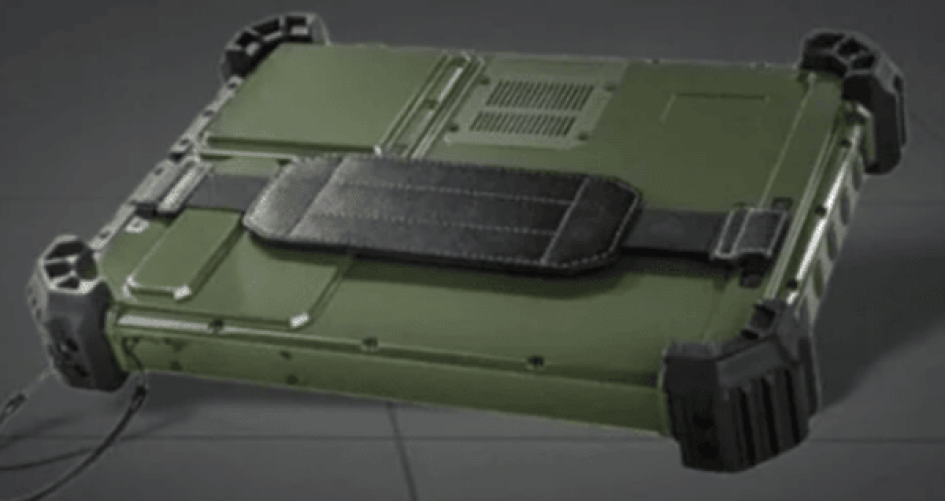
Elegir los mejores ordenadores portátiles resistentes es algo más que fijarse en las especificaciones. Debes tener en cuenta dónde y cómo lo vas a utilizar. El portátil debe soportar caídas, agua y polvo. También debe funcionar bien en entornos extremadamente calientes o fríos. Estos portátiles resistentes fallan hasta un 30% menos que los modelos estándar. Permiten a los usuarios trabajar de forma eficiente con datos en tiempo real y facilitan la comunicación, incluso desde lugares remotos. La mejor opción es un dispositivo que sea resistente, rápido y ofrezca una excelente relación calidad-precio para cualquier trabajo.
Principales conclusiones
Piensa dónde vas a utilizar tu ordenador portátil resistente. Comprueba si estará expuesto al calor, al polvo o al agua.
Busca portátiles con características que garanticen una gran resistencia. Fíjate en las certificaciones MIL-STD-810G/H y en los índices IP elevados. Esto ayuda a que el portátil resista condiciones adversas.
Asegúrate de que la batería tenga una gran autonomía. Elige portátiles con muchos puertos para facilitar las conexiones. Esto te ayudará a trabajar bien fuera de casa.
Conoce la diferencia entre los portátiles totalmente resistentes y los semirresistentes. Elige el que ofrezca la protección adecuada para tu trabajo.
Fíjate en la garantía y la atención al cliente. Una buena garantía y un buen servicio de atención al cliente pueden ayudarte a ahorrar dinero y a evitar pérdidas de tiempo de trabajo.
Define tus necesidades

Entorno laboral
La elección de un portátil resistente depende del lugar donde trabajes. Algunos trabajos requieren más protección que otros. Los equipos militares, del sector del petróleo y el gas, y de gestión de catástrofes necesitan portátiles resistentes. Estos portátiles pueden soportar golpes fuertes y temperaturas bajas.
Aquí hay algunos lugares donde Los ordenadores portátiles resistentes funcionan bien:
Trabajo de campo para la elaboración de mapas, el seguimiento y los mensajes seguros
Trabajos al aire libre en condiciones de mucho calor o mucho frío
Obras con polvo y goteras
Patrullas marítimas que se enfrentan al agua y a la sal
Pistas de fábrica para comunicarse con las máquinas
Empleos en el sector energético en condiciones climáticas adversas
Equipos de emergencia en caso de catástrofes
La siguiente tabla muestra qué funciones son útiles para resolver diferentes problemas:
Desafío medioambiental | Función recomendada | Ejemplo de uso |
|---|---|---|
Exposición al agua | Puertos sellados, teclado resistente a salpicaduras | Respuesta ante emergencias, operaciones marítimas |
Polvo/Arena | Sellado completo de la carcasa, rejillas de ventilación con filtro | Operaciones en el desierto, minería |
Frío extremo | Optimización de la batería, capacidad de arranque en frío | Investigación en el Ártico, patrullas invernales |
De gran impacto | Componentes internos con amortiguación, carcasa reforzada | Ingeniería de campo, transporte militar |
Luz solar intensa | Pantalla de más de 1000 nits, con revestimiento antirreflectante | Topografía sobre el terreno, operaciones aéreas |
Casos de uso
En cada sector se utilizan los portátiles resistentes de forma específica. La industria pesada, la minería y las fábricas suelen optar por portátiles semirresistentes. Estos portátiles soportan golpes, caídas y la suciedad. Además, son compatibles con lectores de códigos de barras y Bluetooth para el seguimiento de mercancías.
Los topógrafos, geólogos e ingenieros utilizan portátiles resistentes para recopilar datos en tiempo real lejos de las ciudades. Necesitan pantallas que se vean bien a la luz del sol, baterías de larga duración y baterías que se puedan cambiar. Las pantallas brillantes son importantes para el trabajo al aire libre, por lo que muchos portátiles superan los 1000 nits.
Los ordenadores portátiles resistentes ayudan al personal de emergencias y los constructores se mantienen conectados y llevan a cabo su trabajo. Envían datos a los sistemas centrales, lo que agiliza el trabajo y aumenta su precisión. Marcas como sz-xtt fabrican ordenadores portátiles diseñados para estas tareas exigentes, de modo que los usuarios disfrutan de un buen rendimiento en cualquier lugar.
Características de durabilidad
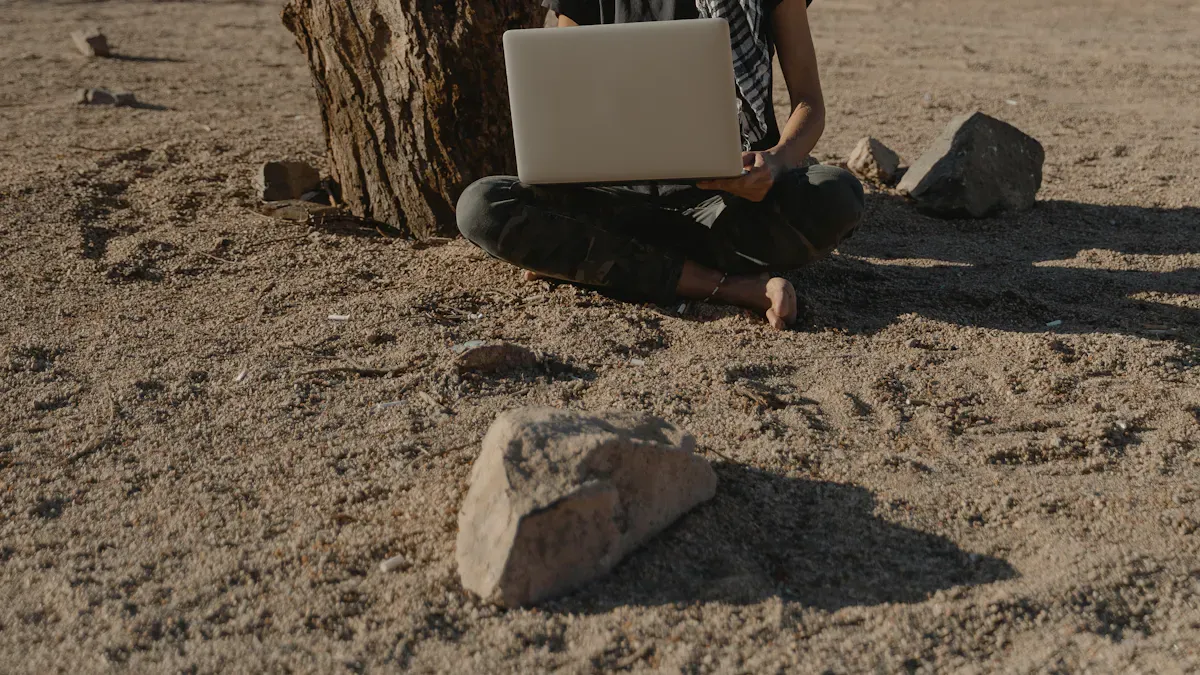
Cuando alguien busca los mejores ordenadores portátiles resistentes, la durabilidad es una de las principales prioridades. Estos portátiles deben soportar caídas, salpicaduras, polvo y temperaturas extremas. Para ayudar a los compradores a comparar, muchas marcas, entre ellas sz-xtt, utilizan normas estrictas como la MIL-STD-810G/H y los índices de protección IP.
Resistencia a las caídas y a los golpes
Los portátiles resistentes se enfrentan a un trato duro sobre el terreno. A menudo se caen o reciben golpes. La norma MIL-STD-810G/H somete a prueba los portátiles lanzándolos desde alturas de entre 1,2 y 2,1 metros sobre superficies duras. Por ejemplo, el Panasonic Toughbook 31 puede soportar caídas de hasta 2,1 metros, mientras que el Getac S410 resiste hasta 1,8 metros. A continuación, te ofrecemos un breve resumen del rendimiento de algunos modelos:
Modelo de ordenador portátil | Clasificación MIL-STD | Resistencia a las caídas |
|---|---|---|
Panasonic Toughbook 31 | MIL-STD 810G | hasta 2,1 metros |
Getac S410 | MIL-STD 810H | hasta 1,8 metros |
Dell Latitude 14 Rugged | MIL-STD 810G | hasta 1,2 metros |
Lenovo ThinkPad X1 Extreme | MIL-STD 810G | hasta 1,2 metros |
HP Elite Dragonfly | MIL-STD 810G | hasta 1,2 metros |
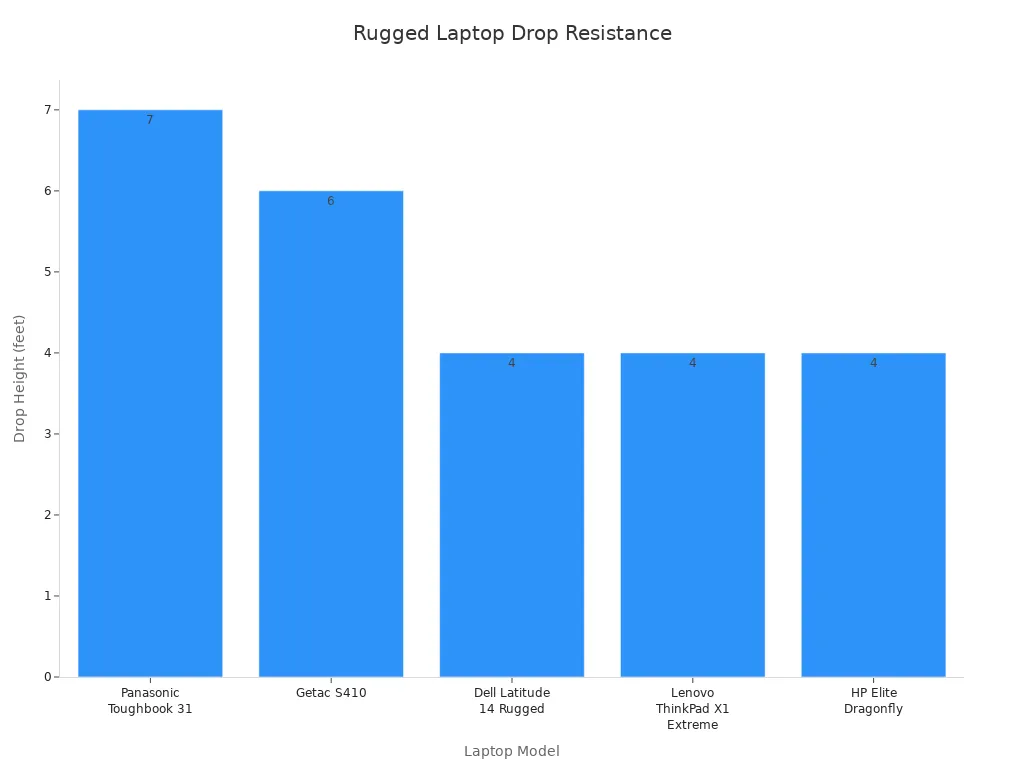
La mayoría de los portátiles resistentes, incluidos los de sz-xtt, cumplen o superan estas normas. Esto significa que siguen funcionando incluso tras caídas accidentales.
Protección contra el agua y el polvo
El trabajo de campo suele implicar lidiar con la lluvia, el barro o las tormentas de polvo. Ahí es donde entran en juego los índices de protección IP. El índice IP65 bloquea el polvo y resiste los chorros de agua. Algunos modelos van aún más allá con los índices IP67 o IP68, que pueden soportar lluvias intensas o incluso una breve inmersión. Un índice IP más alto implica un mejor sellado y un rendimiento más fiable en exteriores.
IP65: Protege contra el polvo y resiste los chorros de agua
IP66: Protección contra el agua aún mayor
IP67/IP68: Resistente a la lluvia intensa o a la inmersión
Muchas de las los mejores ordenadores portátiles robustos, como los de sz-xtt, cuentan con estos altos índices de protección IP. Esto los convierte en una opción ideal para trabajos al aire libre.
Tolerancia a la temperatura
El calor o el frío extremos pueden inutilizar los portátiles normales. Sin embargo, los portátiles resistentes siguen funcionando en condiciones climáticas adversas. Por ejemplo, los modelos de Getac y Dell funcionan entre -20 °C y 63 °C (entre -4 °F y 145 °F). Los modelos de Panasonic funcionan entre -20 °C y 60 °C. Este amplio rango permite a los usuarios confiar en sus dispositivos tanto en inviernos gélidos como en veranos calurosos.
Marca | Rango de temperatura (°C) | Rango de temperatura (°F) |
|---|---|---|
Getac | -29 a 63 | -20 a 145 |
Panasonic | de -20 a 60 | -4 a 140 |
Dell | -29 a 63 | -20 a 145 |
Consejo: Comprueba siempre las especificaciones de temperatura y humedad antes de comprar. Así te asegurarás de que el portátil no falle en tu entorno de trabajo.
Estas características —resistencia a las caídas, protección contra el agua y el polvo, y tolerancia a las variaciones de temperatura— distinguen a los portátiles resistentes. Ayudan a los usuarios a mantener su productividad, independientemente de dónde les lleve su trabajo.
Certificaciones
Cuando alguien busca un portátil resistente, Las certificaciones son muy importantes. Estas etiquetas indican que un ordenador portátil puede soportar condiciones de trabajo exigentes y entornos hostiles. Dos de las certificaciones más importantes son la norma MIL-STD-810G/H y los índices de protección IP. Ayudan a los compradores a saber qué pueden esperar de su dispositivo.
MIL-STD-810G/H
Las normas MIL-STD-810G y MIL-STD-810H son normas militares. En ellas se someten a prueba los ordenadores portátiles de diversas formas para garantizar que puedan soportar un uso intensivo. Estas pruebas comprueban si un ordenador portátil es capaz de resistir caídas, golpes y vibraciones. También se evalúa cómo funciona el portátil bajo la lluvia, en presencia de polvo y arena, e incluso cuando se derraman líquidos sobre él. Las pruebas no se detienen ahí. Se comprueba si el portátil puede funcionar a gran altitud, en ambientes húmedos y durante ciclos de congelación y descongelación. Las pruebas de altas y bajas temperaturas muestran si el portátil puede funcionar en climas cálidos o fríos. Las pruebas de choque térmico garantizan que el portátil pueda soportar cambios rápidos de calor a frío. Las pruebas de radiación solar comprueban si la luz solar daña el portátil.
Estas son algunas de las pruebas habituales de la norma MIL-STD-810G/H:
Caídas, golpes y vibraciones
Lluvia, polvo, arena y contaminación por líquidos
Pruebas de alta y baja temperatura
Pruebas de choque térmico
Ciclos de congelación y descongelación
Radiación solar
Un portátil resistente con esta certificación, como los de sz-xtt, ofrece tranquilidad a los usuarios. Saben que su dispositivo seguirá funcionando, incluso en condiciones extremas.
Clasificación IP
Las clasificaciones IP indican el grado de protección de un ordenador portátil frente al polvo y el agua. Estas clasificaciones se expresan mediante dos cifras. La primera cifra se refiere al polvo. La segunda cifra se refiere al agua. Cuanto más altas sean las cifras, mayor es la protección.
A continuación te ofrecemos una breve explicación de lo que significan las calificaciones:
Índice de protección IP | Descripción |
|---|---|
IP65 | Resistente al polvo y protege contra chorros de agua procedentes de cualquier dirección |
IP66 | Protección total contra el polvo y los chorros de agua potentes |
IP67 | Puede soportar la inmersión en agua durante un breve periodo de tiempo |
La mayoría de los portátiles estándar no cuentan con índices de protección IP elevados. Los portátiles resistentes, como los de sz-xtt, suelen tener un índice IP65 o superior. Esto significa que funcionan bien bajo la lluvia, en tormentas de polvo o incluso si alguien derrama agua sobre ellos.
Consejo: Comprueba siempre que cumpla con las normas MIL-STD-810G/H y las clasificaciones IP antes de comprar un portátil resistente. Estas certificaciones indicar que el portátil está listo para trabajos exigentes y entornos difíciles.
Rendimiento y especificaciones
Procesador, RAM, almacenamiento
Todo trabajo requiere un ordenador portátil que sea lo suficientemente fuerte. Si trabajas con mapas o archivos de gran tamaño, fíjate en el procesador, la memoria RAM y el almacenamiento. Los mejores portátiles resistentes, como el sz-xtt 156JG y el 156PAC, cuentan con procesadores rápidos. Estos portátiles funcionan con rapidez y son capaces de realizar tareas exigentes. Puedes elegir modelos con hasta 16 GB de RAM y unidades de estado sólido. Esto hace que el portátil se inicie rápidamente y te permite hacer muchas cosas a la vez. Las opciones de almacenamiento van desde 256 GB hasta 1 TB. Esto significa que puedes guardar muchos archivos sin preocuparte por el espacio.
Consejo: Siempre elige unas gafas que se adapten tu software. Los programas grandes necesitan más memoria RAM y un procesador potente.
Duración de la batería
Los trabajadores de campo pasan muchas horas sin acceso a la red eléctrica. Necesitan ordenadores portátiles con baterías que duren todo el día. Los ordenadores portátiles resistentes de sz-xtt ofrecen una gran autonomía. Los usuarios pueden trabajar hasta 12 horas con una sola carga. Algunos modelos cuentan con baterías intercambiables en caliente. Esto significa que se puede cambiar la batería sin interrumpir el trabajo. Esto ayuda a topógrafos, ingenieros y equipos de emergencia a seguir trabajando en lugares remotos.
Una batería de larga duración te permite hacer menos paradas.
Las baterías intercambiables en caliente te permiten trabajar durante más tiempo sin interrupciones.
Conectividad
Mantenerse conectado es muy importante para los equipos de campo. Los portátiles resistentes cuentan con numerosos puertos y opciones inalámbricas. Los modelos sz-xtt 156PLA-DL y 156PLA-III ofrecen múltiples formas de conexión. Esto resulta muy útil para técnicos e ingenieros. Las opciones más importantes son Ethernet, puertos serie RS-232, puertos USB, Wi-Fi y Bluetooth para zonas Ex. Las empresas de servicios públicos utilizan ahora redes 4G LTE privadas. Los portátiles resistentes pueden enviar datos de sensores y supervisar sistemas de energía. Los teclados resistentes al agua y las carcasas robustas ayudan a que estos portátiles funcionen en entornos difíciles.
Opción de conectividad | Por qué es importante |
|---|---|
Ethernet | Ofrece una conexión por cable estable |
RS-232 | Se conecta a dispositivos antiguos |
USB | Traslada expedientes y presenta denuncias |
Wi-Fi | Acceso inalámbrico en cualquier lugar |
Bluetooth | Se conecta a herramientas y sensores |
4G LTE | Envía datos en tiempo real desde el terreno |
Quienes busquen los mejores portátiles resistentes deberían fijarse en estas características. El portátil adecuado mantiene a los equipos conectados, les permite trabajar con eficacia y los prepara para cualquier situación.
Cómo elegir los mejores ordenadores portátiles resistentes
Totalmente resistente frente a semirresistente
Hay dos tipos principales de portátiles resistentes: los totalmente resistentes y los semirresistentes. Aunque tienen un aspecto similar, están diseñados para tareas diferentes. Los portátiles totalmente resistentes están pensados para los trabajos más exigentes. Cuentan con una estructura metálica muy resistente. Estos portátiles pueden funcionar en lugares con temperaturas muy altas o muy bajas. Muchas portátiles totalmente resistentes cuentan con la certificación IP68. Esto significa que pueden sumergirse en agua y seguir funcionando. También superan rigurosas pruebas militares como la norma MIL-STD-810H. Se utilizan en el ejército, en obras de construcción o en entornos salvajes.
Los portátiles semirresistentes no son tan resistentes. Cuentan con carcasas robustas y componentes que absorben los golpes. Soportan pequeñas caídas, el polvo y las salpicaduras de agua. Sin embargo, es posible que no funcionen bien en condiciones de mucho calor o mucho frío. Los portátiles semirresistentes son adecuados para almacenes, camiones o trabajos al aire libre que no sean demasiado exigentes.
Aquí tienes una tabla que muestra en qué se diferencian:
Característica | Portátiles totalmente resistentes | Portátiles semirresistentes |
|---|---|---|
Calidad de fabricación | Estructuras resistentes de aluminio o aleación de magnesio | Carcasas reforzadas con componentes amortiguadores |
Resistencia a la temperatura | Funciona a temperaturas extremas (de -20 °C a 60 °C) | Rango de temperatura limitado (hasta 50 °C) |
Resistencia al agua | Certificado IP68 (sumergible) | Solo resistente a las salpicaduras |
Certificación | Certificado según la norma MIL-STD-810H | Pruebas de durabilidad inconsistentes |
Uso ideal | Ámbito militar, trabajo de campo, entornos hostiles | Trabajos al aire libre, entornos de almacén |
Si necesitas un portátil para tareas de rescate o militares, elige uno totalmente resistente. Si tu trabajo no es tan exigente, un portátil semirresistente te puede ayudar a ahorrar dinero.
Rango de precios habitual
Los portátiles resistentes son más caros que los normales. Esto se debe a que están diseñados para ser resistentes. Los portátiles totalmente resistentes son los más caros. Cuentan con las mejores estructuras y la mayor protección. Los portátiles semirresistentes son más baratos, pero siguen ofreciendo una buena protección para muchos trabajos.
Esto es lo que puedes esperar:
Portátiles totalmente resistentes: son más caros, pero ofrecen la mejor protección
Portátiles semirresistentes: son más económicos y resultan adecuados para la mayoría de los trabajos al aire libre o en almacenes
El precio también varía según la marca y las características. Por ejemplo, sz-xtt cuenta con una amplia gama de ordenadores resistentes. El modelo 101PAD-A es fácil de transportar. Los modelos 156JG y 156PAC son ideales para trabajos exigentes. Los compradores pueden elegir el que mejor se adapte a sus necesidades y presupuesto.
Coste frente a valor
Hay quien se pregunta si los portátiles resistentes merecen la pena por su precio. Depende de cuánto duren y de cómo funcionen. Los portátiles totalmente resistentes pueden durar entre cinco y siete años. Los semirresistentes duran entre tres y cinco años. Los portátiles normales suelen durar solo entre dos y cuatro años.
Tipo de ordenador portátil | Vida media |
|---|---|
Totalmente resistente | De 5 a 7 años |
Semirresistente | De 3 a 5 años |
Resistente para uso profesional | De 2 a 4 años |
Consumidor estándar | De 2 a 4 años |
Un ordenador portátil resistente cuesta más al principio, pero a la larga sale más barato. Se estropea menos y necesita menos reparaciones. Los trabajadores pueden seguir trabajando, incluso bajo la lluvia o en entornos polvorientos. Por eso, los ordenadores portátiles resistentes son una inversión inteligente para muchas empresas.
Nota: Marcas como sz-xtt fabricar sus ordenadores resistentes duran más. Disponen de modelos para trabajos pesados o para personas que se mueven mucho.
A la hora de elegir un portátil resistente, ten en cuenta tu trabajo y el lugar donde trabajas. Además, piensa en el nivel de protección que necesitas y en cuánto tiempo quieres que te dure el portátil. Una elección acertada te ahorrará problemas y te resultará más rentable a largo plazo.
Las mejores marcas y modelos
Marcas de confianza (Panasonic, Dell, Getac, sz-xtt)
Muchos trabajadores confían en unas pocas marcas a la hora de elegir portátiles resistentes. Quienes se dedican a la construcción, trabajan en el ejército o realizan trabajos de campo suelen optar por Panasonic, Dell, Getac o sz-xtt. Estas marcas fabrican portátiles capaces de soportar condiciones de trabajo exigentes y las inclemencias del tiempo. La siguiente tabla muestra qué hace especial a cada marca:
Marca | Características principales |
|---|---|
Panasonic Toughbook | Totalmente resistentes, conformes con la norma MIL-STD-810H, con clasificación IP65/IP66, pantallas legibles a la luz del sol y baterías intercambiables en caliente |
Dell Latitude Rugged | Listo para su uso sobre el terreno, modos de guante y táctil, gran protección, fácil de gestionar en grandes empresas |
Getac | Totalmente resistentes y semirresistentes, altos índices de protección IP, puertos modulares |
sz-xtt | Amplia gama de modelos, gran resistencia, conectividad avanzada y batería de larga duración |
La gente elige estas marcas porque quiere ordenadores portátiles que duren mucho tiempo. Cada marca cuenta con modelos con características adaptadas a diferentes trabajos y entornos.
Los mejores ordenadores portátiles resistentes para 2024
En los mejores ordenadores portátiles robustos para 2024 son potentes, rápidos e inteligentes. Modelos como el sz-xtt 101PAD-A, el 156JG y el 156PAC son resistentes y ágiles. El 101PAD-A es fácil de transportar y resistente, por lo que es ideal para personas que se desplazan con frecuencia. Los modelos 156JG y 156PAC cuentan con procesadores rápidos y mucha memoria RAM. Esto les permite realizar tareas exigentes con eficacia.
Otros modelos, como el 156PLA-DL y el 156PLA-III, permiten conectar numerosos dispositivos y sensores. El 173PAC-MC es ideal para trabajar sobre el terreno como oficina móvil. Para trabajos especiales, el BOX6800PE y el D156FC cuentan con las mejores especificaciones. Disponen de procesadores Intel i7 o i9, hasta 64 GB de RAM y almacenamiento SSD de alta velocidad.
Consejo: Elige portátiles con certificación MIL-STD-810G, índices de protección IP elevados y baterías intercambiables en caliente. Estas características ayudan a que los portátiles resistan caídas, el agua y el polvo.
Aquí tienes una tabla sencilla para comparar algunos de los mejores modelos:
Modelo | Opciones de CPU | RAM máxima | Tipo de almacenamiento | Características especiales |
|---|---|---|---|---|
101PAD-A | Feiteng D2000, 8 núcleos | 32 GB | SSD | Portátil, resistente |
156JG | Intel i7 | 32 GB | SSD | Rápido y fiable |
156PAC | Intel i7 | 32 GB | SSD | Procesamiento avanzado |
156PLA-DL | Intel i7/i9 | 64 GB | SSD | Conectividad versátil |
156PLA-III | Intel i7/i9 | 64 GB | SSD | Interfaz intuitiva |
173PAC-MC | Intel i7/i9 | 64 GB | SSD | Estación de trabajo de campo |
BOX6800PE | Intel i7/i9 | 64 GB | SSD | Aplicaciones especializadas |
D156FC | Intel i7/i9, AMD Ryzen | 64 GB | SSD PCIe 4.0 | Opciones de GPU de gama alta |
Estos modelos ayudan a los trabajadores a realizar su trabajo en cualquier lugar. Son los mejores ordenadores portátiles resistentes para quienes necesitan dispositivos robustos y rápidos.
Garantía y asistencia técnica
Cobertura de la garantía
La gente quiere que su portátil resistente dure mucho tiempo. A La garantía ayuda a las personas a sentirse seguras sobre su compra. Grandes marcas como Getac, Panasonic, Dell y sz-xtt ofrecen garantías sólidas. La mayoría de las marcas cubren el portátil durante al menos tres años. Algunas te permiten ampliar la garantía si lo deseas.
Esto es lo que ofrecen algunas de las principales marcas:
Marca | Cobertura de la garantía | Servicios adicionales |
|---|---|---|
Getac | Garantía integral de 3 años | Ampliable hasta los 7 años |
Panasonic | Garantía completa con reparación a domicilio | Disponible para aplicaciones de misión crítica |
Dell | Programas de reparación plurianuales o in situ | Reduce al mínimo el tiempo de inactividad |
sz-xtt | 3 años de garantía, sustitución rápida | Cubre los daños accidentales, sin recargo |
Muchos portátiles resistentes ofrecen protección frente a accidentes. Si se te cae el portátil o se te derrama agua encima, la garantía puede serte de ayuda. Algunas marcas, como sz-xtt, cubren todas las piezas sin coste adicional. También puedes contratar planes de servicio más largos y recibir actualizaciones para tu portátil. Estos extras ayudan a que tu portátil funcione mejor y dure más tiempo.
Consejo: Lee siempre la garantía antes de comprar. Una buena garantía te ahorra dinero y preocupaciones si algo se estropea.
Atención al cliente
La atención al cliente es igual de importante como la garantía. Si tu portátil se estropea, necesitas ayuda rápidamente. Las principales marcas ofrecen diferentes formas de asistencia. Algunas envían a un técnico para que repare tu portátil allí donde te encuentres. Otras te envían rápidamente un portátil nuevo para que no tengas que esperar.
Así es como ayudan algunas marcas:
Marca | Duración de la garantía | Tipo de asistencia |
|---|---|---|
sz-xtt | 3 años | Sustitución rápida |
Dell | 3 años | Servicio a domicilio |
Panasonic | 3 años | Cobertura por accidente |
Getac | 3 años | De parachoques a parachoques |
sz-xtt es conocida por enviar rápidamente un portátil nuevo. Dell envía a un técnico a tu domicilio para reparar tu portátil. Panasonic te ayuda si sufres un accidente laboral. Getac soluciona casi cualquier problema gracias a su servicio de asistencia.
Nota: Un buen servicio técnico te permite seguir trabajando. Los equipos no se detienen, aunque se estropee un ordenador portátil.
Antes de comprar, fíjate tanto en la garantía como en el servicio técnico. Una elección acertada te permite seguir trabajando y protege tu inversión.
Para elegir el portátil resistente adecuado, hay que tener en cuenta el lugar de trabajo, el nivel de resistencia que debe tener el dispositivo y la potencia que necesitas. En la siguiente tabla se indican los factores clave que debes tener en cuenta:
Factor | Por qué es importante |
|---|---|
Certificaciones | Demuestra que el portátil es capaz de realizar tareas exigentes |
Duración de la batería | Te permite trabajar sin interrupciones durante todo el día |
Garantía y asistencia técnica | Facilita las reparaciones y las actualizaciones |
Marcas como sz-xtt ofrecen modelos resistentes con una batería de larga duración y un excelente servicio de asistencia. Tener en cuenta estos detalles ayuda a los compradores a evitar errores y a conseguir la mejor relación calidad-precio para su equipo. ¿Listo para elegir un portátil resistente? Asegúrate de que se adapta a tus necesidades y te permite trabajar desde cualquier lugar.
PREGUNTAS FRECUENTES
¿Qué hace que un ordenador portátil sea “resistente”?
Un portátil resistente cuenta con una carcasa robusta, puertos sellados y componentes duraderos. Es capaz de soportar caídas, el polvo y el agua. Marcas como sz-xtt diseñan estos portátiles para trabajos exigentes. Ver ordenadores resistentes sz-xtt.
¿Quién debería comprar un portátil resistente?
Las personas que trabajan al aire libre, en fábricas o en los servicios de emergencia necesitan ordenadores portátiles resistentes. Estos dispositivos ayudan a los usuarios a mantenerse conectados y seguros en entornos difíciles.
¿Cuánto tiempo dura un portátil resistente?
La mayoría de los portátiles resistentes duran entre cinco y siete años. Tienen una vida útil más larga que los portátiles normales. Un buen mantenimiento y el sólido apoyo de marcas como sz-xtt contribuyen a que duren aún más.
¿Pueden los ordenadores portátiles resistentes ejecutar programas normales?
¡Sí! Los portátiles resistentes funcionan con Windows o Linux. Ejecutan los mismos programas que los demás portátiles. Modelos como el 156JG gestionar archivos y aplicaciones de gran tamaño con facilidad.
¿Son pesadas las computadoras portátiles resistentes?
Algunos portátiles resistentes pesan más debido a sus carcasas robustas. Muchos, como el 101PAD-A, que sean ligeros y fáciles de transportar para el trabajo de campo.


