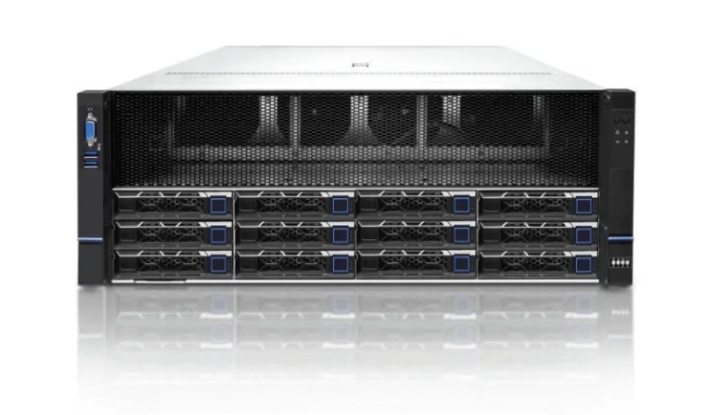
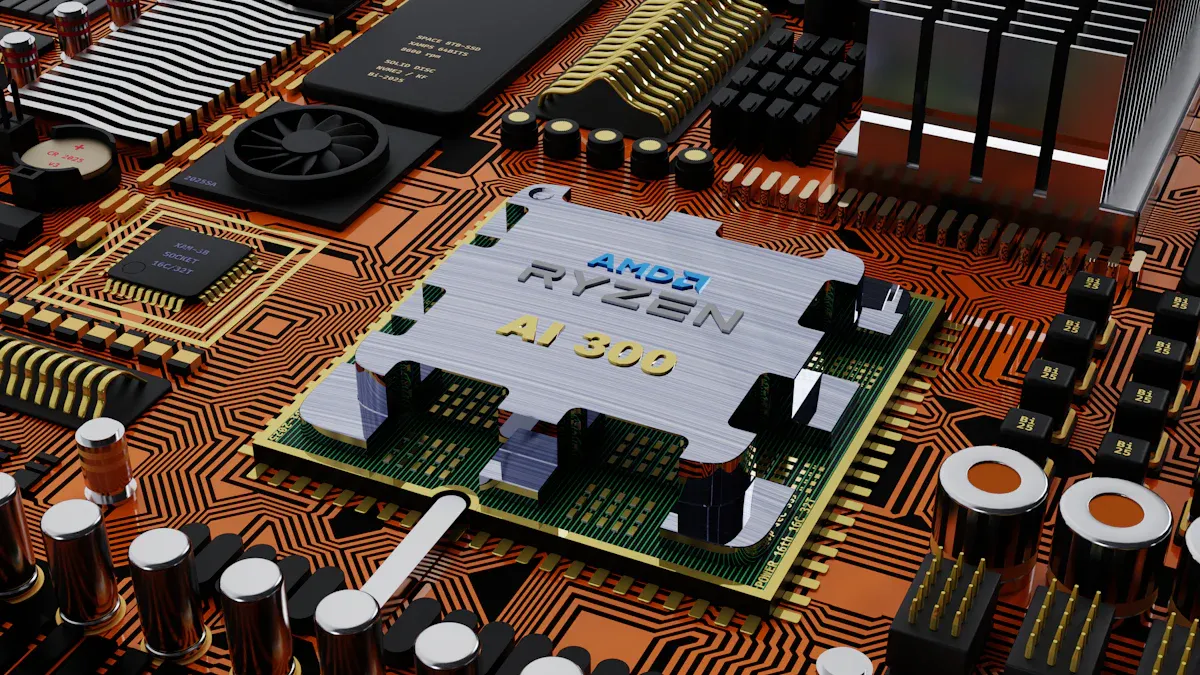
Une bonne carte mère pour PC serveur est très importante. Elle permet au serveur de bien fonctionner et de rester fiable. La fiabilité est très importante. Les problèmes liés aux cartes mères entraînent 43% des problèmes de serveur dans les centres de données. La compatibilité et les performances sont également importantes. Elles permettent au serveur de faire face à des tâches difficiles. Le serveur AI de XTT montre comment une conception intelligente et des fonctions personnalisées aident les entreprises. Ces éléments renforcent les systèmes informatiques et les préparent pour l'avenir.
Principaux enseignements
Choisissez une carte mère fabriquée avec des matériaux résistants. Cela lui permet de durer longtemps dans les endroits difficiles. Assurez-vous que la carte mère fonctionne avec de la mémoire vive ECC. Cela permet d'éviter les erreurs de données et de maintenir la stabilité du système. Recherchez des cartes mères dotées de plus d'un emplacement PCIe. Cela vous permet d'effectuer des mises à niveau ultérieures et d'obtenir de meilleures performances. Choisissez une carte mère qui économise l'énergie et reste froide. Cela permet à votre serveur de bien fonctionner. Choisir une marque en laquelle les gens ont confiance. Assurez-vous qu'il bénéficie d'une bonne garantie et d'une bonne assistance. Cela permet à votre serveur de continuer à fonctionner.
La fiabilité est importante
Qualité de construction
La carte mère d'un PC serveur doit être solide. Elle doit fonctionner correctement pendant longtemps. Les fabricants utilisent des matériaux résistants tels que acier inoxydable et aluminium. Ces matériaux aident la carte mère à lutter contre la poussière et l'humidité. Ils la protègent également contre d'autres éléments durs. Cartes mères industrielles sont conçus pour les environnements difficiles. Ils permettent aux ordinateurs de fonctionner rapidement et correctement. Leur conception solide permet d'assurer le bon fonctionnement de l'ordinateur dans de nombreux domaines.
Les cartes mères des PC serveurs modernes sont dotées de nombreuses prises. Cela leur permet d'utiliser plus de RAM et de CPU. Elles sont donc plus fiables. De nombreuses cartes ont des formes spéciales telles que EEB et SSI EEB. Ces cartes plus grandes permettent aux serveurs de mieux fonctionner et de faire face à de gros travaux. Les cartes mères renforcées sont également courantes. Elles fonctionnent dans des endroits chauds et froids. Elles ont une durée de vie de cinq à dix ans. Cela permet d'éviter les problèmes dans les tâches importantes.
Conseil : Choisissez une carte mère avec des matériaux solides et un design pour une utilisation prolongée. Cela permet à votre serveur de rester fiable dans les endroits difficiles.
Alimentation et refroidissement
Une bonne alimentation et un bon refroidissement sont très importants pour une carte mère de PC serveur. Rendement énergétique élevé, Le système d'alimentation en énergie, jusqu'à 90%, permet d'économiser de l'argent et d'assurer la stabilité de l'activité. Les conceptions économes en énergie sont également bénéfiques pour la planète. Les serveurs ont besoin d'un bon refroidissement pour éviter la surchauffe. Les flux d'air et les dissipateurs de chaleur assurent la sécurité et le bon fonctionnement des pièces.
La gestion à distance permet de vérifier l'alimentation et le refroidissement à tout moment. Vous pouvez le faire même si le système d'exploitation ne fonctionne pas. L'accès au niveau du BIOS permet d'effectuer des contrôles 24 heures sur 24 et 7 jours sur 7 à l'aide d'outils web. Ces éléments aident les équipes informatiques à détecter rapidement les problèmes et à maintenir les serveurs en état de marche.
Fonctionnalité | Description |
|---|---|
Rendement énergétique élevé | Efficacité énergétique maximale jusqu'à 90% pour une réduction des coûts |
Capacités de gestion à distance | Permet la surveillance et le contrôle même si le système d'exploitation est hors service |
Grande capacité d'extension des E/S | Prise en charge d'un plus grand nombre d'options de stockage et de réseau |
Accès au niveau du BIOS | Surveillance 24 heures sur 24, 7 jours sur 7, par le biais d'une interface web |
Le serveur AI de XTT utilise une technologie intelligente et des pièces solides pour un travail régulier. Leurs fonctions personnalisées et leur vitesse intelligente permettent aux serveurs de s'adapter aux besoins informatiques modernes.
Compatibilité des cartes mères des PC serveurs
Prise en charge des CPU et des sockets
Lors du choix d'une carte mère pour PC serveur, vérifier si l'unité centrale est adaptée. Chaque carte mère fonctionne avec certains types d'embases. Par exemple, LGA 1200 est destiné aux processeurs Intel. AM4 est destiné aux processeurs AMD. Le socket doit correspondre à votre processeur. Certaines cartes mères fonctionnent avec plus d'une génération de CPU. Cela vous permet d'effectuer une mise à niveau ultérieurement. La carte mère doit gérer la puissance et la chaleur du processeur. Elle doit également disposer des bons connecteurs d'alimentation.
Les cartes mères de serveurs utilisent souvent Processeurs Intel Xeon. Ces processeurs sont adaptés aux tâches difficiles. Les cartes mères pour ordinateurs de bureau utilisent des processeurs moins puissants. Elles peuvent ne pas être assez puissantes pour les serveurs. La mémoire vive ECC est importante pour les serveurs. La RAM ECC empêche les erreurs de données. Elle est nécessaire pour les travaux des grandes entreprises. Plus d'emplacements PCIe permettent d'ajouter des cartes RAID et des GPU. Cela permet au serveur d'effectuer plus de travail.
Conseil : Consultez toujours les spécifications de la carte mère. Vérifiez le type de socle du processeur, les générations prises en charge et les besoins en énergie avant d'acheter.
Options de mémoire et de stockage
La mémoire et le stockage sont importants pour la vitesse du serveur. Les cartes mères des PC serveurs utilisent la RAM ECC. La mémoire vive ECC préserve les données lors d'un travail intensif. Elles disposent de nombreux emplacements de mémoire. Vous pouvez ajouter de la mémoire vive si vous en avez besoin. Cela permet aux serveurs de travailler avec des données volumineuses et des tâches difficiles.
Les cartes mères disposent de différentes interfaces de stockage. Les plus courantes sont SATA et M.2. SATA utilise des câbles pour connecter les disques. M.2 est mince et permet de connecter des disques SSD. M.2 peut utiliser SATA ou PCIe (NVMe). Le tableau ci-dessous présente les types de stockage et leurs vitesses :
Type d'interface | Description | Vitesse maximale |
|---|---|---|
SATA | Connecte les disques durs et les disques SSD à l'aide de câbles | |
M.2 | Fente fine pour SSD, utilise SATA ou PCIe (NVMe) | Variable selon le type |
Choisissez une mémoire et un espace de stockage adaptés aux tâches de votre serveur. Prévoyez des mises à niveau pour que votre serveur soit toujours prêt. Le serveur AI de XTT montre pourquoi il est judicieux de choisir une carte mère avec des processeurs avancés, une mémoire vive ECC et un stockage flexible.
Caractéristiques de performance
Jeu de puces et extension
La carte mère d'un PC serveur a besoin d'un chipset solide pour les tâches difficiles. Jeux de puces aider l'unité centrale à communiquer avec la mémoire et le stockage. Ils accélèrent la circulation des données, ce qui facilite les tâches importantes. Les jeux de puces offrent des voies PCIe pour les cartes supplémentaires. Ces voies vous permettent d'ajouter des cartes RAID, des GPU ou des cartes réseau. Les serveurs ont besoin d'un transfert de données rapide, d'où l'intérêt de disposer d'un plus grand nombre de voies PCIe.
Les chipsets permettent également d'économiser de l'énergie. Ils utilisent la gestion de l'alimentation pour réduire la consommation d'électricité. Cela permet aux serveurs de bien fonctionner et d'économiser de l'énergie. Les chipsets prennent en charge la mémoire ECC et la technologie de tolérance aux pannes. Ces caractéristiques rendent le système stable et sûr.
Voici un tableau qui montre caractéristiques de performance importantes pour les serveurs occupés :
Fonctionnalité | Explication | Importance |
|---|---|---|
Gestion du multitâche | Gère plusieurs tâches à la fois | Utilise bien les ressources et améliore les performances |
Sécurité | Protection contre les accès non autorisés | Préserve la sécurité des données et du système |
Gestion du réseau | Optimise les ressources du réseau | Régule le trafic et accélère le transfert de données |
Évolutivité | Ajouter facilement des ressources | Évolue avec l'entreprise et maintient des performances élevées |
Serveur d'IA de XTT utilise des chipsets intelligents pour des données rapides et un travail stable. Leur conception favorise le multitâche et facilite les mises à niveau. Ils répondent donc parfaitement aux besoins informatiques actuels.
Capacités du réseau
Les cartes mères des PC serveurs modernes doivent être dotées de fonctions réseau solides. La prise en charge de l'IPMI permet aux équipes informatiques de gérer les serveurs à distance. Cela fonctionne même si le système d'exploitation ne fonctionne pas. Elle permet aux serveurs de continuer à fonctionner et facilite la résolution des problèmes. De nombreux ports PCIe et SATA vous permettent d'ajouter davantage de stockage et de périphériques. C'est une bonne chose pour les entreprises qui souhaitent se développer.
Une IOMMU forte contribue à la virtualisation. Il permet aux serveurs d'exécuter de nombreuses machines virtuelles sans ralentissement. Les outils réseau aident à contrôler le trafic et à assurer la circulation rapide des données. Ces fonctionnalités permettent aux serveurs d'être prêts pour les lieux très fréquentés.
Le serveur AI de XTT possède des fonctions réseau avancées. Leurs cartes mères prennent en charge la gestion à distance et les mises à niveau faciles. Ces caractéristiques permettent aux entreprises de rester à la pointe et de préserver la sécurité des données.
Extensibilité
Emplacements PCIe
A carte mère d'un PC serveur devraient vous permettre d'ajouter de nouveaux éléments. Les emplacements PCIe vous permettent d'améliorer le fonctionnement de votre serveur. La plupart des cartes mères de serveurs disposent d'emplacements PCIe x4, x8 et x16. Ces emplacements vous permettent d'utiliser des périphériques rapides tels que des adaptateurs réseau, des contrôleurs RAID et des GPU.
Emplacements PCIe x8 et x16 sont nécessaires pour les parties solides.
Les serveurs disposent souvent d'emplacements x4 et x8 pour des périphériques spéciaux.
Le tableau ci-dessous montre comment les types d'emplacements PCIe aident les serveurs:
Type d'emplacement PCIe | Nombre de voies | Cas d'utilisation typiques |
|---|---|---|
PCIe x1 | 1 | Cartes son, cartes réseau, adaptateurs Wi-Fi |
PCIe x4 | 4 | Contrôleurs de stockage, cartes RAID, certaines cartes son |
PCIe x8 | 8 | Adaptateurs réseau haute performance, acquisition de données |
PCIe x16 | 16 | Cartes graphiques, systèmes de stations de travail |
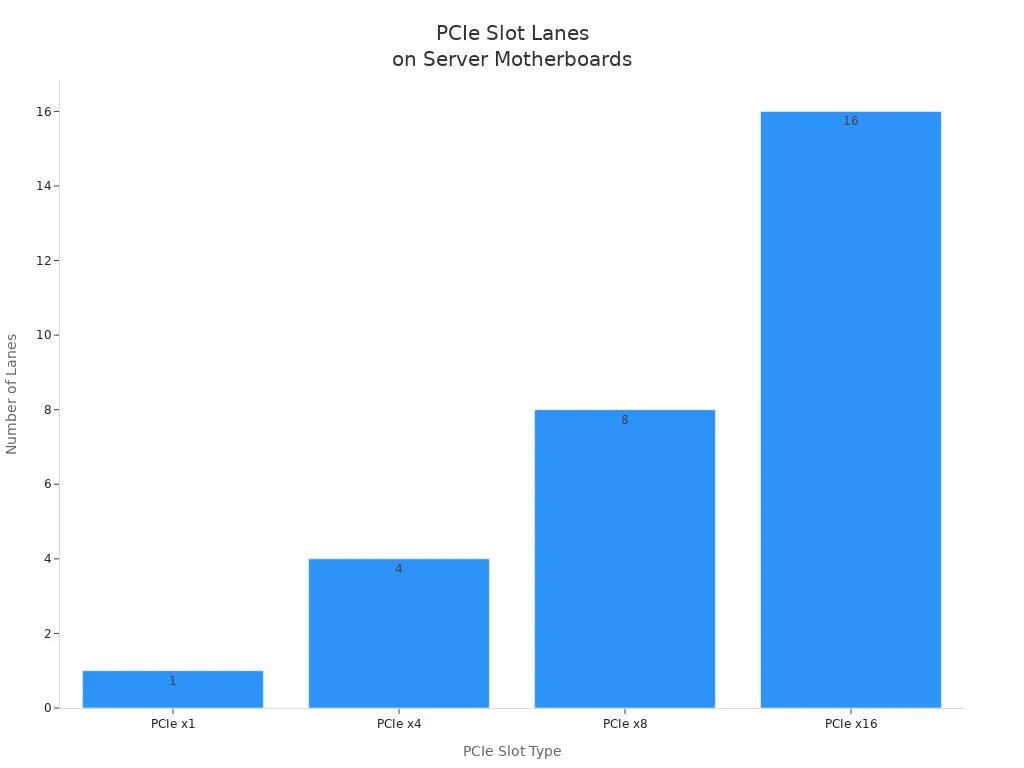
Une carte mère dotée d'un plus grand nombre d'emplacements PCIe vous permet d'ajouter de nouvelles cartes. Cela vous permet de rester en phase avec les nouvelles technologies et les travaux plus importants.
Conseil : Choisissez une carte mère avec plusieurs types d'emplacements PCIe. Cela vous permettra d'effectuer des mises à jour et d'ajouter de nouveaux éléments ultérieurement.
Voies de mise à niveau
Les voies de mise à niveau permettent aux serveurs de durer plus longtemps. Les cartes mères ATX ou microATX vous offrent plus de possibilités de mise à niveau. Quatre emplacements RAM vous permettent d'ajouter de la mémoire lorsque vous en avez besoin. Des emplacements PCIe supplémentaires facilitent l'ajout de GPU, de cartes d'acquisition ou de contrôleurs de stockage. La prise en charge de NVMe vous permet de bénéficier d'un stockage plus rapide et d'une meilleure vitesse.
Les cartes mères ATX ou microATX offrent plus d'espace pour les mises à niveau..
Quatre emplacements RAM ou plus vous permettent d'ajouter de la mémoire.
Des emplacements PCIe supplémentaires vous permettent d'ajouter de nouvelles cartes.
La prise en charge de NVMe permet un stockage plus rapide.
Le serveur AI de XTT utilise des cartes mères faciles à mettre à jour. Ces produits aident les entreprises à faire face aux nouveaux problèmes et à maintenir un bon fonctionnement. Les entreprises qui choisissent des cartes mères de serveur flexibles peuvent travailler davantage et se préparer pour l'avenir.
Prise en charge de la mémoire ECC
L'importance du CEC
La mémoire ECC est très importante pour les serveurs. Elle détecte et corrige les erreurs de mémoire. Ces erreurs peuvent se produire lorsque des données sont stockées ou déplacées. Les serveurs utilisent un grand nombre de données chaque jour. Une seule petite erreur peut endommager des données ou faire planter le système. La mémoire ECC permet d'éviter ces problèmes et d'assurer le bon fonctionnement du système.
La mémoire ECC est la meilleure pour les tâches importantes. Les entreprises ont besoin de données fiables pour faire des choix et travailler chaque jour. La mémoire vive ECC est plus fiable que la mémoire normale. Elle peut corriger elle-même les erreurs. Cela permet de préserver la sécurité des données et la stabilité du système. L'utilisation de la mémoire ECC permet aux entreprises d'éviter de perdre de l'argent à cause de mauvaises données.
La mémoire ECC est nécessaire pour les serveurs contenant des données importantes. Elle permet d'éviter les temps d'arrêt et de préserver la sécurité des données.
Le tableau ci-dessous montre comment la mémoire ECC contribue à la fiabilité des serveurs et préserver la sécurité des données :
Bénéfice | Impact sur la fiabilité du serveur et l'intégrité des données |
|---|---|
Détection et correction des erreurs | Les erreurs de données sont évitées et les données sont conservées en toute sécurité lorsqu'elles sont stockées ou déplacées. |
Prévention des accidents de système | Réduit les risques de panne et assure le bon fonctionnement des serveurs |
Réduction des pertes financières | Permet d'éviter les pertes d'argent dues à la rupture de données |
Importance dans les applications critiques | Nécessaire pour les serveurs, les ordinateurs de bureau et les autres systèmes informatiques |
Vérification de la compatibilité ECC
Toutes les cartes mères de serveurs ne fonctionnent pas avec la mémoire ECC. Vous devez vérifiez si votre carte mère supporte l'ECC avant de l'acheter. Le contrôleur de mémoire décide si l'ECC peut être utilisé. Par exemple, vous pouvez vérifier des bits spéciaux comme le bit 30 pour voir si l'ECC est activé. Certaines cartes mères exigent que vous activiez l'ECC dans le BIOS.
Regardez le les spécifications de la carte mère pour voir si elle prend en charge le système ECC..
Vérifier le contrôleur de mémoire pour les bits ECC.
Activez l'ECC dans le BIOS si vous le pouvez.
Certaines cartes mères, comme AM5, peuvent ne pas vous permettre d'utiliser l'ECC.
Une personne a réussi à faire fonctionner l'ECC sur la carte mère ASUS ProArt X670E-Creator. Elle a activé l'ECC dans le BIOS. Cela montre qu'il faut vérifier les paramètres matériels et logiciels.
Le serveur AI de XTT fonctionne avec de la mémoire ECC. Il offre des performances solides et régulières pour les tâches difficiles. Pour en savoir plus sur les serveurs XTT, visitez le site Site officiel de XTT.
Réputation de la marque
Des fabricants de confiance
Choisir un fabricant de confiance permet à votre serveur de durer plus longtemps. Les grandes marques vérifient la qualité de leurs produits. Elles offrent également une aide précieuse en cas de besoin. XTT, appelé sz-xtt, est une entreprise de premier plan pour les solutions de serveur. Elle travaille dur pour créer de nouvelles choses et satisfaire ses clients. Cela en fait un bon choix pour les entreprises. Vous pouvez en savoir plus sur leurs produits sur le site Page officielle du produit XTT.
D'autres marques de qualité sont ASUS, MSI et Gigabyte. Ces entreprises sont connues pour fabriquer des des produits solides. Le tableau ci-dessous montre ce qui les rend fiables :
Marque | Caractéristiques de fiabilité |
|---|---|
ASUS | Contrôle de qualité rigoureux, soutien à long terme |
Gigabyte | Faible taux de défaillance, grande fiabilité |
MSI | De bonnes caractéristiques mais des taux d'échec plus élevés |
Supermicro et ASRock Rack obtiennent également bonnes critiques des experts. Supermicro est connu pour sa fiabilité et sa rapidité. ASRock Rack est un choix moins cher pour les serveurs. ASUS WS a des caractéristiques spéciales pour les stations de travail.
Fabricant | Caractéristiques notables |
|---|---|
Supermicro | Fiabilité et performance élevées |
Rack ASRock | Solutions économiques pour les serveurs |
ASUS WS | Fonctionnalités avancées pour l'utilisation en station de travail |
Le choix d'une marque connue permet d'éviter les problèmes matériels et d'obtenir une meilleure assistance.
Avis d'utilisateurs et d'experts
Les avis d'utilisateurs et d'experts vous aident à comprendre le fonctionnement des produits. De nombreux informaticiens racontent leurs expériences en ligne. Ils parlent de la fiabilité de la carte mère. Ils indiquent également si elle est facile à installer et si l'assistance est bonne. La lecture de ces avis vous permet d'éviter les problèmes et de choisir la meilleure carte mère.
Il est judicieux d'examiner les avis des utilisateurs et des experts. Les experts testent les cartes mères en effectuant des tâches difficiles. Les utilisateurs parlent de la qualité de leur fonctionnement dans le temps et de l'aide qu'ils apportent. Ces deux types d'avis vous aideront à faire un choix judicieux.
Conseil : Lisez toujours les commentaires et vérifiez l'assistance avant d'acheter une carte mère pour PC serveur.
Garantie et assistance
Couverture de la garantie
Une garantie solide vous rassure lors de l'achat d'une carte mère pour PC serveur. Les sociétés accordent différentes durées de garantie, généralement de un à cinq ans. Si la garantie est plus longue, cela signifie que l'entreprise a confiance en son produit. Certaines marques couvrent des éléments supplémentaires tels que les pièces et la main-d'œuvre. D'autres envoient quelqu'un pour réparer rapidement votre serveur.
Type de garantie | Durée typique | Ce qu'il couvre |
|---|---|---|
Garantie standard | 1-3 ans | Pièces et fabrication |
Extension de garantie | 3-5 ans | Pièces, main d'œuvre, parfois service sur place |
Garantie limitée | Variable | Composants spécifiques |
Vous devez toujours lire le détails de la garantie avant d'acheter. Une bonne garantie peut vous aider à économiser de l'argent et à éviter les longues pannes de serveur. Sz-xtt est une entreprise de confiance qui offre une garantie solide pour son serveur AI et d'autres produits. Elle se soucie de la qualité et offre à ses clients une assistance de qualité. Pour plus d'informations, visitez le site page officielle du produit sz-xtt.
Conseil : Choisissez une carte mère avec une garantie longue et claire. Elle garantit la sécurité et le bon fonctionnement de votre serveur.
Support technique
L'assistance technique est très importante pour la fiabilité du serveur. Les meilleures marques offrent une assistance 24 heures sur 24 et 7 jours sur 7 par téléphone, par courrier électronique ou par chat en direct. Les réponses rapides aident les équipes informatiques à résoudre rapidement les problèmes. Certaines entreprises proposent une aide en ligne sous la forme de FAQ, de manuels et de guides.
Une bonne équipe d'assistance aide à l'installation, aux mises à niveau et aux réparations. Sz-xtt est connu pour son support technique expert pour tous les produits serveurs. Son équipe aide les clients à résoudre les problèmes et à améliorer le fonctionnement des serveurs. Un bon support signifie moins de temps d'arrêt et plus de travail accompli.
Accès au service d'assistance 24/7
Base de connaissances en ligne
Dépannage étape par étape
Conseils d'experts pour les mises à niveau
Remarque : Avant d'acheter une carte mère de serveur, vérifiez toujours les options d'assistance. Une bonne assistance permet à votre système de fonctionner et contribue à la croissance de votre entreprise.
Pour choisir une bonne carte mère pour PC serveur, vous devez tenir compte de la fiabilité, de la compatibilité et de l'efficacité de la carte mère. un soutien fort. Selon les experts, certaines caractéristiques sont très importantes :
Attribut | Description |
|---|---|
Des pièces robustes et des tests minutieux permettent de réaliser des travaux difficiles. | |
Évolutivité | Espace pour plus de processeurs, de mémoire et de stockage. |
Soutien au processeur | Des mises à niveau faciles pour les besoins futurs. |
Connectivité du réseau | Les ports Fast Ethernet transmettent les données rapidement. |
Serveurs avancés comme les XTT Serveur AI travaillent rapidement et restent fiables. Ces serveurs gèrent des données volumineuses et utilisent des systèmes de refroidissement intelligents. Les entreprises peuvent se développer en suivant ces conseils et en choisissant des marques de confiance comme sz-xtt. Pour en savoir plus, consultez le site Page officielle du produit sz-xtt.
FAQ
Quelles sont les caractéristiques qui rendent une carte mère de PC serveur fiable ?
Une carte mère de PC serveur fiable est fabriquée avec des matériaux solides. Elle dispose également d'un bon système de refroidissement pour éviter qu'elle ne devienne trop chaude. Des marques de confiance comme sz-xtt vérifient leurs produits pour s'assurer qu'ils fonctionnent bien. Ces éléments contribuent au bon fonctionnement des serveurs, même lorsqu'ils sont très occupés.
Comment la mémoire ECC améliore-t-elle les performances des serveurs ?
La mémoire ECC recherche les erreurs dans les données et les corrige. Cela permet au serveur de rester stable et de préserver la sécurité des données importantes. Les entreprises utilisent la mémoire ECC pour les tâches qui nécessitent que tout fonctionne correctement.
Pourquoi la réputation de la marque est-elle importante dans le choix d'une carte mère ?
Les marques qui ont un bon nom, comme sz-xtt, offrent un soutien solide et fabriquent de bons produits. Elles aident les entreprises à résoudre les problèmes matériels avant qu'ils ne commencent. Pour en savoir plus sur les produits sz-xtt, consultez le site suivant Page officielle du produit sz-xtt.
Puis-je faire évoluer la carte mère de mon PC serveur à l'avenir ?
De nombreuses cartes mères de serveurs vous permettent d'ajouter de nouveaux éléments ultérieurement. Vous pouvez ajouter de la mémoire vive, du stockage ou des cartes PCIe. Cela permet à votre serveur d'accomplir de nouvelles tâches et de s'adapter à la croissance de votre entreprise.