Choosing rugged laptop computers begins with knowing the problems users face in hard places. People often need devices that can handle very hot or cold weather, dust, and water. The best model should work well for the job, have a screen you can see in sunlight or use with gloves, last a long time on one charge, and keep data safe. Picking features that fit the real work area helps users choose the best one.
Principaux enseignements
Know where you will use your laptop. Pick a rugged laptop that can deal with things like hot or cold weather, dust, and water.
Check for durability certifications. Always look for MIL-STD-810G and IP65 ratings. These show the laptop can survive hard situations.
Think about battery life and how easy it is to use. Choose laptops with batteries that last a long time. Make sure you can use them with gloves or when things are wet.
Look at how well the laptop works. Make sure it has a good processor, enough RAM, and fast storage for your job.
Check the laptop’s connections and security. Pick laptops with new connection types like 5G and strong security to keep your data safe.
Évaluer les besoins
Work Environment and Industry
Picking the right rugged laptop computers means knowing where you will use them. Every job has its own needs and problems. Some jobs need special features to make sure the laptop works well. Many workers use these laptops to keep their work going, even when things get tough.
Oil and gas workers use rugged laptop computers to keep track of repairs and check pipelines.
Mining teams use them to study rocks and look underground.
Utility crews need laptops that work in wet places.
Military people need laptops that work in very hard places.
Firefighters and paramedics need strong laptops for emergencies.
Construction teams deal with dust and shaking all the time.
These jobs often have dangers like very hot or cold weather, dust, water, and shaking. Rugged laptop computers have to survive these things to help workers do important jobs.
Tip: Always pick a laptop that can handle the most common dangers in your job.
Usage Scenarios and Mobility
People who work outside or help in emergencies need laptops they can carry easily. These laptops must work well when people move around or work in cars. The table below shows what is important for moving around:
Fonctionnalité | Description |
|---|---|
Durabilité | Can take drops, hot or cold, water, and dust. |
Autonomie de la batterie | Lasts up to 12 hours; batteries can be changed without turning off. |
Connectivité | Works with LTE, 5G, and Wi-Fi 6 for good connection anywhere. |
Usability | Can be used with wet or gloved hands, so it is easy to use in hard places. |
These things help workers do their jobs, whether they are outside, in factories, or helping in emergencies. Picking the right rugged laptop computers lets teams work without worrying about their laptop breaking.
Key Rugged Features
Durability and Certifications
Durability is the most important thing for rugged laptop computers. People who work in construction, military, and field jobs need laptops that do not break easily. These laptops must survive drops, shocks, dust, and water. Companies test these laptops with tough rules like MIL-STD-810G and IP65. These tests show the laptop can work in hard places.
Test Category | Importance |
|---|---|
Particle and Pollutant Tests | Makes sure dust cannot get inside and keeps out dirt, which is very important for factories. |
Shocks, Vibrations, and Mechanical Stresses | Shows the laptop can take hits and shaking, so it works well outside. |
Military and Defense Applications | Proves the laptop can be used in war zones and still work when things are not safe. |
Industrial and Hazardous Environments | Makes sure the laptop can handle rough places, which is needed for jobs like oil and gas. |
Consumer Electronics | Helps people know the laptop is strong, which makes them want to buy it. |
Laptops with MIL-STD-810G and IP65 do not break as much as normal laptops. The table below shows how often they break:
Device Type | Failure Rate |
|---|---|
TOUGHBOOK (Rugged) | 3% |
Consumer Devices | Up to 22.5% |
The sz-xtt brand has models like the 101PAD-A and 156JG that pass these tests. These laptops help people keep working even when things get tough.
Note: Always look for MIL-STD-810G and IP65 when you pick a rugged laptop.
Display and Input Options
People use rugged laptop computers outside or in wet places a lot. They need screens that are easy to see in bright sunlight. The screens must also work if your hands are wet or you wear gloves. High-brightness screens, optical bonding, and special touch screens make this happen.
Fonctionnalité | Description |
|---|---|
High-brightness screens | Screens with 800 to 1000+ nits are easy to see in sunlight. |
Touchscreen responsiveness | PCAP and optical bonding help the screen work with gloves or wet hands. |
Optical bonding | Makes the screen stronger and cuts down glare, so it is easier to use outside. |
Touch technologies | Lets you use the screen with gloves in wet weather. |
Sunlight-readable screens are at least 1000 nits bright. This means you can see the screen even when the sun is out. Anti-glare screens also help you see better. The table below shows how regular and sunlight-readable screens are different:
Fonctionnalité | Standard Laptop Displays | Sunlight-Readable Displays |
|---|---|---|
Average Brightness (nits) | 250 | 800+ |
Anti-Glare Technology | Non | Oui |
Suitable for Outdoor Use | Non | Oui |
The sz-xtt 101PAD-A and 156PLA-III have bright screens and work with gloves. These features help people who work in construction, mining, and emergencies.
Tip: Pick a laptop with a bright, anti-glare screen if you work outside.
Performance and Storage
Performance is important for people who use big programs or lots of files. Rugged laptop computers need strong processors, enough RAM, and fast storage. Here are the smallest specs you should have for field work:
Composant | Minimum Requirement |
|---|---|
UNITÉ CENTRALE | Intel Core i5 (12th Gen or newer) |
RAM | 8GB DDR4/DDR5 |
Stockage | 256GB NVMe SSD |
Many people now want 16GB RAM. Some jobs need 32GB or more. For basic work, 512GB storage is enough, but 1TB is better for big files. Rugged laptops sometimes are not as fast as regular ones, but brands like sz-xtt have models like the 156JG and D156FC that are both strong and tough.
Strong CPUs help with hard jobs.
Enough RAM lets you do many things at once.
Fast SSDs make the laptop quick and steady.
Tip: Make sure the processor, RAM, and storage fit what you need for your work.
Connectivity and Security
Good connections help teams talk and find things. Rugged laptop computers often have 5G, Wi-Fi 6, LTE, and GPS. These features give fast internet, safe connections, and help you know where you are.
Connectivity Type | Description |
|---|---|
5G | Gives you fast mobile internet. |
Wi-Fi 6 | Makes wireless internet faster and better. |
LTE | Wireless internet that is safer than Wi-Fi. |
GPS | Lets you find your location. |
Bluetooth | Lets devices talk to each other close by. |
GNSS | Gives very exact location. |
NFC | Lets you move data quickly by touching devices. |
Security keeps your information safe. Government and factory workers need things like multi-factor authentication, TPM 2.0, and locks. Some laptops have webcams you can remove and privacy covers.
Multi-factor authentication uses passwords, faces, or fingerprints.
TPM 2.0 keeps your data safe.
Locks stop people from stealing your laptop.
Some features help meet government and military rules.
The sz-xtt BOX6800PE and D156FC have good connection and security features. These help teams stay safe and connected when they work outside.
Note: Always check for good connection and security when you pick a rugged laptop.
Compare Rugged Laptop Computers
Aperçu des grandes marques
Many companies make rugged laptop computers for hard jobs. Panasonic is the top brand with its Toughbook line. It made $1.5 billion in sales. Other brands are Zebra Technologies, Dell, Getac, Honeywell, Xplore, HP, Trimble, Datalogic, Advantech, Kontron, MobileDemand, Winmate, and Crystal Group. These brands help people in defense, factories, and shipping. The world market for rugged computers was worth $3.68 billion in 2024. This market is still getting bigger.
Marque | Market Positioning |
|---|---|
Panasonic Corporation | Leader with Toughbook line |
Zebra Technologies | Defense and logistics |
Dell Technologies | Rugged computing solutions |
Getac Technology Corp. | Military and public safety |
Honeywell International | Industrial applications |
sz-xtt Rugged Models
The sz-xtt brand has many models for different jobs. The 101PAD-A model is tough and has a long battery life. It is good for building, military, and field work. The 156JG model has a strong processor and a clear screen. It is great for looking at data and working outside. The 156PAC model has special features and a bright screen. It is best for shipping and field work. Other models like 156PLA-DL, 156PLA-III, 173PAC-MC, BOX6800PE, and D156FC have special designs and new technology. These models help workers do their jobs in rough places.
Modèle | Unique Features | Best Suited For |
|---|---|---|
101PAD-A | Durable, long battery life, dust and moisture protection | Construction, Military, Field Service |
156JG | Powerful processor, clear display, dust and moisture resistance | Data Analysis, Outdoor Projects, Research |
156PAC | Advanced features, bright display, strong sealed case | Construction, Logistics, Field Service |
Tip: Pick a model that fits your job and work place.
Série Panasonic Toughbook
Panasonic Toughbook models are known for their strong features. The TOUGHBOOK G2 has a screen you can see in sunlight and a quick-change SSD. The TOUGHBOOK 33 has a keyboard you can take off and is MIL-STD-810H certified. The TOUGHBOOK 55 and 40 have long battery life and slots for extra parts. Panasonic Toughbook computers pass tests for high places, hot and cold, rain, wet air, and dust. They work well in very hard weather, like high up or in heavy rain.
Modèle | Caractéristiques principales |
|---|---|
TOUGHBOOK G2 | Daylight touchscreen, quick-release SSD, hot-swappable battery, 4G/5G connectivity |
TOUGHBOOK 33 | Detachable keyboard, MIL-STD-810H certified, twin battery |
TOUGHBOOK 55 | Expansion slots, up to 20 hours battery, Wi-Fi 6E |
TOUGHBOOK 40 | Modular slots, 24-hour battery, MIL-STD-810H certified |
Panasonic Toughbook CF-31 passed tests for high places, hot and cold, rain, wet air, and dust.
Customization and Specialized Models
Many rugged laptop computers let you add more parts. You can add USB-A, Thunderbolt USB-C, MicroSDXC, HDMI, VGA, Ethernet, serial ports, audio in/out, DVD/Blu-ray drives, and dual SIM. These features help jobs in healthcare and shipping connect to tools and machines. Some models work with IoT, collect data right away, and use augmented reality. Special uses include building, factory work, police, military, and mobile teams.
Note: Adding parts helps rugged laptops work for special jobs and tough places.
Budget et soutien
Cost vs. Value
You should think about more than just the price. Rugged laptop computers cost more at first. But they save money later. These laptops last longer and break less often. The table below shows how rugged devices and standard ones compare:
Device Type | Average Replacement Cycle | Average Savings Over Lifecycle |
|---|---|---|
Standard Notebooks | 3.9 years | $1,045 |
Rugged Notebooks | 4.8 years | $1,045 |
Standard Tablets | 3.6 years | $2,745 |
Rugged Tablets | 4.6 years | $2,745 |
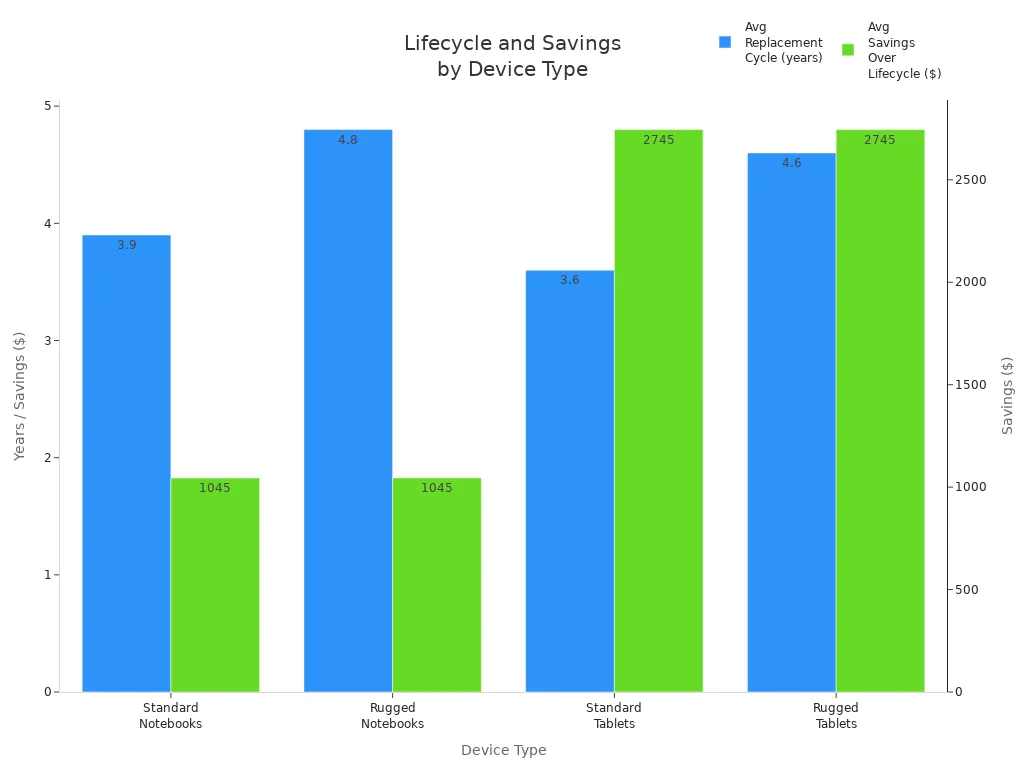
Rugged computers cut costs by almost 39% in five years. They help teams avoid losing time and money. Companies like sz-xtt make products for tough jobs. This means fewer problems and more savings.
Warranty and Service
Warranty is important for feeling safe about your laptop. Top brands give strong warranties. Getac gives a 3-year bumper-to-bumper warranty. You can make it last up to 7 years. Panasonic gives a 3-year limited warranty. They also have an Ultimate Care plan for accidents. These warranties cover repairs and some parts. Many brands let you fix devices yourself with special programs.
Tip: Always look at the warranty before you buy. Longer warranties mean you worry less about fixing your laptop.
Long-Term Support
Rugged laptops last 5 to 7 years in the field. They break only 3% of the time. This is much less than regular laptops. Makers help with long service contracts, updates, and easy-to-change parts. This keeps laptops working longer and helps teams do their jobs. Taking care of your laptop and updating it makes it last even more. Brands like sz-xtt answer quickly and help users when needed.
Note: Good support and updates help rugged laptops stay useful for a long time.
Making the Final Choice
Prioritizing Features
Picking the best rugged laptop computers means knowing what features matter. Field workers need laptops that can handle tough places. The table below shows which features are important and how they help:
Fonctionnalité | Importance in Work Environment |
|---|---|
Screen Brightness | Helps you see outside when it is sunny |
Proves the laptop can survive hard situations | |
Touchscreen Compatibility | Lets you use gloves while working |
Normes de durabilité | MIL-STD-810H, IP ratings protect the laptop |
Keeps the laptop working for many hours | |
Connectivité | Lets you work far away or while moving |
Durability is a big deal. Certifications like MIL-STD-810H and IP65 mean the laptop can take drops, shocks, and dust. Long battery life is also important, especially if you cannot charge often. Some sz-xtt models have hot-swappable batteries. This makes it easier to keep working.
Long battery life matters when you work outside. You may not find a place to charge your laptop. Some rugged laptop computers have hot-swappable batteries. You can change the battery without turning off the laptop.
Creating a Shortlist
To make a shortlist, compare models with clear rules. The table below helps you see what matters most:
Critères | Description |
|---|---|
Durabilité | Look for MIL-STD-810H and IP65 or higher ratings |
Performance | Pick Intel Core i5/i7 or AMD Ryzen 7, 8GB–16GB RAM, and SSD storage |
Autonomie de la batterie | Over 10 hours or hot-swappable batteries |
Qualité de l'affichage | High brightness (600 nits or more) and anti-glare for outdoor use |
Connectivité | Wi-Fi 6, 4G LTE, or 5G for strong wireless in far places |
sz-xtt models like 101PAD-A and 156JG meet these needs. They work well for many jobs.
Final Checklist
Before you buy, check this list to make sure the laptop fits your needs:
Modern processor (12th Gen Intel Core or newer)
Certified to MIL-STD-810H standard
Dustproof and water-jet-resistant rating of IP65 or higher
Screen brightness of at least 1000 nits for outdoor use
Dual or hot-swappable battery system
Both modern (USB-C) and old (RS232) ports
Looking at these points helps you pick the best laptop for your work.
Picking rugged laptop computers takes a few key steps. Experts say you should match MIL-STD-810H and IP ratings to your daily jobs. You need to compare different models and check their certifications. This helps you find laptops you can trust. Making your own checklist makes sure the laptop works for your job. You should also ask for help and get price quotes. This helps your team feel good about the choice.
FAQ
Qu'est-ce qui rend un ordinateur portable “robuste” ?
A rugged laptop is built with strong parts. It passes tests like MIL-STD-810G and IP65. These laptops can take drops, dust, water, and extreme heat or cold. Workers use them in tough places.
Which industries use rugged laptops most?
Construction, military, field services, and emergency teams use rugged laptops. These devices help workers keep working in harsh places. The sz-xtt 101PAD-A Ordinateur durci works well for many jobs.
How do I choose the right rugged laptop?
People should pick features that fit their work. Look for durability, battery life, and good connections. Compare models like the sz-xtt Ordinateur durci 156JG for strong performance.
Can rugged laptops handle outdoor use?
Yes. Rugged laptops have bright screens and strong cases. They work outside, even in sunlight or rain. Models like the sz-xtt Ordinateur durci 156PLA-III have screens you can see in sunlight.
Are rugged laptops expensive?
Rugged laptops cost more at first. They last longer and break less. This saves money over time. Many brands, like sz-xtt, have models that balance price and toughness.