

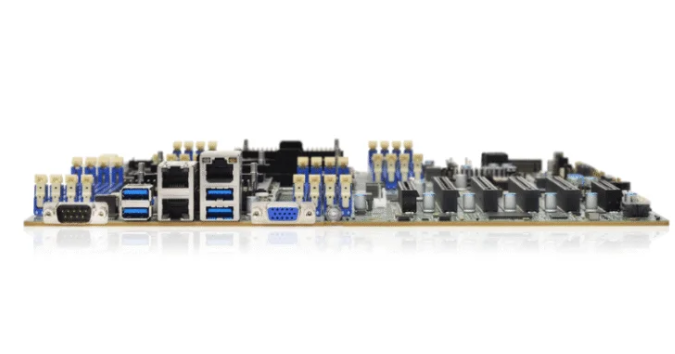
Choosing the best server motherboard for clusters means looking at features that fit what the cluster needs. IT professionals need to think about CPU support, memory type, and ways to add more parts. Each choice changes how well the cluster works and how reliable it is. The right motherboard helps the server stay on and makes it easier to add more servers. Good choices make clusters strong and work well.
Key Takeaways
Pick a server motherboard that works with new CPUs and ECC memory. This helps your server run better and keeps your data safe.
Find motherboards that have many PCIe slots. This lets you add more parts later and make your cluster bigger.
Choose motherboards with good remote management tools. These help you fix problems fast and keep your server working.
Make sure the motherboard has high memory bandwidth and quick network support. This helps your servers share data and talk to each other faster.
Think about the future and pick motherboards that can use more CPUs and memory. This helps your cluster grow when you need it.
What Defines the Best Server Motherboard

Key Performance Factors
The best server motherboard needs to be fast, reliable, and able to grow. These things help clusters do hard jobs and let many people use them at once. High memory bandwidth means the server can move data fast between the CPU and memory. This speed is needed when clusters run lots of jobs at the same time. The server motherboard should work with new CPUs and lots of ECC memory. ECC memory finds and fixes mistakes, so the system stays safe and does not lose data.
A server motherboard is different from a consumer motherboard in a few ways:
It is made to be reliable and easy to expand.
It has out-of-band management for remote checks.
It uses ECC memory to fix errors.
It works with server operating systems and CPUs with many cores.
These things help clusters work better. Fast memory, good CPU support, and strong management tools let the server do big jobs without slowing down.
Reliability and Uptime
Reliability is very important for clusters. A server motherboard should keep working with almost no breaks. Many clusters need to be online most of the time. The table below shows how much downtime is allowed each year for different levels of availability:
Availability % | Downtime per year |
|---|---|
99 | 3.65 days |
99.9 | 8.76 hours |
99.99 | 52.56 minutes |
99.999 | 5.26 minutes |
99.9999 | 31.5 seconds |
99.99999 | 3.15 seconds |

A server motherboard with ECC memory and remote management helps meet these high goals. These features keep data safe, stop crashes, and let IT teams fix problems fast. High memory bandwidth also helps keep the server running during busy times.
Server Motherboard Role in Cluster Building
Central Node Functions
The server motherboard is like the main part of every server in a cluster. It links the CPU, memory, and network parts together. The central node needs a strong server motherboard to do many jobs at once. Picking the right server motherboard changes how well the CPU works. Some motherboards work with the newest CPUs, which help the server handle more data fast.
A good server motherboard can move lots of data between the CPU and memory. This is called high memory bandwidth. Many server motherboards use more than one memory channel for this. Fast memory helps the central node handle jobs from other servers.
Network speed is important, too. The server motherboard should work with fast network choices. Infiniband and other quick connections help servers talk to each other right away. This keeps the cluster working well.
Key jobs of the server motherboard in the central node are:
Working with the right CPU for hard jobs
Giving high memory bandwidth with more channels
Allowing fast network links for quick data sharing
Impact on Cluster Efficiency
The server motherboard helps the whole cluster work better. If every server has a good motherboard, the cluster can finish jobs faster. The right server motherboard means less downtime and a stable system. This lets IT teams trust their servers to stay online.
The table below shows how the server motherboard helps cluster efficiency:
Feature | Impact on Cluster Efficiency |
|---|---|
CPU Compatibility | Faster data processing |
High Memory Bandwidth | Smooth multitasking |
Fast Network Support | Quick communication between servers |
Reliable Design | Less downtime |
Building a cluster needs the right server motherboard. Each server must work well with the others. When IT teams pick the best server motherboard, they make a cluster that is strong, fast, and ready to grow.
Choose Motherboard Features for Clusters
CPU and Dual Socket Support
A cluster needs strong CPUs. The best server motherboard works with new CPUs. It can use more than one processor. Many data centers pick a dual socket motherboard. This lets them put two CPUs in one server. This setup boosts cpu compatibility. It helps the server do more jobs at once. Dual socket motherboards help clusters handle big tasks. They also keep up with more work. IT teams should check if the board has dual sockets. They should also see if it works with the newest processors.
ECC Memory and Optimization
Keeping data safe is important in clusters. ECC memory helps by finding and fixing mistakes in storage. This keeps data correct and safe. The best server motherboard always works with ECC memory. High memory bandwidth helps the server move data fast. This speed matters for clusters that use lots of data. Teams should pick motherboards that allow lots of ECC memory. They should also look for high memory bandwidth.
Tip: ECC memory is needed for clusters that cannot lose or mess up data.
PCIe Slots and Expansion
Expansion helps clusters grow. A server motherboard with many PCIe slots lets teams add new parts. These can be GPUs or NVMe storage. This makes the cluster stronger and more flexible. The newest PCIe Gen5 slots are twice as fast as old ones. This means data moves faster and uses less power. High bandwidth helps with quick networking and storage. These are needed for big jobs. Teams should pick motherboards with enough PCIe slots for future needs.
PCIe Gen5 NVMe servers reach 32 GT/s bandwidth.
These slots use less power and fit more devices.
They work with new NVMe drives and fast networking.
Multiple NICs and Connectivity
Network speed helps clusters work well. The best server motherboard has many NICs for better connections. More NICs let the server join different networks. It can handle more traffic. This helps clusters share data fast. It also keeps them online if one link fails. Teams should pick boards with enough NICs for their network plans. Fast network links also help memory bandwidth between servers.
Remote Management (IPMI, Redfish)
Remote management tools make server care easier. IPMI and Redfish let IT teams check servers from anywhere. These tools help fix problems quickly. They also lower downtime. The best server motherboard always has strong remote management. This is important for clusters that must stay online. Teams should pick boards with built-in remote management. This keeps servers working well.
Note: Remote management saves time. It helps IT teams fix problems before they get worse.
Interface Architectures (RoCEv2)
Modern clusters need fast data movement. RoCEv2 interface architecture helps by using zero-copy design. This lets the server move data without making extra copies. It saves time and makes things faster. RoCEv2 also uses more network bandwidth. This makes clusters work better.
RoCEv2 stops extra data copies between apps and the operating system.
This design helps data move faster and uses network bandwidth better.
IT teams should pick motherboards that support advanced interface architectures like RoCEv2. This helps clusters handle big jobs and keeps data moving fast.
Table: Key Features for Cluster Motherboards
Feature | Why It Matters for Clusters |
|---|---|
Dual Socket Support | Doubles CPU power for heavy workloads |
Protects data and ensures reliability | |
PCIe Expansion | Adds GPUs, NVMe, and high-speed networking |
Multiple NICs | Improves connectivity and uptime |
Remote Management | Enables fast troubleshooting |
Boosts data transfer and efficiency |
Teams that pick these motherboard features build clusters that are fast and reliable. The best server motherboard has all these features. It helps clusters work well and get ready for the future.
Comparing Server Motherboard Models
Overview of Leading Brands
Many companies pick server motherboards from famous brands for clusters. These brands are HP, IBM/Lenovo, Fujitsu, Supermicro, Cisco, and Intel. Each brand makes server motherboards that are strong, can grow, and work well. People trust these brands because their servers stay online and have good features.
Model Comparison for Cluster Building
The sz-xtt brand has six server motherboard models for different cluster jobs. Each model is made for a special kind of work and has its own good points.
Model | Strengths | Best Use Case |
|---|---|---|
11DPI-N | High performance, stability | Data analytics clusters |
11DPL-I | Versatility, expandability | Mixed application clusters |
12DAI-N6 | Enhanced connectivity, fast data transfer | Real-time processing clusters |
2SEEP | High-density, multi-processor support | HPC and scientific clusters |
3DE | Energy efficiency, strong processing | Eco-friendly server clusters |
3DGQ | Scalability, modular design | Growing business clusters |
The 11DPI-N model is good for clusters that need to look at data fast. The 11DPL-I model is best for clusters that do many different jobs. The 12DAI-N6 model helps clusters that need to move data right away. The 2SEEP model is for clusters that do hard science or math jobs. The 3DE model is for clusters that want to use less power. The 3DGQ model is for clusters that want to get bigger later.
Pros and Cons of Top Choices
Every server motherboard model has something good for clusters. The 11DPI-N model is fast and does not crash much. The 11DPL-I model can do many jobs and change when needed. The 12DAI-N6 model moves data quickly. The 2SEEP model fits lots of CPUs in a small space. The 3DE model saves power but still works fast. The 3DGQ model is easy to make bigger for more work.
Tip: Teams should pick the server motherboard model that matches what they want their cluster to do.
Matching Motherboard to Cluster Needs
Sizing for Cluster Building
Teams must decide how many servers they need for their cluster. The size of the cluster depends on the jobs it must do. A small business may need only a few servers. A research lab may need many servers for heavy tasks. Each server motherboard must support the right amount of memory and storage. Teams should check if the server motherboard can fit in their rack space. They should also look at power needs. A good plan helps the cluster grow without wasting resources.
Tip: Start with the number of servers you need now. Choose a server motherboard that lets you add more servers later.
Workload-Specific Choices
Different jobs need different server motherboards. Some clusters run AI training. Others do scientific simulations. The right server motherboard matches the job. Teams should look at these factors:
Scalability: The server must handle more work as the cluster grows.
Cooling: The server must stay cool during heavy use.
Memory connectivity: The server must move data fast between CPU and memory.
Energy efficiency: The server must use less power to save costs.
A GPU server needs a motherboard with many PCIe slots. A storage server needs strong network connections. Picking the right server motherboard for the job makes the cluster work better and saves money.
Planning for Scalability
A cluster must grow as needs change. Teams should pick a server motherboard that supports more CPUs, memory, and storage. Modular designs help teams add new parts without changing the whole server. Good server motherboards let teams upgrade network cards and storage drives. This keeps the cluster ready for new jobs. Planning for growth helps the cluster last longer and stay useful.
Planning Step | Why It Matters |
|---|---|
Choose modular parts | Easy upgrades |
Check CPU support | Handles future workloads |
Review expansion | Adds storage and networking |
A smart plan helps teams build a cluster that meets today’s needs and tomorrow’s goals.
Installation and Maintenance Tips

Setup Best Practices
Setting up a server for a cluster takes careful work. Teams should check every hardware connection first. Each cable and part must fit tight. Good airflow inside the case keeps things cool. The server should be in a clean room with no dust.
To get the best performance, teams should do these things:
Use 1-2 CPU cores for each 1 million IOps with random jobs.
Use at least 4 CPU cores for every 20 GBps with steady jobs.
Change BIOS settings by turning off C-States and setting CPU to performance mode.
Make sure the CPU layout matches the chipset.
Turn on Hyper-Threading or Simultaneous Multi-Threading for more speed.
On Linux, turn off Transparent Huge Pages, Kernel Transparent Huge Pages, and Kernel Same-Page Merging. These changes help lower wait times and use less CPU.
Set read-ahead values for NVMe devices to fit the job.
Install all needed packages to tune performance.
Tip: Teams should label each server and write down hardware changes. This helps fix problems faster later.
Ensuring Long-Term Reliability
Long-term reliability helps clusters run well for a long time. Teams should look at server logs often. Early problems can show up in these logs. Cleaning dust from fans and vents stops overheating. Updating firmware and drivers keeps servers safe and fast.
A maintenance schedule helps teams remember what to do. The table below shows a simple plan:
Task | How Often |
|---|---|
Check hardware logs | Weekly |
Clean fans and vents | Monthly |
Update firmware | Every 6 months |
Test backups | Monthly |
Teams should also test backup systems. This step keeps data safe if a server fails. Good records of updates and repairs help teams find problems and fix them fast.
Note: Reliable servers need good setup and regular care. Teams that follow these steps build clusters that last.
Picking the best server motherboard for clusters means following some easy steps. First, think about what jobs the cluster will do and if it will get bigger later. Next, look for important features like CPU support, ECC memory, and ways to add more parts. Then, check the table to see which models are good for different jobs.
Teams that use these steps make clusters that work well and stay strong. The right motherboard helps every cluster do its best.
FAQ
What is ECC memory and why does a cluster need it?
ECC memory stands for Error-Correcting Code memory. It finds and fixes small data errors. Clusters use ECC memory to keep data safe and prevent crashes. This helps servers run without problems.
How does dual socket support help a server cluster?
Dual socket support lets a server use two CPUs. This doubles the processing power. Clusters with dual socket motherboards finish jobs faster and handle more tasks at once.
Why are multiple NICs important for server motherboards?
Multiple NICs (Network Interface Cards) give servers more network connections. This helps clusters share data quickly. If one connection fails, the server can still stay online.
What is remote management and how does it help IT teams?
Remote management tools like IPMI or Redfish let IT teams control servers from anywhere. They can fix problems, check hardware, and update settings without being in the server room.
How does PCIe expansion improve cluster performance?
PCIe slots let teams add parts like GPUs or fast storage. This makes clusters stronger and faster. More PCIe slots mean more ways to upgrade and improve the server.


