You see mini ITX server motherboard technology changing fast. New things like DDR5 memory, NVMe storage, and 10GbE networking make these boards work better and faster. In 2023, companies sent out over two million notebook-style server motherboards. The market grew by 12% because of micro-data centers and edge systems. Now, you can find more mini ITX choices for businesses and home users. These changes help you build smaller and stronger servers for your needs in 2025.
Key Takeaways
Pick mini ITX motherboards with DDR5 memory for quicker speed and better energy use.
Use NVMe storage to make files open faster and save power.
Get motherboards with 10GbE networking for quicker data moves and better network speed.
Think about the small size of mini ITX boards to save space in offices and home labs.
Plan your build for future upgrades by choosing parts you can change and cooling that works well.
Mini ITX Server Motherboard Trends
DDR5 Memory Standard
DDR5 memory is now the main choice for mini ITX server builds in 2025. This new memory is faster and can hold more data. DDR5 modules can go up to 128GB. You can run bigger programs without running out of memory. DDR5 also uses less power, so your server stays cooler and works better.
Here is a simple comparison between DDR4 and DDR5:
Feature | DDR4 | DDR5 |
|---|---|---|
Maximum Data Rate | 3200 MT/s | Up to 8400 MT/s |
Voltage | 1.2V | 1.1V |
Module Capacity | Up to 64GB | Up to 128GB |
DDR5 gives you twice the bandwidth. This helps your server move more data at once. Lower voltage and built-in power control make your system more stable. If you want a fast and cool mini ITX server, DDR5 is the best choice.
Tip: Pick a mini ITX server motherboard with DDR5 support. This will help your build last longer and work better.
NVMe Storage Focus
Mini ITX server motherboards now use NVMe storage more. NVMe drives are much faster than SATA SSDs. You can open files and run programs in just a few seconds. NVMe also saves energy, so your server uses less power.
Here is a table showing the difference between SATA SSDs and NVMe SSDs:
Metric | SATA SSD Performance | NVMe SSD Performance |
|---|---|---|
Sequential Read Speed | 500-580 MB/s | |
Sequential Write Speed | 450-550 MB/s | 2,000-12,000 MB/s |
Random Read IOPS | 75,000-100,000 | 300,000-1,000,000+ |
Random Write IOPS | 80,000-90,000 | 250,000-1,000,000+ |
Latency | ~100 μs | ~10-20 μs |
Gaming Performance | Good | Excellent (30-50% faster) |
NVMe storage helps with AI and machine learning jobs. You get real-time data for things like trading and telecom. Virtual machines work better, and database searches are faster. Your mini ITX server can do more work with less waiting.
Note: NVMe drives use less power and make less heat. This is great for small form factor builds.
10GbE Networking Adoption
10GbE networking is now common in mini ITX server motherboards. This gives you much faster data speeds than 1GbE. For example, the Topton N18 NAS mini ITX motherboard has a 10GbE RJ45 port. This is good for network storage and big server jobs.
Here is a table comparing 1GbE and 10GbE networking:
Feature | 1GbE | 10GbE |
|---|---|---|
Data Transfer Speed | Up to 1,000 MB/s | |
Scalability | Limited | Highly scalable |
Network Traffic | Higher bottlenecks | Lower bottlenecks |
Latency | Higher | Reduced |
Application Support | Basic | Advanced applications |
With 10GbE, you can move big files fast and help more users at once. Your mini ITX server can do things like video editing, cloud storage, and run virtual machines. You get less lag and fewer slowdowns, so your network works well.
Tip: For the fastest network speeds, pick a mini ITX motherboard with 10GbE.
Other Significant Trends
You can see other big changes in mini ITX server motherboards:
PCIe 5.0 support makes GPUs and SSDs faster.
Built-in Wi-Fi 6E and Wi-Fi 7 give better wireless speeds.
Cooling is better for strong CPUs and GPUs.
New designs use less energy and are better for the planet.
These features help you build a mini ITX server that is fast, strong, and ready for the future.
Why Mini-ITX Matters for SFF Servers
Space Efficiency
You might need a server that fits in small places and stays quiet. Mini-itx motherboards are only 170mm by 170mm. They are the smallest kind for small form factor builds. You can put a mini-itx system on a shelf or under a desk. It also fits inside a small NAS case. This small size helps you save space in offices, dorms, or home labs.
Here are the main reasons mini-itx is good for saving space:
Small size fits in tight spots.
Works with many CPUs and graphics cards for good performance.
Uses less energy, so it is quieter.
Low power use means less heat, which is good for servers that run all day.
Works with efficient processors like Intel Core and AMD Ryzen.
Has several SATA ports and M.2 slots for storage.
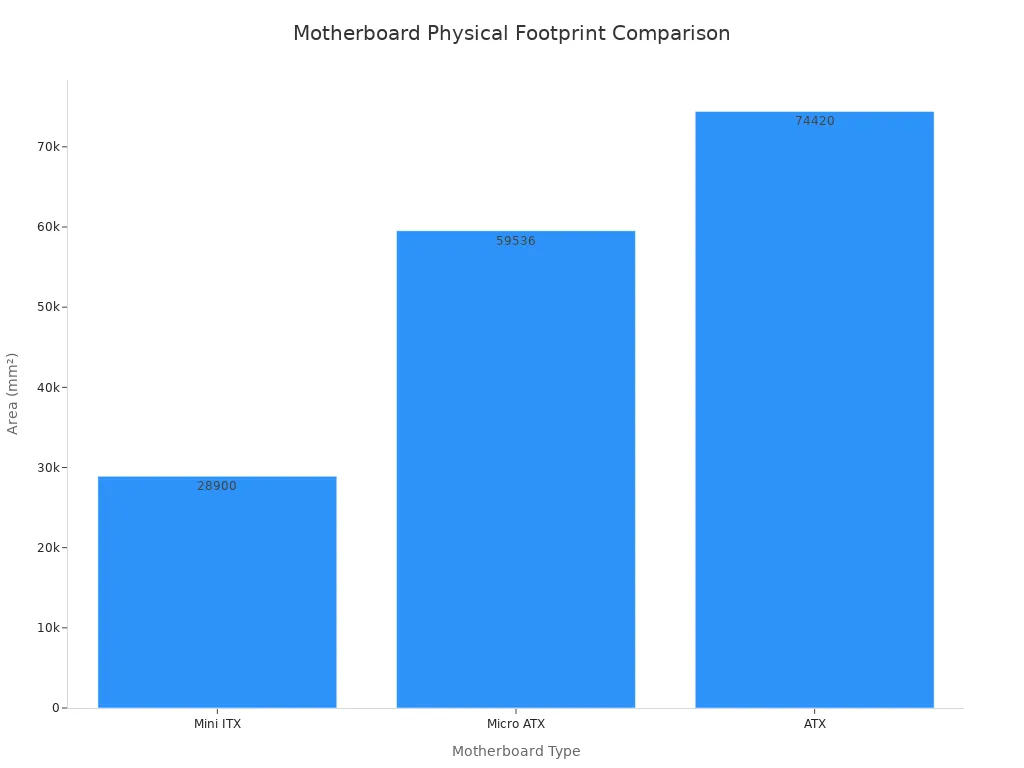
You can look at the table below to see how big different motherboards are:
Motherboard Type | Dimensions (mm) | Size Comparison | Features |
|---|---|---|---|
Mini ITX | 170 x 170 | Smallest | 1 PCIe slot, 2 memory slots, compact design |
Micro ATX | 244 x 244 | 25% larger than Mini ITX | 2-4 PCIe slots, 2-4 memory slots |
ATX | 305 x 244 | Largest | 4-8 PCIe slots, 4-8 memory slots |
Tip: Pick mini-itx if you want a server that is small and quiet.
Versatility for Users
Mini-itx lets you build many types of computers. You can make a home theater PC or a small desktop. You can also build a portable system. Businesses use mini-itx for edge computing and small office servers. You get strong performance in a small size.
The table below shows how mini-itx helps with different needs:
Feature | Description |
|---|---|
Fits in places with little space. | |
Expansion Slots | One PCIe x16 slot makes design simple. |
RAM Support | Two DIMM slots give you dual-channel memory for better speed. |
Connectivity | Fewer USB and SATA ports, but enough for most jobs. |
Ideal Use Cases | Good for home theater PCs, portable builds, and small desktops. |
You can now find more mini-itx server motherboards than before. The market is bigger because people want smaller computers. You can get models with high performance for gaming or work. There are also options for DIY builds. This means you can choose the best mini-itx for what you need.
Note: Mini-itx motherboards now have features like bigger boards, so you do not lose performance just because they are small.
2025 Features and Advancements
Enhanced Expandability
You can now find mini-itx server motherboards with more ways to expand your system. Top brands like ASUS, MSI, and Gigabyte offer models with extra M.2 slots, more SATA ports, and support for PCIe 5.0. These features let you add fast SSDs, extra hard drives, and even powerful graphics cards. The Asus ROG Strix X870-I Gaming Wifi stands out as a leading example. You get Wi-Fi 7, two M.2 slots, and a PCIe 5.0 x16 slot. This means you can build a mini-itx server that handles gaming, streaming, and heavy workloads.
You also see new brands like sz-xtt joining the market. They offer mini-itx boards with flexible storage options and strong networking features. You can choose a motherboard that fits your needs, whether you want a home server or a small business system.
Tip: Look for mini-itx boards with extra M.2 slots and PCIe 5.0 support. You will have more choices for upgrades in the future.
Improved Power Efficiency
Mini-itx server motherboards in 2025 use less power and run cooler. You can pick models with low-power processors, fanless designs, and smart energy controls. This helps your server stay quiet and saves money on electricity.
Here is a table showing some power-efficient options:
Motherboard | Processor | TDP Range | Fanless Ready | Special Features |
|---|---|---|---|---|
Intel Core Ultra 3/5/7 | 15W-65W | Yes | Low-profile, low latency | |
Intel N100/N97 | 6W | Yes | 4 SATA ports, 1 M.2 slot | |
sz-xtt SFF Board | Intel N100 | 6W | Yes | Silent operation, 24/7 uptime |
You can run these mini-itx servers all day without worrying about heat or noise. The Intel N100 and N97 chips use only 6 watts, so you get silent performance in small spaces. These boards work well for home labs, edge computing, and small offices.
Note: Power-efficient mini-itx boards help you build green servers that last longer and cost less to run.
Comparing Current and Future Mini ITX Models
Performance Evolution
Mini ITX motherboards are getting better from 2024 to 2025. New boards are faster and do not get as hot. Your apps and games run smoother. DDR5 memory lets your server do more jobs at once. PCIe 5.0 slots help you add strong graphics cards and quick SSDs. You will see less lag and easier multitasking.
Here is a table that shows how 2024 and 2025 models are different:
Feature | 2024 Models | 2025 Models |
|---|---|---|
Memory Standard | DDR4 | DDR5 |
Max RAM Capacity | 64GB | 128GB |
PCIe Version | PCIe 4.0 | PCIe 5.0 |
Networking | 1GbE / 2.5GbE | 10GbE, Wi-Fi 7 |
Storage | 1-2 M.2 slots | 2-3 M.2 slots, NVMe focus |
Power Efficiency | Moderate | High (ENERGY STAR certified) |
Cooling | Basic | Advanced thermal solutions |
You can upgrade more parts and keep your server cool. New boards use less power, so you save money. Your mini ITX server can work harder without getting too hot.
Tip: Pick a 2025 mini ITX board for more speed, more memory, and lower power bills.
Storage and Networking Upgrades
Mini ITX boards now have faster storage and better networking. NVMe SSDs open files very quickly. You can run virtual machines and databases with less waiting. 10GbE ports help you move big files fast, which is good for video editing and cloud backups.
These upgrades help you in many ways:
You save space and keep your desk tidy.
You help the planet with energy-saving mini ITX boards.
You keep your server safe from spills by storing it away.
You get better airflow, so your server stays cool and quiet.
You can upgrade RAM, storage, and CPU easily for the future.
If you want a quiet and energy-saving mini ITX, check out sz-xtt. They have boards for home labs and small offices. You can see their new products at sz-xtt official site.
Note: Getting a new mini ITX motherboard gives you more speed, better cooling, and easy upgrades for a long time.
DIY vs. Prebuilt SFF Server Solutions
DIY Pros and Cons
When you build your own mini-itx server, you pick every part. You choose the case, processor, memory, and storage you want. You can upgrade parts later if you need to. If you like learning about hardware, building can be fun. You can make your mini-itx server for gaming, streaming, or work.
But building your own server can cost more at first. You must buy each part and put them together yourself. If something breaks, you have to fix it alone. Mini-itx cases are small, so building is harder for beginners. Cooling is tough because small cases get hot fast. SFF parts like cases and power supplies often cost more because they are special.
Here is a table that shows how DIY and prebuilt mini-itx servers are different:
Aspect | DIY Mini ITX Server | Prebuilt Mini ITX Server |
|---|---|---|
Cost | Lower initial cost with predictable monthly fees | |
Customization | Highly customizable based on individual needs | Limited customization options |
Support | Self-managed, requires personal expertise | 24/7 support included, less personal effort |
Prebuilt Pros and Cons
Prebuilt mini-itx servers save you time and work. You get a server that works right away. Companies like sz-xtt sell ready-made mini-itx servers with good support. You do not need to worry about picking parts or building. If you are busy or want something easy, prebuilt is a good choice.
But prebuilt mini-itx servers do not let you change as much. Upgrading parts is harder. Some prebuilt servers get hot because they are small. Small space means cooling is not as good. If you want to change BIOS settings or every detail, you may not like prebuilt.
Tip: Go to sz-xtt official site to see prebuilt mini-itx servers for home labs and small offices.
Choosing the Right Option
Think about your skills, time, and what you need before you pick. If you like building computers and want control, DIY is for you. You can make a server for games, media, or work. If you want something easy with help, prebuilt is better. Many busy people or those new to hardware pick prebuilt. You get help with software and setup.
People who do not want to plan or care about hardware often pick prebuilt. If you want to learn and try new things, DIY gives you more freedom. Both ways help you get a strong mini-itx server for small spaces.
Planning Your 2025 Mini ITX Build
Actionable Tips
When you plan your mini-itx server build for 2025, you want to make smart choices. Picking the right parts helps your system last longer and work better. Here are some practical tips to guide you:
Check the size of your case. Make sure it fits all mini-itx components.
Use SATA cables with angled connectors and locks on the hard drive side. This saves space and keeps cables secure.
Attach 4-way splitters with angled and locked connectors to your SATA power cables. You get better power supply and easier cable management.
Write the serial numbers of your hard drives on the bottom next to the SATA connectors. This makes it easy to find the right drive during maintenance.
Choose brands that offer strong support and new features. For example, sz-xtt has mini-itx boards designed for home labs and small offices. You can see their latest products at sz-xtt official site.
Tip: Good cable management keeps your mini-itx build tidy and improves airflow.
Future-Proofing Strategies
You want your mini-itx server to stay useful for years. Picking the right hardware and case features helps you upgrade later and keep your system running smoothly. The table below shows some ways to future-proof your build:
Strategy | Details |
|---|---|
Modularity | Pick a fully modular power supply. This makes cable management and airflow much easier. |
Power Supply Wattage | Use 650-750W for mid-range, 850-1000W for high-end, and 1200-1500W for extreme mini-itx builds. |
Case Features | Look for front mesh panels, dust filters, cable channels, and enough space for large GPUs. |
Case Style | Choose airflow-focused for best cooling, silent design for quiet use, or showcase style for looks. |
You should also select CPUs and memory that support new standards. For example, AMD EPYC Rome or newer CPUs give you strong performance and better efficiency. Memory with Optane DCPMM or Micron NVDIMM support works well for virtualization. Always check the performance per watt to balance speed and energy use.
Note: Planning ahead with these strategies helps your mini-itx server handle new tasks and upgrades in the future.
You see mini-itx server motherboards changing how you build small form factor servers. Faster DDR5 memory, NVMe storage, and 10GbE networking help you get better speed and efficiency. You can choose brands like sz-xtt for reliable options and new features. When you plan your next build, follow these steps:
Prepare your anti-static workspace.
Install the CPU carefully.
Attach the heatsink and fan.
Install the RAM securely.
Prepare the case for airflow and cooling.
Visit the sz-xtt official site for more mini-itx server products.
FAQ
What makes mini ITX server motherboards good for small spaces?
You get a compact size. Mini ITX boards measure only 170mm by 170mm. You can fit them in tight spots like shelves or small cases. They help you save space in offices or home labs.
Can you upgrade parts in a mini ITX server?
You can upgrade memory, storage, and sometimes the CPU. Most boards have M.2 slots for fast SSDs. You should check your case size before adding new parts.
Why should you choose DDR5 memory for your build?
DDR5 memory gives you faster speeds and more capacity. You run bigger programs and use less power. Your server stays cool and works better.
Where can you find reliable mini ITX server motherboards?
You can visit the sz-xtt official site for trusted mini ITX boards. They offer products for home labs and small offices. See their latest models at sz-xtt official site.
Do mini ITX servers support fast networking?
You get 10GbE networking on many new mini ITX boards. This lets you transfer files quickly and run advanced applications. Your server handles more users with less lag.