The biggest difference between a network splitter vs switch is how they handle connections. A network splitter allows many devices to use one cable, while a switch provides each device with its own dedicated path. People who set up home networks should understand which device is better suited for their needs. Families typically seek easy ways to establish their networks, whereas offices may require faster and more robust network performance. This article highlights the best picks for 2026, including the 200-48X and 200-48X6C network splitters, which assist users in creating a strong home network.
Key Takeaways
A network splitter lets many devices use one cable. A switch gives each device its own cable.
Use a splitter for small home networks with few devices. It is simple to set up and does not cost much. It works well for basic jobs.
Pick a switch for homes or offices with lots of devices. It gives fast and steady connections, even when many people use it.
Managed switches have extra features like traffic control and security. These are good for busy networks.
Think about how many ports you need and how fast you want your network to be. This helps your network grow as you add more devices.
Network Splitter vs Switch: What’s the Difference?
What Is a Network Splitter?
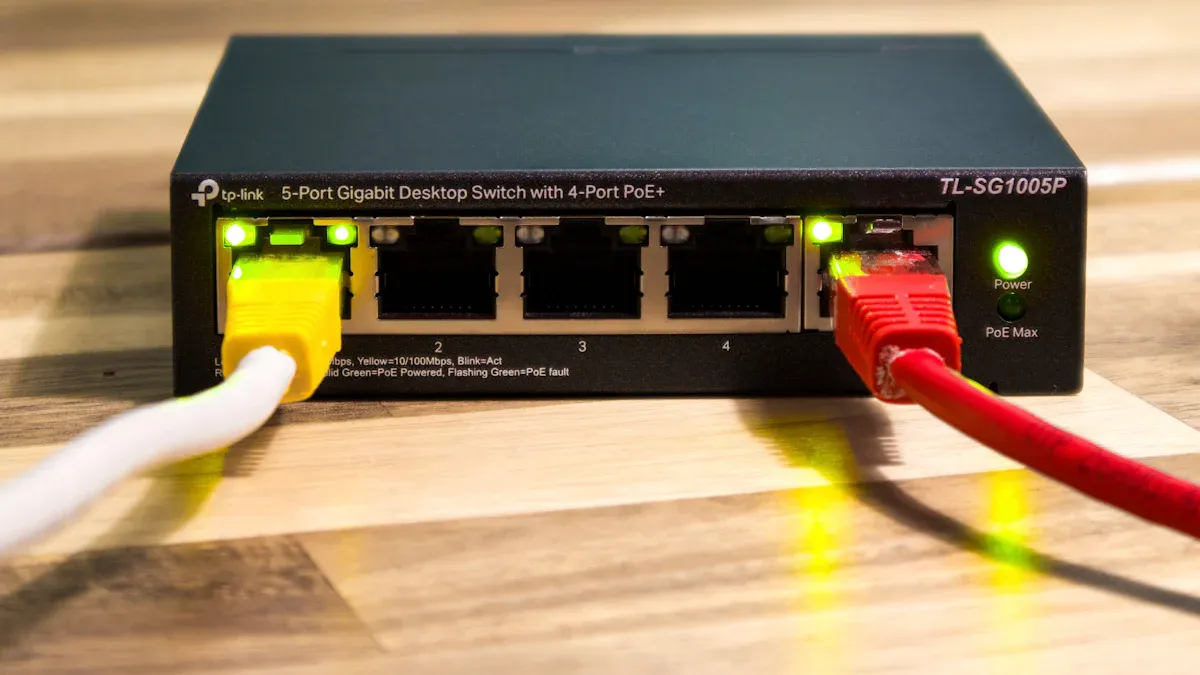
A network splitter is a small device. It takes one network cable and splits it into more outputs. People use splitters to connect many devices to one network source. This could be a wall port or a router. The network splitter does not control how data moves. It just lets all the devices share the same connection. Each device gets only part of the total bandwidth. If many devices use the network, speed can drop.
Network splitters are good for homes or small offices. They help connect things like computers, printers, or smart TVs. Setting up a splitter is simple. You plug it into the network cable. Then you connect your devices to the splitter. You do not need any special software or settings. People like splitters because they are easy to use. But splitters are not great if you need fast or strong connections for many devices.
What Is a Network Switch?
A switch connects many devices in a local area network. It is different from a splitter. A switch gives each device its own path for data. The switch checks each device’s address. It sends data only to the right device. This keeps the network fast and smooth, even with many devices.
Switches work at Layer 2 of the OSI model. They use MAC addresses to send data to the right place. Switches are not the same as routers. Routers move data between different networks. Switches are used in offices, schools, and homes. They help people get strong and steady network performance. Some switches have managed features. These let users control and watch network traffic. Managed switches help set rules, pick which devices are most important, and keep the network safe.
Switches come in different sizes. Some have just a few ports for small networks. Others have many ports for big offices. Choosing between a network splitter and a switch depends on how many devices you have. It also depends on how much control you want over your network.
How They Work
How a network splitter or switch works changes your network experience. Here is an easy comparison:
Feature | Network Splitter | Switch |
|---|---|---|
Connection Type | Shares one cable | Dedicated path for each device |
Data Management | No traffic control | Manages and prioritizes traffic |
Speed | Shared bandwidth | Full speed for each device |
Setup | Plug and play | May require configuration |
Best Use | Few devices, basic needs | Many devices, high performance |
Tip: If you only have a few devices at home, a network splitter might be enough. If you have many devices or need more speed, a switch is better.
Switches handle data in several ways:
They connect many devices and help them talk to each other.
They can make sure important things, like video calls, work well.
They watch network performance and help find problems.
They offer managed features for more control.
Splitters just split the connection. They do not control or manage data. This is a big difference between a network splitter and a switch. Switches help stop slow speeds and network issues when lots of devices connect.
Comparing network splitters and switches shows that switches give more control, speed, and reliability. Managed switches give extra tools to keep the network safe and fast. Both devices are useful, but switches are better for bigger or busier networks.
Use Cases and Scenarios
When to Use a Splitter
A network splitter works best in a home with only a few devices. Families often want to connect a computer and a printer to the same network cable. A splitter helps them share one cable without extra setup. People who build a simple home network find splitters easy to use. They do not need special software or tools. In small office networks with light internet use, a splitter can connect a couple of devices to the same port. However, splitters do not manage traffic. If everyone streams videos at once, the network slows down. Splitters suit homes where users browse the web or check email. They do not fit bandwidth-intensive scenarios.
Tip: Use a splitter for basic tasks in a home or a small office with low network demands.
When to Use a Switch
A switch fits homes and offices with many devices. It gives each device its own path, so everyone gets a steady connection. In a busy office, a switch connects computers, phones, and printers. It keeps the network fast, even when people use video calls or cloud apps. Switches handle more traffic than splitters. They work well in small office networks that need reliability and speed. Switches also scale as the network grows. They support new users and devices without slowing down. Many switches, like the Hikvision DS‑3E0524R‑O, offer plug-and-play setup and high-speed connections. These features help offices run smoothly.
Switches support:
Scalability for growing networks
Reliability for maximum uptime
Speed for demanding applications
Which Is Better for You?
Choosing between a splitter and a switch depends on the network needs. A splitter works for a simple home network with two or three devices. It keeps things easy and affordable. A switch fits homes with many devices or offices with heavy network use. It supports video calls, streaming, and file sharing without slowing down. Switches also help in bandwidth-intensive scenarios. For most office setups, a switch gives better performance and future growth. People who want a strong, stable network should pick a switch.
Pros and Cons Comparison
Splitter Advantages and Drawbacks
A network splitter is a simple tool. It lets you connect more devices to one cable. Many families use a splitter for a printer or another computer. People like splitters because they are easy to use. You do not need extra software or a hard setup. Just plug in your devices and use the network.
Advantages of a network splitter:
Simple to set up and use
No special skills needed
Saves money for small networks
Good for basic internet jobs
Drawbacks of a network splitter:
Devices must share bandwidth
Not good for fast internet needs
Does not control traffic or boost speed
A splitter is best for homes or small offices with light use. It does not give each device its own path. If many devices use the network, it can slow down. For things like browsing or printing, a splitter is fine.
Switch Advantages and Drawbacks
A switch gives every device its own path. This keeps the network fast and steady. People use switches in busy homes or offices. A managed switch lets you control how data moves. You can set rules and watch the traffic. A managed switch also helps keep the network safe. People compare managed vs unmanaged switch before buying. A managed switch has more options. An unmanaged switch is easier to use.
Note: A managed switch is good for big offices or lots of users. An unmanaged switch is better for small networks.
Advantages of a switch:
Each device gets full speed
Handles lots of devices at once
Managed switch gives control and safety
Unmanaged switch is easy to set up
Drawbacks of a switch:
Managed switch costs more money
Managed switch needs more setup steps
Unmanaged switch has fewer features
People often ask about managed vs unmanaged switch. A managed switch is for people who want more control. An unmanaged switch is for people who want things simple. Both types work better than a splitter for most networks.
Best Network Splitters 2026
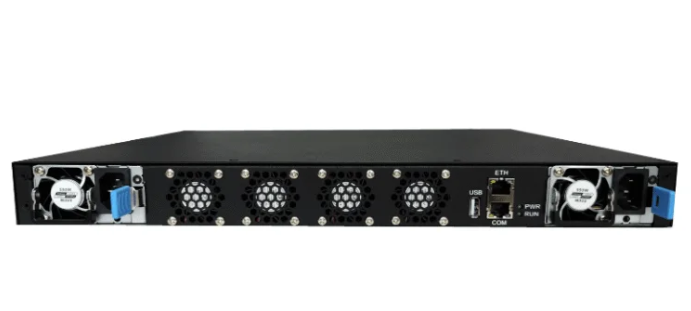
200-48X Network Splitter Overview
The 200-48X network splitter is a good pick for people who want more ethernet connections. It lets many devices use one cable and keeps data moving well. You can use it at home or in an office with lots of computers or printers. The 200-48X is easy to set up. Just plug in your devices and start using the network. Its strong build helps it last a long time.
Key Features:
Works with many ethernet devices
Easy plug-and-play setup
Strong and sturdy for daily use
200-48X6C Network Splitter Features
The 200-48X6C network splitter works better for busy places. It can handle more data and keeps each device working well. Offices with lots of network use like the 200-48X6C because it uses smart technology. Each device gets the best bandwidth possible. This splitter is great for people who need strong and steady ethernet.
Highlights:
Handles lots of data traffic
Gives each device the best bandwidth
Simple to install and use
Tip: The 200-48X6C is best for offices or homes with many ethernet devices and lots of internet use.
TP-Link Ethernet Splitter
TP-Link has a well-known ethernet splitter for simple needs. It lets you connect two devices to one ethernet cable. The TP-Link splitter is good for easy setups, like connecting a computer and a printer. People like it because it is cheap and simple to use. You do not need special tools or software.
Pros:
Low cost
Fast to set up
Good for basic ethernet jobs
Use Cases for Splitters
Network splitters help in many ways. Families use them to connect smart TVs, computers, and printers to one ethernet source. Small offices use splitters to share the internet with a few devices. Splitters are best when you want more ethernet connections without a hard setup. They work well in homes and offices with light or medium network needs.
Use Case | Best Splitter Model |
|---|---|
Home networking | 200-48X, TP-Link |
Office setups | 200-48X6C |
Multiple devices | 200-48X, 200-48X6C |
Note: Pick a splitter based on how many ethernet devices you have and how much you use the network.
Best Network Switches 2026
Strex Network Switch Review
The Strex Network Switch is great for homes and small offices. It has five ports that all use gigabit ethernet speeds. You can connect computers, printers, and smart devices. You do not have to worry about slow internet. The switch works at 1000 Mbps. Many people pick this switch because it is easy to set up. It gives steady connections. Strex helps families and small teams grow their networks.
Switch Model | Port Count | Performance (Mbps) | Use Case |
|---|---|---|---|
Strex Network Switch | 5 | 1000 | Home and small office use |
Cisco CBS350-8MGP-2X Overview
Cisco’s CBS350-8MGP-2X is made for business networks. It has two very fast 2.5 Gigabit ethernet ports. There are six regular gigabit ethernet ports with PoE. It also has two 10G combo ports. This switch can power IP phones and cameras with PoE. It has advanced managed features for security, VLANs, and QoS. The switch is small and fits in offices easily. Cisco is known for being reliable and ready for the future. This switch is a top choice for businesses that want to grow.
Feature | Description |
|---|---|
Ports | 2 x 2.5GE, 6 x GE PoE, 2 x 10G combo |
PoE Capability | Powers IP phones and cameras |
Managed Functionality | Security, VLAN, QoS controls |
Future-proofing | Supports Wi-Fi 6 and high-bandwidth devices |
Reliability | Cisco management tools and trusted performance |
sz-xtt Smart Switch
The sz-xtt Smart Switch adds smart features to networks. This brand makes managing your network easy and strong. The smart switch lets you watch traffic and pick which devices are most important. You can set up VLANs and control bandwidth for each port. The sz-xtt Smart Switch works well in homes and offices that want smart options. To learn more, visit the sz-xtt website and see their smart switch choices.
TP-Link TL-SG105S
TP-Link’s TL-SG105S is a favorite for small networks. It has five gigabit ethernet ports. The switch is quiet because it does not have a fan. You just plug it in and use it. TP-Link gives energy-saving features and strong reliability. This switch is good for homes, classrooms, and small offices.
Use Cases for Switches
Switches help in homes and businesses. People use switches to connect computers, printers, and smart TVs. Offices use smart switches for video calls and cloud apps. Managed switches help IT teams control traffic and keep networks safe. Families use switches for gaming and streaming. Businesses pick powerful switches for fast speeds and future growth.
Switch Model | Speed | Reliability (MTBF) | Smart Features |
|---|---|---|---|
NETGEAR GS308E | 16 Gbps | DoS attack protection, password protection, supports up to 64 VLANs, fanless design | |
NETGEAR GS308EP | N/A | N/A | Advanced PoE controls, uninterrupted PoE, simplified VLAN and QoS setup, energy management features |
Tip: The best network switch is fast, smart, and reliable. Smart switches help you control traffic and keep devices online. Switches with lots of ports help networks grow.
Smart Switch Features Explained
What Makes a Switch Smart?
A smart switch gives you more control than a basic switch. You can use a smart switch to manage how data moves. It lets you set up security rules and control traffic. You can also make groups for devices called VLANs. A fully managed switch has even more options. It lets you watch the network and change settings for each port.
The table below shows how smart switches and unmanaged switches are different:
Feature | Smart Switches | Unmanaged Switches |
|---|---|---|
Security Features | Yes, includes security configurations | No |
Traffic Management | Yes, allows for traffic control | No |
VLAN Support | Yes, can create VLANs | No |
A fully managed switch helps keep the network safe and neat. It also makes fixing problems easier when they happen.
Benefits of Smart Switches
Smart switches help homes and offices in many ways. They save people time and money. With a smart switch, you can find and fix problems faster. This means fewer trouble tickets and less time fixing things. A fully managed switch also helps lower network costs.
Here is a table that shows some main benefits:
Benefit Description | Percentage Reduction |
|---|---|
Networking trouble tickets | Up to 90% fewer |
Networking operational expenses (OpEX) | Up to 85% reduction |
Time to reach networking incident resolution | Up to 50% less |
Tip: Smart switches help networks work well and keep devices connected without slowdowns.
People who use smart switches get better security and more control. They also see better performance. These switches are good for busy offices and growing businesses. They also help families who want a safe and strong home network.
Buying Guide: Choosing the Right Device
Number of Ports
Count how many devices need wired connections. Switches with more ports connect lots of devices. Offices use switches with eight or more ports. Homes often need only four or five ports. Unmanaged switches are good for small networks. Managed switches work better for bigger networks. Picking the right number of ports stops you from buying too much. Many people want switches that fit their budget.
Tip: Think about future devices. Extra ports help when you add new computers or printers.
Speed and Bandwidth
Speed is important for streaming and gaming. Switches with gigabit speeds give fast connections. Unmanaged switches are fine for simple jobs. Managed switches let you control bandwidth. They use qos to give speed to important devices. Offices with lots of devices need high bandwidth switches. Qos keeps video calls and downloads running smoothly.
Switch Type | Speed Support | Qos Features | Best Use |
|---|---|---|---|
Unmanaged | Basic | No | Small networks |
Managed | High | Yes | Busy networks |
Power Options (PoE)
Power over ethernet sends power and data in one cable. PoE helps connect cameras and phones without extra wires. Managed switches often have poe. Unmanaged switches may not have poe. Offices use poe for cameras and phones. Homes use poe for smart devices. Picking a switch with poe saves time and money.
Managed vs Unmanaged
Managed switches let you control security and qos. They help manage traffic and keep devices safe. Unmanaged switches are good for simple networks. They do not have advanced security or qos. Managed switches let you set rules and watch traffic. Offices with many devices need managed switches. Homes with few devices can use unmanaged switches. People want to know how to buy the right switch.
Note: Managed switches cost more but give better security and control. Unmanaged switches are best for saving money.
Compatibility Tips
Check if the switch works with all your devices. Some switches only support certain speeds or connections. Managed switches support more devices and features. Unmanaged switches work for basic setups. Look for switches with qos and security. Make sure the switch fits your budget and needs. PoE helps connect smart devices easily.
Feature | Managed Switch | Unmanaged Switch |
|---|---|---|
Qos | Yes | No |
Security | Yes | No |
Budget | Higher | Lower |
Wired Connections | Many | Few |
Tip: Always check the switch’s specs before you buy. Compatibility makes sure all devices work together.
Network splitters and switches do different jobs in a network. A splitter is good for simple tasks at home with only a few devices. A switch can handle lots of devices and keeps connections strong. This makes it great for busy offices or homes with many devices. People should look at the buying guide before picking a device for their home. The suggested products help users make a strong and steady home network.
Check out the best choices to make your home network better.
FAQ
What is the main difference between a network splitter and a switch?
A network splitter lets many devices use one cable. A switch gives each device its own way to send data. Switches help keep the network fast and smooth. Splitters do not control how data moves.
Can a network splitter increase internet speed?
A network splitter does not make the internet faster. It splits the speed between all the devices. Each device only gets some of the total speed.
When should someone use a network switch instead of a splitter?
People should pick a switch if they have lots of devices. Switches are good for homes or offices that need fast and steady internet.
Are network splitters hard to install?
Network splitters are simple to set up. You plug the splitter into the cable and then add your devices. You do not need any special tools or programs.