
Businesses need to keep lots of data each day. Top brands like Lenovo ThinkSystem, EliteNAS, QNAP, and Dell PowerEdge give good ways to manage work. Companies want good speed, trust, room to grow, price, and extras when picking a storage server 48. Comparing servers side by side helps people choose what works best for them.
Основные выводы
A 48-bay storage server can keep a lot of data. This is good for businesses that need to store lots of information. It helps them manage their files easily.
Picking the right storage server means you must check your company’s data needs. Think about what you need now and in the future. Make sure the server can grow and work well as your needs change.
Reliability is very important. You should look for servers with high Mean Time Between Failures (MTBF). Also, choose ones with low Annualized Failure Rates (AFR). This helps keep your data safe.
Think about energy use when picking a server. Some servers use less power and can save up to 50% on energy. This helps your business save money over time.
Use comparison tables to look at different models. Check their features, support, and prices. This will help you find the best server for your business.
What Is a Storage Server 48?

A storage server 48 is a strong machine. It can hold up to 48 hard drives or solid-state drives. Companies use it to keep lots of data safe. It also makes data easy to get when needed. This server is special because it can be set up in many ways. For example, the HPE Alletra Storage Server 4120 48SFF can use 24 big drives and 12 EDSFF drives. It has fast memory speeds, up to 5600 MT/s. This is much faster than older servers. These things help businesses handle more data and work faster.
Business Use Cases
Many companies pick a storage server 48 for different jobs. The table below shows how businesses use this server:
Пример использования | Описание |
|---|---|
Virtual Desktop Infrastructure | Runs thousands of virtual desktops with quick boot and login times |
Data Mining & Machine Learning | Keeps training datasets and model checkpoints for AI work |
Edge Computing | Works in faraway places for local data jobs |
Cloud Gaming | Gives fast game streaming with quick asset loading |
A storage server 48 helps companies run virtual desktops. It supports AI work, handles data in remote places, and gives fast gaming.
Benefits for Enterprises
A storage server 48 gives companies many good things.
Strong processing power helps teams work with big data fast.
Scalability means the server can grow as data needs grow.
Real-time analytics give instant answers, so leaders can decide quickly.
Advanced storage technology makes data handling and finding faster.
Много storage server models, like the NDS-1122, use energy-saving processors such as Intel’s Atom C2000. These servers can use up to 50% less power. This saves money and keeps performance high. Companies can manage data better and spend less with a storage server 48.
Key Factors for Business Storage
Потребности в производительности
Businesses need fast data storage to run important apps. A storage server 48 has many virtual cores. This helps teams work with big data quickly. The table below shows how more vCores and better storage help with big jobs.
vCores | Previous Storage | Current Storage |
|---|---|---|
8 vCores+ | 1 TB | 2 TB |
16 vCores+ | 2 TB | 4 TB |
24 vCores+ | 2 TB | 5.5 TB |
32 vCores+ | Н/Д | 8 TB |
48 vCores+ | 4 TB | 12 TB |
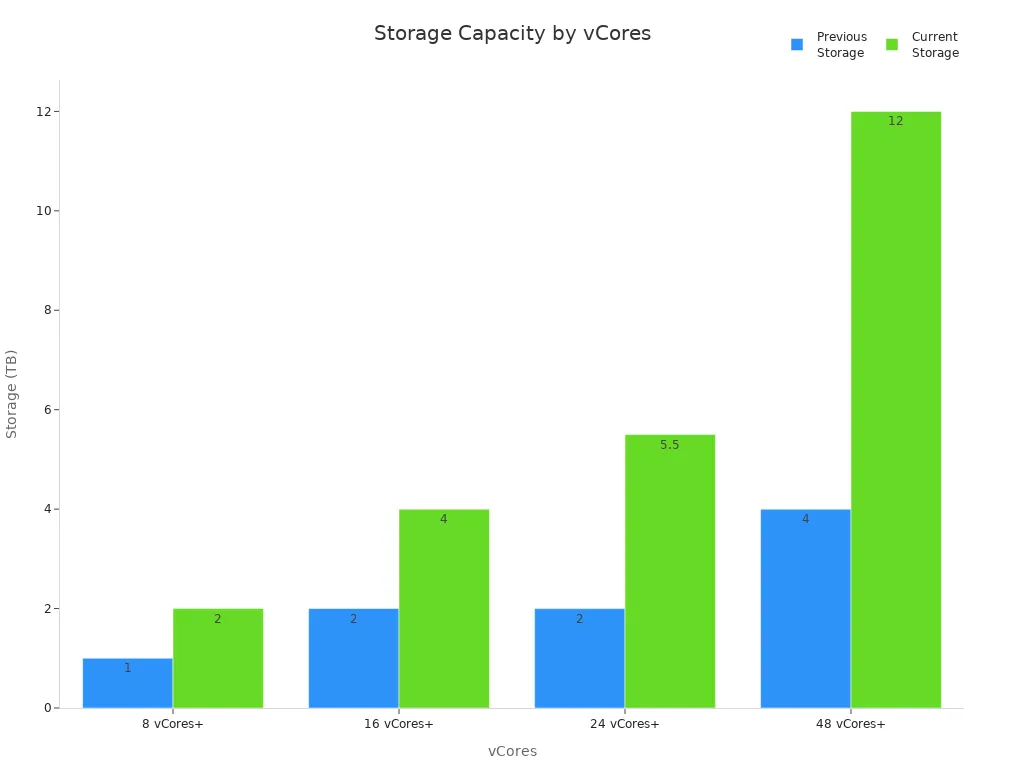
A strong storage system helps companies handle more data. Fast speed means less waiting and better work.
Надежность и время безотказной работы
Reliability is important for every business. Companies want their storage to work all the time. The most important numbers are:
Mean Time Between Failures (MTBF): Shows how long a device works before it breaks.
Total Terabytes Written (TBW): Tells how much data a drive can handle in its life.
Annualized Failure Rate (AFR): Predicts how many drives might break each year.
Метрика | Описание |
|---|---|
Mean Time Between Failures (MTBF) | Shows the average hours a device works before it breaks. This helps people know how long it will last. |
Total Terabytes Written (TBW) | Tells how much data can be written to a drive. This shows how long the drive will last. |
Annualized Failure Rate (AFR) | Predicts the percent of drives that may break in a year. This helps businesses know how reliable their storage is. |
A reliable storage server keeps data safe and helps the business run.
Масштабируемость
Growing companies need storage that can get bigger. Top storage server 48 models let businesses add more drives or connect more servers. The table below lists some top models and their features.
Модель | Scalability Feature |
|---|---|
CyberServe Xeon SP2-FT48TB7105 | Can grow with more drives or scale-out nodes |
HPE Nimble Storage AF80 | Uses Adaptive Flash for easy scaling |
THE STORINATOR XL60 | Clustering for easy management and high availability |
Scalable storage lets companies add more data as they grow. They do not need to stop work.
Соображения по поводу стоимости
Cost is important for every company. Businesses look at the price to buy storage and the cost to keep it running. The table below shows prices for business storage servers.
Product Description | Диапазон цен |
|---|---|
PowerEdge R670 Rack Server, 2x Xeon Gold 6448Y, 384GB DDR5 RAM, 8x 3.84TB SSD | $60,000–$80,000 |
$132,146 |
Businesses should match their storage needs with their budget. Big companies may pay more for better speed and reliability. Small businesses can start simple and upgrade later.
Tip: Companies should check their data growth and pick a storage server 48 that fits now and later.
Top Storage Server 48 Models
Lenovo ThinkSystem SR860 V2
The lenovo thinksystem SR860 V2 is a fast storage server. It can hold up to 48 drives in one chassis. This model uses strong Intel Xeon Scalable processors. The thinksystem design lets businesses upgrade easily. Companies can add more memory or storage when they need it.
The lenovo thinksystem SR860 V2 has these features:
It can use four Intel Xeon Scalable processors for fast work.
It supports 48 hot-swap drive bays, with 2.5-inch and 3.5-inch drives.
It can have up to 6TB of DDR4 DIMMs memory.
There are many PCIe 3.0 slots for extra cards.
It has two power supplies for better safety.
It supports advanced RAID for data safety.
The thinksystem SR860 V2 is good for big data centers. It can run virtualization, analytics, and database jobs. Lenovo gives tools to help set up and watch the server. The thinksystem series also saves energy to lower costs.
EliteNAS EN448L12
The EliteNAS EN448L12 is a reliable storage choice for companies. It has a 48-bay top load design. This model uses two Intel Xeon Silver processors and 128GB DDR4 ECC memory. The EN448L12 has hardware RAID and hot-swappable parts.
Характеристика | Описание |
|---|---|
Процессор | Dual Intel Xeon Silver 4210, 2.20 GHz |
Память | 128GB DDR-4 ECC |
Отсеки для дисков | 48-bay (Top Load) |
Поддержка RAID-массивов | Built-in RAID 5 and 6, hardware RAID protection |
Expansion | Optional SAS expander for up to 240 drives |
Источник питания | Hot-swappable redundant power supplies |
Охлаждение | Redundant hot-swappable cooling fans |
iSCSI Support | Works with VMware and Microsoft Hyper-V |
Mirroring | Optional Active Cluster Mirroring for high uptime |
Replication | Real-time NAS to NAS replication for backup |
Environmental | 80 Plus redundant power supply for saving energy |
The EliteNAS EN448L12 also gives:
Built-in de-duplication and snapshot tools.
NAS to NAS folder copying for extra safety.
Support for iSCSI and Fibre Channel storage.
Optional Single Name Space for easy expansion.
This model is good for companies that need high uptime and backup. The 48-bay design lets businesses store lots of data. The EN448L12 works for both virtualization and backup jobs.
Серия QNAP Rackmount
The QNAP Rackmount Series gives flexible storage for many needs. These servers have a small rack design. Each one can hold up to 48 drives. QNAP uses Qtier technology for automatic data moving. This moves data between NVMe SSDs, SATA SSDs, and hard drives for better speed.
Характеристика | Описание |
|---|---|
Storage Technology | |
Форм-фактор | Small rack design |
Гибкость | Supports many drive and SSD types, add-in cards for speed |
Масштабируемость | Can grow with VJBOD, up to 8 more QNAP NAS devices |
Производительность | Intel 8-core processor, fast data, supports virtualization |
Долголетие | Supported until 2030, good for long projects |
IT Deployment | Flexible for IT and virtualization jobs |
Операционная система | Runs QTS or ZFS-based QuTS hero OS |
Расширение хранилища | Many ways to add more NAS storage |
The QNAP Rackmount Series fits many business jobs. It can handle data access, backup, and file server work. The 48-bay models let companies make big storage pools. QNAP supports QTS and QuTS hero operating systems. This lets businesses pick what works best for them.
Dell PowerEdge Options
Dell PowerEdge servers give strong speed and reliability. The PowerEdge line has models with up to 48 drive bays. These servers use Intel Xeon Scalable processors. They can have lots of memory and advanced RAID options.
Key features of Dell PowerEdge 48-bay models:
They support up to 48 hot-swap drives.
There are many Intel Xeon processor choices.
They have high memory for big jobs.
They have two power supplies and cooling fans.
They use advanced RAID controllers for data safety.
They have tools for easy setup and watching.
Dell PowerEdge servers are good for database, virtualization, and backup jobs. The 48-bay design gives companies room to grow. Dell gives strong support and warranty for peace of the mind.
Note: Each model above has its own strengths. The lenovo thinksystem SR860 V2 is flexible and fast. The EliteNAS EN448L12 is great for backup and saving energy. QNAP Rackmount Series has smart data moving and long support. Dell PowerEdge gives reliability and good management tools. Companies should pick the 48-bay storage server that fits their needs.
Specs and Features Comparison
Вместимость хранилища
Емкость для хранения is very important in a 48-bay storage server. Top models can hold lots of data. The table shows how much each model can store:
Модель | Maximum Effective Capacity | Density | |
|---|---|---|---|
AFF C80 | 14.7PB | 707PB | Up to 3PB raw in 4U |
AFF C60 | 7.3PB | 118PB | Up to 1.5PB raw in 2U |
AFF C30 | 2.2PB | 29.4PB | Up to 736.8TB raw in 2U |
These numbers show that new storage servers can hold a lot. Companies pick a model based on how much data they need now and later. High density means more storage fits in less space. This helps save room in data centers.
Processor and Memory
Processors and memory make storage servers work fast. The best models use strong CPUs and lots of RAM. The table lists common setups:
Технические характеристики | Подробности |
|---|---|
Процессор | |
Cores Per Socket | Up to 28 |
Threads Per Socket | Up to 56 |
Max Memory Speed | Up to 2666 |
Максимальная память | 4TB Max RAM |
Memory Population | 6 channels of up to 2 RDIMMs, LRDIMMs |
TDP (W) | 70W-205W |
Memory Configuration | Up to 12 modules of DDR4 ECC |
Источник питания | 2000Watt Platinum Power Supply |
Поддержка GPU | Up to 5 x GPU / Graphics Cards |
Слоты PCIe | Up to 11 PCIe slots in total |
Форм-фактор | Rackmount or Tower |
Redundant Power Supply | Да |
More cores and memory let servers do more jobs at once. This helps with big data, virtualization, and analytics. ECC memory stops errors and keeps the system stable.
Возможность подключения
Connectivity lets storage servers link to networks and devices. New servers support many protocols and features. The tables show some main options:
Protocol | Описание |
|---|---|
Amendment 1 (ANSI INCITS 230-1994/AM1-1996) | |
FC-PI-2 | Revision 10 (ANSI INCITS 404-2006) |
FC-PI-5 | Revision 6 (ANSI INCITS 479-2011) |
Характеристика | Описание |
|---|---|
T11 standards-compliant FCoE | |
Initialization Protocol | T11 FCoE Initialization Protocol (FIP) |
Multihop FCoE | Support for virtual E (VE) port |
Ethernet Interoperability | Converged Enhanced Ethernet (CEE) interoperability |
Class of Service | Class 2, Class 3, and Class F |
Port Types | VE, TE, and VF |
Zoning | Standard, Domain and port, Enhanced zoning |
Storage servers often connect to Cisco MDS-based SANs and support multihop FCoE. These features help companies build big, flexible networks. Different classes of service and zoning keep data safe and moving well.
Redundancy
Redundancy keeps data safe and servers running if something breaks. Enterprise storage servers have many protections:
Clustering gives built-in redundancy and high availability.
The system keeps data available during hardware problems.
Data spreads across nodes for better fault tolerance.
Servers support RAID Levels: 0, 1, 5, 6, 10, 50, 60, and JBOD.
Auto-Rebuild helps fix data fast.
Hot-swap and hot spare support keep servers working without stopping.
If one part fails, the server still works. Companies can trust their data will stay safe and easy to get.
Инструменты управления
Management tools help IT teams control and watch storage servers. Top models have advanced software and easy interfaces. The table lists some popular tools:
Management Tool | Описание |
|---|---|
A high-performance, scalable parallel file system with extensive data management features. | |
Houston UI | A user-friendly interface that integrates graphical and command-line operations for storage management. |
SnapShield | A security tool that protects against ransomware by severing connections to infected clients. |
IBM Spectrum Scale gives a global namespace and strong recovery.
Houston UI makes management simple with a clear dashboard.
SnapShield helps protect against ransomware.
These tools help companies manage big storage systems with less work. They also make security better and help fix problems faster.
Производительность и надежность
Real-World Benchmarks
Storage server 48 models do well in real tests. Many companies use these servers for jobs like virtualization, analytics, and backup. Lenovo ThinkSystem SR860 V2 works with big databases and has low wait times. QNAP Rackmount Series moves files fast and lets many people get data quickly. Dell PowerEdge servers run virtual machines well, even when busy. EliteNAS EN448L12 keeps backup jobs going without slowdowns. These tests show top models give steady speed and work well for business needs.
Redundancy Features
Reliability is very important for business storage. Storage server 48 systems have features that keep data safe and services working:
Hot swap and hot spare features keep data safe if drives break.
Failed drives get fixed fast with automatic rebuilds.
Failover lets the system use backup paths with no downtime.
Self-monitoring tools (SMART) help IT teams find problems early.
These features help companies stop data loss and avoid service stops. Businesses trust these systems to keep their data safe.
Support and Warranty
Big brands give strong support and good warranty plans for storage server 48 models. The table below shows what companies get:
Vendor | Warranty Terms | Support Terms |
|---|---|---|
Nfina | 5-year warranty | 24/7 US-based technical support |
QNAP | Standard 3-year, extended up to 5 | Advanced Replacement service available |
Broadberry | Standard 3-year warranty | Lifetime technical support |
Nfina gives a five-year warranty and help any time of day. QNAP lets you get a longer warranty and will send a new NAS in two days. Broadberry gives lifetime phone help with every product. These support plans help companies fix problems fast and keep storage working.
Scalability and Integration
Expansion Options
Storage server 48 models help companies get ready to grow. As data grows, businesses need more space. Many servers have features that make adding space easy and cheap. Some models let you use 10GbE connections. This means data moves faster and big files do not slow things down. Data deduplication is also important. It removes extra copies of files. This saves space and cuts costs.
On-premises backup lets companies keep data copies at work and in the cloud. This gives them choices as their needs change. Virtual machine features help make and manage virtual backups. These backups can grow with the company. This makes it easier and cheaper to get data back.
Характеристика | Описание |
|---|---|
Ready for more data, moves files faster, and stops slowdowns. | |
Data Deduplication | Saves space and money by removing extra files. |
On-Premises Backup | Lets companies back up to the cloud and at work. |
Virtual Machine Capabilities | Makes backup and recovery easy to grow and less costly. |
Tip: Pick servers that are easy to expand. This helps avoid paying more later.
Совместимость инфраструктуры
Companies need storage servers that work with what they already have. Most 48-bay models work with many operating systems. This helps IT teams add new servers without big changes. These servers also work with top database engines. This means companies can store and use data with no problems.
Support for different file systems lets companies organize data their way. These servers also work with hypervisors like VMware and Microsoft Hyper-V. This helps run virtual machines and use resources well.
Compatibility Aspect | Подробности |
|---|---|
Operating Systems | Works with many operating systems. |
Database Engines | Works with all top database engines. |
File Systems | Supports all main file systems. |
Hypervisors | Works with VMware and Microsoft Hyper-V. |
Note: Picking a server that fits what you have saves time and money when setting up.
Cost Analysis
Upfront Investment
Businesses look at how much a 48-bay storage server costs at first. This server costs more than a regular office computer or a small business server. The price is higher because it has special parts and more drive bays. It also has extra features that help keep data safe. Companies pay for strong processors and lots of memory. They also pay for built-in redundancy. The table below shows how costs and features are different:
Критерии | Office Computer | Small Business Server |
|---|---|---|
Безопасность | Basic antivirus | Encryption, firewalls |
Expandable Storage | 1-2 hard drives | Multiple drives, hot swap |
Up-front Cost | Нижний | Выше |
Operating Cost | Низкий | Higher (24/7 operation) |
A storage server 48 lets businesses add more storage and gives better security. The higher price at the start helps the company for many years.
Operating Costs
Operating costs mean money spent on power, cooling, and fixing things. Storage servers run all the time, so they use more electricity than normal computers. Companies pay for cooling to keep servers from getting too hot. Maintenance means fixing broken parts and updating software. Some servers use less energy, which helps save money. Businesses should think about these costs before buying.
Power and cooling: Needed for servers that run all day
Maintenance: Fixing hardware and updating software
Energy efficiency: Some servers use up to 50% less power
Tip: Picking servers that save energy can help lower costs over time.
Value Assessment
Companies check the total cost of ownership (TCO) before buying a storage server 48. TCO means the price to buy and the money spent to keep it working. Businesses decide what the server will do, like storing files or running apps. This helps them choose the right budget and features. They also see if the server can grow with their needs. Servers that are easy to upgrade are worth more later.
Total Cost of Ownership (TCO): Adds buying and fixing costs
Performance Needs: CPU and memory should fit daily jobs
Scalability: Servers that can upgrade are better for the future
A storage server 48 costs more at first, but it can save money and time as the business gets bigger.
Choosing the Right Storage Server 48
Оценка потребностей
IT managers first look at what their business needs. They check how much data the company uses each day. They think about how quickly the team needs to get files. Some companies use many virtual machines. Others keep big backups or use data for reports. Managers also think about how much the business might grow soon. They ask, “Will we need more storage later?” and “Do we need fast access for special jobs?” These questions help them set clear goals before picking a server.
Matching Features
After making goals, managers look at server features. The table below shows how each feature helps with business jobs:
Характеристика | Описание |
|---|---|
Dual Processor System | Handles heavy workloads and data tasks. |
RAM Capacity | Up to 1.5TB RAM for fast performance. |
Hot-Swap Drives | Lets staff replace drives without stopping work. |
2.5″ Drive Support | Saves energy and gives more choices for storage. |
SATA Drive Support | Good for storing lots of data at a lower cost. |
PCIe Expansion Slots | Adds more connections for future upgrades. |
Managers match these features to what their company needs. For example, a business with many users may want hot-swap drives and lots of RAM. A company with lots of files may pick SATA drive support to save money.
Decision Tips
Experts give tips to help managers pick the best server:
Match the server to the work it will do.
Think about growing bigger in the future.
Make sure the server keeps data safe.
Look at all costs, not just the first price.
Check how well the server works, including storage and backup.
Tip: Managers should use guides and tools to compare servers. They can look at vendor sites and read reviews for more help. Good planning helps companies pick a server that works now and later.
Quick Comparison Table
Picking the right 48-bay storage server can be hard. The table below shows the main differences between top models. Each server has special strengths for different business jobs.
Модель | Max Drives | Параметры процессора | Максимальная память | Основные характеристики | Лучшее для | Поддержка/гарантия |
|---|---|---|---|---|---|---|
Lenovo ThinkSystem SR860 V2 | 48 | До 4x Intel Xeon | 6 ТБ DDR4 | Отсеки с горячей заменой, расширенный RAID, энергосбережение | Центры обработки данных, аналитика | Премьер-поддержка Lenovo |
EliteNAS EN448L12 | 48 | Двойной Intel Xeon Silver | 128 ГБ DDR4 | Аппаратный RAID-массив, верхняя загрузка, кластерное зеркалирование | Резервное копирование, виртуализация | 3 года, возможна пролонгация |
Серия QNAP Rackmount | 48 | 8-ядерный процессор Intel | 512 ГБ DDR4 | Автоуровень Qtier, расширение VJBOD | Обмен файлами, резервное копирование | 3 года, расширенная замена |
Dell PowerEdge (48 отсеков) | 48 | Intel Xeon Scalable | 4 ТБ DDR4 | Двойной блок питания, усовершенствованный RAID, простое управление | Виртуализация, база данных | ProSupport, до 5 лет |
Сервер хранения данных sz-xtt | 48 | Intel Xeon/AMD EPYC | 1 ТБ+ DDR4 | Высокая плотность, энергоэффективность, гибкость | Корпоративное хранилище | Посетите sz-xttofficial product page |
Tip: Match your business needs with the features in this table. For more help, check each vendor’s website or talk to their support teams.
Ключевые моменты, которые следует запомнить:
Lenovo ThinkSystem gives strong speed and easy upgrades.
EliteNAS is best for backup and keeping data safe.
QNAP lets you expand and manage data easily.
Dell PowerEdge is reliable and has good support.
sz-xtt is great for companies that need lots of storage.
This table makes it quick to compare choices. It helps IT managers pick the best server for their company’s data.
Companies pick storage server 48 models for different reasons. Lenovo ThinkSystem SR860 V2 is good for fast and heavy jobs. EliteNAS EN448L12 is best when backup and trust are important. QNAP Rackmount Series makes it simple to add more storage. Dell PowerEdge is great for running virtual machines and databases. sz-xtt gives choices for big business needs. You can find out more about sz-xtt products here.
To get the best results, look at the quick comparison table. Ask vendors for more info and use online tools to check features.
ЧАСТО ЗАДАВАЕМЫЕ ВОПРОСЫ
What is a 48-bay storage server?
A 48-bay storage server can hold up to 48 hard drives or SSDs. It helps businesses keep lots of data safe. Companies use these servers for backup, virtualization, and analytics jobs.
How do businesses choose the right model?
They check speed, reliability, and price. Managers see how much data their company uses. They pick server features that match what the business needs. They also think about growing bigger in the future.
Why is redundancy important in storage servers?
Redundancy keeps data safe from loss. If one drive stops working, backup drives help. This stops companies from losing important files.
What makes sz-xtt storage servers special?
sz-xtt has servers that save space and energy. These models are good for big companies. You can learn more about sz-xtt on their официальный сайт.
Can these servers work with existing systems?
Most 48-bay servers work with many operating systems and databases. They also work with VMware and Microsoft Hyper-V. This helps companies add new servers easily.


