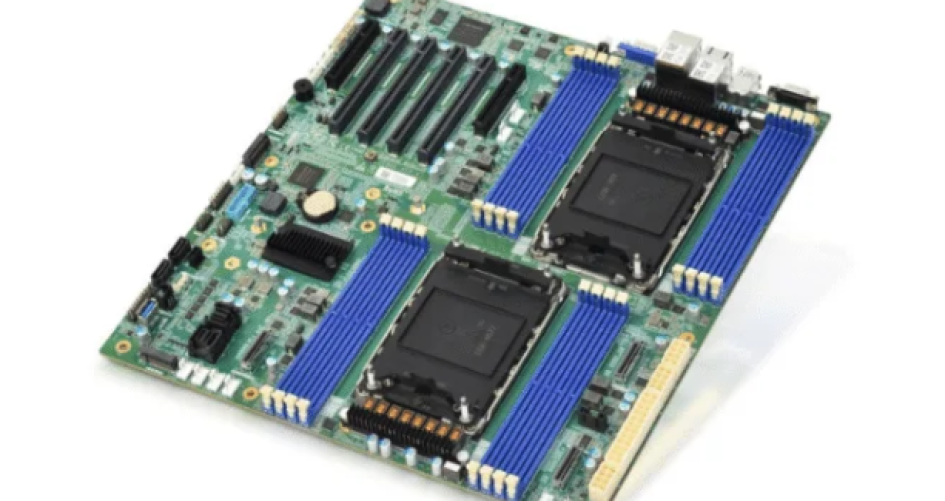
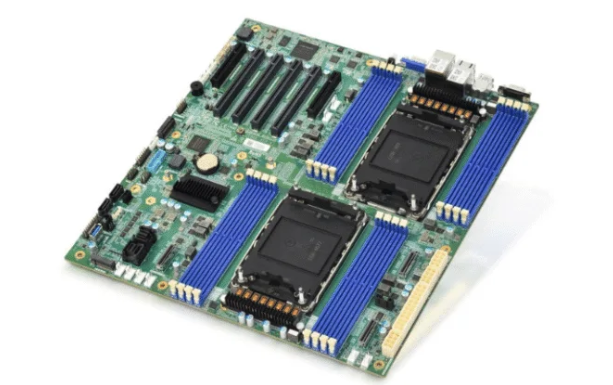
A mini itx server motherboard is good at saving energy because it is built in a smart way. It has an efficient chipset and CPU support. The power delivery is made to use less energy. The layout is simple. It uses low-power parts. The BIOS has advanced power management. All these things help use less power. Users get many clear benefits. The table below shows how these boards save money on electricity, run quietly, last longer, and are better for the environment.
Выгода | Описание |
|---|---|
Энергоэффективность | Uses between 6W to 35W when working hard. This saves a lot of money on electricity over time. |
Silent Operation | Makes little heat, so it does not need fans. This is great for places where you need quiet. |
Enhanced Reliability | There are no moving parts, so fewer things can break. This helps the system last longer and work more. |
Экономия средств | You spend less on fixing and keeping it running. It works better for a long time because it is reliable. |
Воздействие на окружающую среду | It uses power well and makes less heat. This helps the environment and is good for green setups. |
Основные выводы
Mini ITX server motherboards have chipsets and CPUs that use less power. This helps save energy and lowers electricity bills. These motherboards are quiet because they do not make much heat. This makes them good for places that need to be quiet. Smart BIOS settings help users control how much power is used. This makes the boards use energy better. Mini ITX boards have a simple design with fewer parts. This means they use less power and make less heat. Using SSDs instead of HDDs for storage can save a lot of energy. It also helps the computer work faster.
Efficient Chipset and CPU Support
Mini ITX server motherboards use special chipsets and CPUs to save energy. These parts work together to lower power use and keep the system running smoothly. The right combination helps the motherboard use less electricity, even when it works hard.
Low-Power Chipsets
Chipsets control how the motherboard talks to other parts. Some chipsets use less power than others. Many mini ITX server motherboards use the Intel B760 chipset. This chipset supports fast memory and strong networking while keeping power use low. The table below shows some popular models that use this chipset:
Чипсет | Mainboard Model | Memory Type | Network | Порты USB | M.2 Slots |
|---|---|---|---|---|---|
Intel B760 | ASUS ROG Strix B760-I Gaming | DDR5 | 2.5 GbE | 6x A, 2x C | Multiple |
Intel B760 | ASRock B760M-ITX/D4 WiFi | DDR4 | 1 GbE | 4x A, 1x C | 1 |
Intel B760 | Biostar B760NH-E | Н/Д | 1 GbE | 5x A | 1 |
Intel B760 | GIGABYTE B760I AORUS Pro DDR4 | DDR4 | 1 GbE | 7x A, 1x C | 1 |
These chipsets help the motherboard use energy-efficient circuits. They also support features that help save even more power.
Energy-Efficient CPU Options
The CPU is the brain of the server. Some CPUs use less power but still work fast. Many mini ITX boards use CPUs like the Intel N100. This CPU can run at only 8 watts when idle. Even with a large hard drive, the system may use only 15 watts. The table below shows how much power some CPUs use:
Компонент | Power Consumption (Watts) |
|---|---|
Intel N100 Mini PC (idle) | 8 |
With 14TB HDD | 15 |
Comparison with LED bulb | 15 |
The 12th Gen Intel Core Alder Lake S Processor uses a hybrid design. It has both high-power and low-power cores. This design helps the CPU do more work with less energy. The chipset also supports lower voltage and better power management.
Power Consumption Ranges
Mini ITX server motherboards can use very little power. The amount depends on the chipset, CPU, and power supply. Here are some real-world examples:
Intel 12th generation CPUs can reach idle power as low as 7 watts.
AMD chipsets often use more power than Intel’s latest models.
A user saw 14.4 watts with a Seasonic Focus 1000w PSU, but only 10.1 watts with a Corsair RM750x. The power supply can make a big difference.
Older boards like the Intel D201GLY show how power use has improved over time. The D201GLY uses about 25 watts on average. Newer boards can idle at just 6-7 watts. The chart below shows how the D201GLY uses power in different tasks:
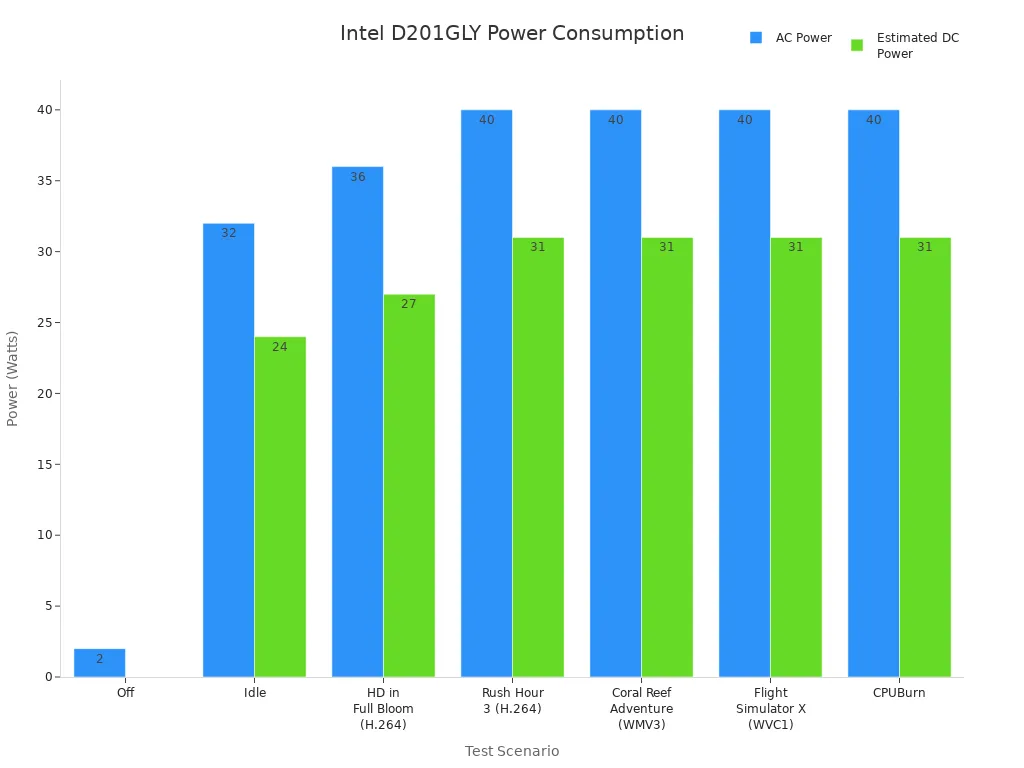
Note: Newer mini ITX server motherboards can run powerful servers with much less energy than older models.
Power Delivery Design
Mini ITX server motherboards use advanced power delivery systems to save energy. These systems help the board give the right amount of power to each part. Good power delivery means less wasted energy and less heat.
Efficient VRMs
Voltage Regulator Modules (VRMs) control how much power goes to the CPU and other parts. High-quality VRMs work with less waste. They keep the voltage steady. This helps the motherboard use less power, especially when the server is not busy. Many mini ITX boards use digital VRMs. These VRMs adjust quickly to changes in power needs. They help the system stay cool and quiet.
Smart Power Phasing
Smart power phasing splits the power load into smaller parts. The motherboard can turn off some phases when the server does not need much power. This saves energy during light tasks. When the server works hard, all phases turn on to give more power. This smart system helps the board use only what it needs. It also makes the board last longer because it reduces stress on the parts.
Tip: Smart power phasing can lower heat and make the server run more quietly.
Idle vs Load Power Draw
Power draw changes based on what the server does. At idle, the motherboard uses very little power. When the server works harder, power use goes up. Advanced power delivery designs keep both idle and load power draw low. The table below shows how much power a mini ITX server motherboard can use in different states:
Condition | Power Draw (W) |
|---|---|
Idle | 7 |
Load | 14.5 |
Maximum | 28.2 |
Some boards use even less power at maximum load, as low as 12 watts. These numbers show how smart design helps save energy. Lower power draw means less heat and lower electricity bills. Users get a server that works well without wasting energy.
Minimalistic Board Design
Fewer Components
Mini ITX server motherboards have a simple design with fewer parts. Engineers take out extra chips and connectors. This means there are fewer circuits that need power. Tests show these boards can run at just 9 watts. If you add an SSD, power use stays low, between 10 and 12 watts.
Simple motherboards use less energy because they have fewer parts.
Power use stays low even when you add storage.
Fewer chips make less heat, so less cooling is needed.
Short PCB Traces
The printed circuit board in a mini ITX motherboard has short traces. These traces connect the parts right to each other. Shorter traces lower electrical resistance. Less resistance means less energy is lost. Engineers put parts close together to keep traces short.
Short PCB traces help the board save power and keep signals strong.
Short traces also make the board work better. Signals move faster and do not get weak. This helps the server run well and use less electricity.
Space and Power Savings
Mini ITX boards are small and fit in less space. The small size lets people build tiny systems. Smaller boards need less cooling and fewer fans.
Характеристика | Mini ITX Board | Standard ATX Board |
|---|---|---|
Размер | 17 x 17 cm | 30 x 24 cm |
Typical Power Use | 10-35 W | 40-120 W |
Cooling Needs | Низкий | Высокий |
A small board uses less power and makes less heat. People can put these boards in small places, like home offices or little server racks. The design helps save money on power and cooling. Mini ITX motherboards are a smart way to build energy-saving servers.
Low-Power Components
Efficient RAM Choices
Mini ITX server motherboards use memory that saves energy. DDR5 memory is the best choice for these boards. It only needs 1.1 volts to work. DDR4 memory needs 1.2 volts. Using less voltage means DDR5 uses less power. This helps the server stay cool. DDR5 can also move data faster and hold more memory. The table below shows how DDR4 and DDR5 are different:
Характеристика | DDR4 | DDR5 |
|---|---|---|
Maximum Data Rate | 3200 MT/s | Up to 8400 MT/s |
Voltage | 1.2V | 1.1V |
Module Capacity | До 64 ГБ | Up to 128GB |
Servers with DDR5 memory run faster and use less energy. They can do more jobs at the same time. DDR5 helps mini ITX motherboards work well and last longer.
SSD and Storage Options
Storage devices are important for saving power. Solid State Drives (SSDs) use less energy than Hard Disk Drives (HDDs). SSDs usually use between 17 and 19 watts. HDDs can use about 22 watts when not spinning. SSDs are faster and make less heat. They help the server stay quiet and save power.
SSDs use less power when working.
HDDs can save energy by turning off when not needed.
HDDs can hold more files than SSDs.
Picking SSDs for mini ITX servers makes them faster and cheaper to run. Some people use both SSDs and HDDs to get more space and save energy.
Integrated Networking
Mini ITX server motherboards often have built-in networking. These chips use less power than extra network cards. Many boards have fast Ethernet, like 1 GbE or 2.5 GbE. Built-in networking keeps the system simple and saves energy. It means you do not need extra parts and use less power.
Integrated networking helps mini ITX servers stay small and save energy. Users get good connections without wasting power.
Mini ITX motherboards use good RAM, smart storage, and built-in networking. These things help people build servers that save energy and work well.
BIOS Power Management
Mini ITX server motherboards have smart BIOS settings. These settings help save energy. Users can change how the board uses power. This keeps the system cool. Good power management makes the server work better. It also uses less electricity.
Power-Saving Profiles
Many BIOS setups have power-saving profiles. These profiles change how much energy the motherboard uses. Users can pick a profile that fits their needs. Some profiles lower CPU speed or turn off extra lights. If users turn off unused ports and devices in the BIOS, the motherboard stops sending power to them. This cuts down on wasted power and makes the board more efficient. For mini ITX boards, every watt matters. Turning off extra parts can drop idle power use to about 15 watts.
Tip: Picking the right power-saving profile keeps the server cool and quiet.
Fan and Thermal Controls
BIOS settings let users control fan speeds and heat. The motherboard can change fan speed based on temperature. When the server is not busy, fans slow down or stop. This saves energy and makes less noise. Thermal management keeps the system safe from getting too hot. The BIOS can set limits for how hot the CPU or other parts can get. If things get hot, the fans turn on faster. This protects the hardware and keeps power use low.
Setting | Effect |
|---|---|
Fan Curve | Changes fan speed |
Temp Limit | Stops overheating |
Quiet Mode | Makes fans quieter |
Peripheral Control
The BIOS lets users pick which devices stay on. Turning off unused USB ports, audio chips, or extra network cards saves power. The motherboard does not send energy to these parts. This helps mini ITX boards use less power when idle. Advanced BIOS options include Wake-on-LAN and scheduled power states.
Wake-on-LAN lets users turn on the server from far away. The system stays in a low-power state until needed.
Scheduled power states let the server sleep, hibernate, or shut off at set times. These states use less energy and keep the server ready for work.
Mini ITX motherboards use these BIOS tools to manage heat and save energy. Smart BIOS settings help users build servers that last longer and use less power.
Choosing the Right Mini ITX Server Motherboard
Feature Comparison
To pick the best mini itx server motherboard, you need to compare features. Look at how much power each board uses. Check if the board stays cool and does not get too hot. See if it has special settings to save energy. The table below lists what to check:
Критерии | Описание |
|---|---|
Power Consumption | See how much power the board uses when busy. |
Heat Management | Make sure the board has good cooling and airflow. |
Energy Efficiency Features | Find boards with low-power modes and smart voltage control. |
Always check the energy rating before you buy a board. Think about power-saving features that help use less electricity.
Brand Considerations (e.g., sz-xtt)
There are many brands that make mini itx server motherboards. The sz-xtt brand is known for smart power controls and lots of storage choices. It is made for small businesses and people who build their own servers. Other brands may have different features or focus on more people. The table below shows how sz-xtt compares to other brands:
Характеристика | sz-xtt | Other Brands |
|---|---|---|
Энергоэффективность | Advanced power controls | Varies by manufacturer |
Storage Flexibility | Flexible options | Limited in some models |
Target Audience | SMBs, custom builds | General market |
Compatibility | Intel and AMD | Varies by model |
Pick a brand that works with both Intel and AMD chips. Also, look for boards with good storage and network choices.
Tips for Energy Savings
You can do easy things to help your mini itx server motherboard use less power. Here are some tips:
Pick a board that works with energy-saving CPUs like Intel Core or AMD Ryzen.
Choose memory that uses less voltage, like DDR5.
Use SSDs instead of HDDs to save power.
Turn off ports and devices you do not use in the BIOS.
Set up smart fan controls to keep things cool and quiet.
Make sure the board has good cooling and enough SATA ports for drives.
Look for boards with remote management so you can check your server easily.
Making smart choices and setting up your board well helps your server use less energy and last longer.
Mini ITX server motherboards use less energy because of their smart parts. They have efficient chipsets, good power delivery, and a simple design. This helps people pay less for electricity. The systems are also quieter and last longer.
Pick boards that have low-power CPUs and helpful BIOS settings.
Go with trusted brands like sz-xtt for strong and steady use.
Using less energy is good for the planet and saves money. Making smart choices really helps when building servers.
ЧАСТО ЗАДАВАЕМЫЕ ВОПРОСЫ
What is a mini ITX server motherboard?
A mini ITX server motherboard is a small board. It connects all the computer parts together. The size is 17 by 17 centimeters. Engineers make it for small and energy-saving servers.
How does a mini ITX motherboard save energy?
Mini ITX motherboards use special chipsets and low-power CPUs. They also have smart BIOS settings. There are fewer parts and short lines on the board. These things help the board use less electricity.
Can a mini ITX server motherboard run 24/7?
Yes, many mini ITX server motherboards can run all day. They stay cool and do not use much power. This makes them good for home servers and small businesses.
Which brands offer energy-efficient mini ITX server motherboards?
Some brands like sz-xtt, ASUS, and ASRock make these boards. They use smart power controls and work with low-power CPUs.
What storage options work best with mini ITX server motherboards?
Solid State Drives (SSDs) are the best choice. SSDs use less power and are faster than Hard Disk Drives (HDDs). Many mini ITX boards can use both SSDs and HDDs for more storage.