A splitter for network allows individuals to connect multiple devices to a single network. This device takes one signal and splits it, enabling many devices to utilize the same connection. People use a splitter for network purposes both at home and in the workplace. It assists computers, TVs, and other electronics in accessing the internet or cable. There are various types of splitters available; for instance, Ethernet splitters are specifically designed for computer networks, while coaxial cable splitters cater to TV signals.
Key Takeaways
A network splitter lets many devices use one network. This is good for homes and offices.
Picking the right splitter type is important. Passive or active splitters help keep signal strong and fast.
Coaxial splitters share TV and internet signals with many devices. You do not need extra cables.
Think about how many devices you have. Also, think about the speed you need. This helps you choose the best splitter for your network.
Knowing how splitters and switches are different helps you choose better for your network setup.
Splitter for Network Basics

What Is a Splitter
A splitter for network is a device that splits one signal into several. People use it to connect more than one device to one source. This device helps homes and businesses share internet, phone, or TV signals. For example, a splitter lets one phone line work for both DSL internet and phone service. It usually has two RJ-11 sockets. One socket is for the DSL modem. The other socket is for the telephone. A phone line filter connects the telephone to the splitter. This setup lets people use more connections without adding new wires.
How Splitters Work
A splitter divides one input signal into many output signals. This lets many devices get the same signal at once. People use splitters for ethernet, coaxial, or fiber optic cables. The device works with a wide range of frequencies. This makes it good for cable TV, satellite TV, and internet. Good splitters send signals well by matching impedance and lowering signal loss. There are different port types, like two-way, three-way, or four-way. These help people pick the right splitter for their needs. Low insertion loss keeps the signal strong for all outputs. Splitters also work with many cables and connectors. This lets people set up their systems in different ways.
In fiber optic networks, splitters send signals to each Optical Network Unit. Fiber Bragg Gratings give each unit its own reflection signal. These special signals help the network tell connections apart. This technology lets many connections work and keeps the network neat.
Common Network Applications
People use splitters in many network setups at home and at work. At home, PLC splitters are important for Fiber to the Home networks. These networks bring fiber optic service right to houses. A splitter for network lets one Passive Optical Network serve many people. This setup gives high-speed internet to more users without extra cables.
Ethernet splitters are used a lot in offices and homes. They let people connect many computers or devices to one ethernet cable. This is helpful when there are not enough ethernet ports or running new cables is hard. Ethernet splitters let computers, printers, and smart TVs share one cable. In LAN setups, splitters make it easy to manage ethernet connections and grow the network.
Businesses use splitters to connect security cameras, phones, and computers. Ethernet splitters help keep cables neat and tidy. They also make it easy to add new devices to the network. In big offices, splitters help LAN setups by linking many devices with one ethernet cable.
Tip: Picking the right ethernet splitter keeps the signal strong and the network working well for all devices.
Ethernet Splitter Types
Passive Ethernet Splitter
Passive ethernet splitters do not need power to work. They take one ethernet cable and make two connections. These splitters use simple wires to share the signal. People use passive ethernet splitters in small home networks. These devices do not make the signal stronger. They only split the wires inside the cable. Passive ethernet splitters are helpful if you have one cable but two devices. But, passive ethernet splitters can make the signal weaker. The signal gets weaker as it moves through split wires. This can slow down the network and make it less steady. Passive ethernet splitters work for basic ethernet, but not for fast networks.
Active Ethernet Splitter
Active ethernet splitters use electronics to control the signal. These splitters need power to work. Active ethernet splitters can make the signal stronger and stop loss. They are better for big networks or long cables. Active ethernet splitters have things like signal boost and fixing errors. These things help keep ethernet connections strong. Active ethernet splitters work with faster speeds and more devices. People use active ethernet splitters in offices and businesses. The device helps stop signal loss and keeps the network working well. Active ethernet splitters cost more than passive ones, but they work better.
Ethernet Splitter Performance
How well an ethernet splitter works depends on its type. Passive ethernet splitters may only let the network go up to 100 Mbps. They can make the signal weaker and the network less steady. Active ethernet splitters can go faster, like 1 Gbps or more. These splitters help stop signal loss and keep the network strong. The type of ethernet splitter also changes how many devices you can connect. Active ethernet splitters let you connect more devices and use longer cables. People should think about the type before picking a splitter for their network. Signal loss can make streaming, gaming, and file sharing worse. A good ethernet splitter helps the network work well.
Note: XTT has advanced ethernet splitter products for fast networks. Their splitters help stop signal loss and keep ethernet connections steady.
Type | Power Source | Speed Support | Signal Loss | Best Use Case |
|---|---|---|---|---|
Passive Splitter | None | Up to 100 Mbps | Higher | Small home networks |
Active Splitter | Required | 1 Gbps+ | Lower | Offices, businesses |
Coaxial Cable Splitter Overview

What Is a Coaxial Cable Splitter
A coaxial cable splitter is a tool that splits one coaxial signal into more than one output. This device lets people send TV or internet signals to different things at the same time. The most used coaxial splitters are the 2-way splitter and the amplified splitter. A 2-way splitter takes one signal and makes two equal signals. This makes it easy to connect two TVs or other devices. An amplified splitter makes the signal stronger. This helps when the signal must go far or reach many devices. Coaxial cable splitters work with the usual coaxial cables in homes and offices. They support cable TV, satellite TV, and broadband internet. People pick a coaxial cable splitter when they want more connections without adding new cables. The device helps keep the signal clear and strong for all devices.
Use Cases for Coaxial Splitters
Coaxial cable splitters are important for home entertainment and security systems. People use them to share signals with many rooms and devices. Here are some common ways people use coaxial cable splitters:
Sending TV signals to more rooms
Sharing a broadband signal with routers and modems
Hooking up CCTV cameras around a building
Setting up smart home devices
A 2-way splitter is used when someone wants to watch TV in two rooms. This setup lets both TVs get the same signal from one cable. An amplified splitter is good when the signal must go to many devices or travel far. People use coaxial cable splitters to connect security cameras, so they can watch different places in a building. In smart homes, coaxial cable splitters help connect things like smart TVs and internet modems. The main types of coaxial splitters make it easy to pick the right one for each job. A coaxial cable splitter is a good way to share signals and keep everything connected.
Tip: Always count how many outputs you need before picking a coaxial cable splitter. Using the right kind, like a 2-way splitter or amplified splitter, keeps the signal strong and stops problems.
Splitter Selection and Product Example
Choosing the Right Splitter for Network Needs
Picking the right splitter helps people get a good network. It makes sure all devices connect well and work fast. People need to think about a few things before buying a splitter. First, count how many devices you want to connect. If you have lots of computers, TVs, or cameras, pick a splitter with enough ports. The kind of device is important too. Devices like gaming computers or streaming TVs need splitters that can handle fast speeds.
Speed and bandwidth are very important. Check if the splitter can support the speed you need, like 1 Gbps or more. How far your devices are from each other also matters. If they are far apart, you need a splitter that works over long distances. Make sure the splitter works with your ethernet cables, like Cat5e or Cat6. This helps everything run smoothly.
The table below shows what to look for when picking a splitter:
Criteria | Description |
|---|---|
Number of Connections Needed | Choose a splitter with the appropriate number of ports for your devices. |
Type of Devices to be Connected | Consider the specific network requirements of the devices, especially high-bandwidth ones. |
Speed and Bandwidth | Ensure compatibility with the required network speeds and bandwidths. |
Distance Between Devices | For devices far apart, select a splitter that supports higher transmission distances. |
Compatibility with Ethernet Standards | Ensure the splitter is compatible with the Ethernet standards of your devices (e.g., Cat5e, Cat6). |
Tip: Always pick a splitter that matches what you need. This keeps your network fast and stops problems.
Device Compatibility and Speed
Device compatibility and speed are important for splitters. There are different types of ethernet splitters. Each type works with different speeds. Passive ethernet splitters work with basic networks and go up to 100 Mbps. These are good for small homes with just a few devices. Active ethernet splitters can go faster, like 1 Gbps or more. They are better for offices or places with lots of devices.
Check if the splitter matches your cables and devices. Cat5e and Cat6 cables are good for fast speeds. They work best with new ethernet splitters. If you use old cables, your network might slow down. The best way is to use a splitter that matches the speed and type of all your devices.
Think about the kind of connection you have. Some splitters work with both IPv4 and IPv6. This helps your network get ready for new devices. When picking a splitter, look for things like traffic mirroring, filtering, and support for many protocols. These features help keep your network safe and working well.
Note: A good ethernet splitter keeps your network fast and lets many devices work together without trouble.
XTT UT200-48X6C Network Splitter Features
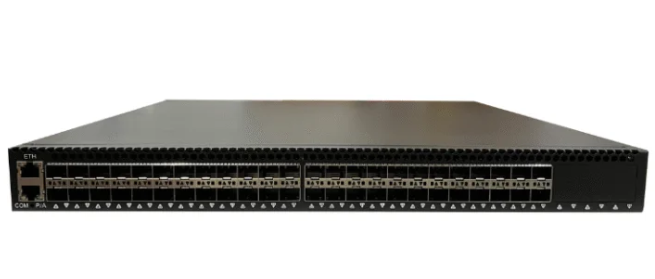
The XTT UT200-48X6C is a strong splitter for big networks. It has 48 10GE/GE ports and 6 100GE/40GE ports. This makes it great for big offices or data centers. The UT200-48X6C can move 1080Gbps of data. This is good for things like checking network speed, looking at data, and keeping things safe.
This ethernet splitter can connect many types of devices. It supports different cables and connections. The UT200-48X6C can copy and mirror traffic. This helps keep data safe and correct. It also has advanced filtering. You can set rules using VLAN ID, MAC address, and IP address. The splitter works with both IPv4 and IPv6 networks.
The UT200-48X6C can see tunnel packets. It supports VLAN, MPLS, GRE, and VXLAN. This helps people watch and control network traffic. The device has one RJ45 management port. It supports CLI, SNMP, and WEB management. These tools make it easy for network managers to use the splitter.
XTT started in 2007 and knows a lot about networks. The UT200-48X6C works well from 0 to 40 degrees Celsius. It uses a 220V AC power supply. The device uses 300W of power, so it works well and saves energy.
If you want a strong ethernet splitter, the UT200-48X6C is a good choice. You can visit the sz-xtt website to learn more about this and other splitters.
Callout: The UT200-48X6C helps businesses grow their network, stay safe, and connect many devices at high speed.
Splitter vs. Switch
Key Differences
A splitter and a switch both connect devices to a network, but they do not work the same way. A splitter takes one signal and splits it into more signals. This lets many devices use the same connection. A switch sends data to each device by itself. It knows where to send each signal and controls how devices talk to each other.
The table below shows how ethernet splitters and switches are different:
Feature | Ethernet Splitters | Ethernet Switches |
|---|---|---|
Scalability | Limited capabilities, minimal expansion | Superior scalability, supports extensive growth |
Device Support | Suitable for basic setups | Accommodates multiple devices, flexible solutions |
Advanced Features | Lacks advanced features | Managed switches offer VLANs, link aggregation |
A splitter is good for simple networks. It does not have special features. A switch can connect many devices and has more options. Managed switches let people set up VLANs and link aggregation. These features help big networks work better.
When to Use a Splitter or Switch
People use a splitter when they want to connect a few devices in one place. A splitter is simple and does not need power. It works for easy jobs, like sharing internet between two computers. In homes or small offices, a splitter can fix basic connection problems.
A switch is best for bigger networks. It can connect many devices and keeps data moving fast. Switches are used where there are lots of computers, printers, or smart TVs. They also have special features for managing the network. If someone wants to add more devices or grow their network, a switch is the better choice.
Choosing between an ethernet splitter and a switch depends on how big the network is and what it needs. For small networks, a splitter is enough. For bigger or growing networks, a switch works better and gives more options.
Tip: The sz-xtt brand has good network products for both splitters and switches. Their products help people build strong and flexible networks.
Network splitters let people link many devices to one network. There are different kinds, like Ethernet splitters and coaxial splitters. People need to pick a splitter that fits their network and device speed. The XTT UT200-48X6C works well for networks that need a lot of power. Choosing the right splitter can make the network work better. People should look at their network and what their devices need before buying.
Tip: Planning ahead helps your network stay fast and steady.
FAQ
What does a network splitter do?
A network splitter lets several devices share one network connection. It divides the signal so each device can connect. People use splitters in homes and offices to link computers, TVs, and cameras.
Can a splitter slow down my network?
A splitter may lower speed if too many devices connect or if the splitter does not support high bandwidth. Active splitters help keep speeds fast. Users should choose splitters that match their network needs.
How is a splitter different from a switch?
A splitter divides one signal for multiple devices. A switch sends data to each device separately. Switches work better for large networks and offer more control.
Which devices work with the XTT UT200-48X6C splitter?
The XTT UT200-48X6C supports computers, servers, security cameras, and network analyzers. It works with 10GE/GE and 100GE/40GE ports. Users can visit the sz-xtt website for more product details.
Where can someone buy sz-xtt network splitters?
Sz-xtt offers network splitters and switches for many needs. People can find product information and purchase options on the official sz-xtt website.