

Enterprises need good server storage to handle more data. The best 10 choices are Dell PowerScale, HPE 3PAR StoreServ, NetApp FAS Series, Huawei OceanStor, Sangfor Enterprise Storage, EMC VNX, Arcserve Cloud, Google Workspace Storage, Microsoft OneDrive for Business, and Dropbox Business. By 2025, data in Asia may reach 170 zettabytes. Enterprises will manage most of this data. The right storage helps you grow, work faster, and keeps data safe from harm. Every business should look at its needs before picking a storage option.
Key Takeaways
Enterprise storage is important for handling lots of data. It keeps data safe and helps work go well. It lets businesses get bigger and run without problems.
Some things to look for in storage are scalability, speed, data protection, and good security. These features help keep data safe and easy to use.
Picking the best storage can stop expensive problems. It also helps follow rules about keeping data safe.
Think about what your company needs. Look at what apps you use and how much money you have before you choose storage.
Using good monitoring and management tools can make storage work better. These tools help stop problems before they happen.
What Is Enterprise Storage

Enterprise storage means special ways to store lots of data. Big companies use these solutions to keep important business information safe. They help businesses save, organize, and protect their data. Enterprise storage lets workers get their data when they need it. It also helps companies grow over time.
Key Features
Enterprise storage has many features that make it better than simple storage:
High capacity: These solutions can hold huge amounts of data. This is good for businesses that are getting bigger.
Scalability: Companies can add more storage as they need it. This gives them more choices as they grow.
Performance: Enterprise storage lets people get their data quickly. Fast access helps workers do their jobs better.
Data protection: These solutions have backup and disaster recovery. This keeps data safe if something goes wrong.
Security: Strong security stops people from stealing or seeing private data. It also helps block cyber attacks.
Integration: Enterprise storage works with other business tools and apps.
Note: Enterprise storage often has special tools. These tools help IT teams watch and manage data storage easily.
Business Importance
Enterprise storage is very important for businesses. It helps keep information safe and lets work continue without problems. Good storage stops downtime, which can make companies lose money and work slower. Some businesses must follow strict rules about keeping data private and safe. Enterprise storage helps meet these rules with strong backup and security.
Downtime can make businesses lose money and work time.
Rules say companies must have backup and disaster recovery.
Many industries have tough laws about keeping data private and safe.
Good backup and disaster recovery help companies fix problems fast.
Strong security keeps private data safe from hackers and thieves.
Following data rules helps companies avoid trouble with the law.
Enterprise storage makes sure companies can get their data when they need it. It helps businesses keep working and follow important rules. Picking the right storage helps companies work better and grow in the future.
Server Storage Evaluation Criteria
Picking the best enterprise data storage takes careful thought. IT leaders check many things to find what works best for their company. Each thing they check helps with data growth, working well, and keeping data safe.
Scalability
Scalability shows if storage can grow with a company. When data grows, companies need storage that gets bigger without stopping work or costing too much. New storage lets companies add more space only when they need it. This helps with sudden data growth and stops buying too much storage.
Feature/Benefit | Description |
|---|---|
Unpredictable Data Growth | Solutions give room for growth up to 14 petabytes. |
Pay-as-you-Grow Model | Companies add storage as needed, saving money at first. |
Zero Downtime | Failover keeps important data ready all the time. |
Enhanced Efficiency | Automation and flexibility help use systems better and get more value. |
Performance
Performance is how fast users and apps get data. Companies need quick, steady storage for daily work. Tests like CPU speed, memory speed, data speed, and I/O rates show how well storage works.
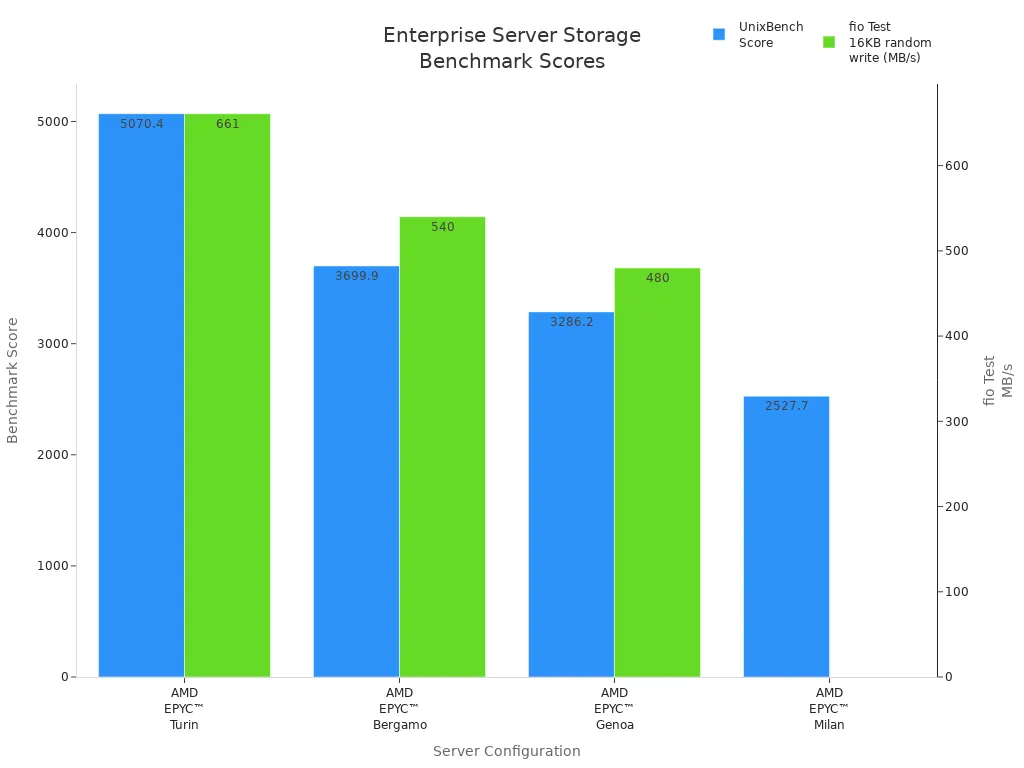
CPU and memory speed
Data speed
I/O speed
System strength
Data Protection
Data protection keeps company data safe from loss, theft, or disasters. Good storage has disaster recovery, backup management, and data copying. These things help companies keep working and fix problems fast.
Feature | Description |
|---|---|
Disaster Recovery | Brings back work after disasters, so business keeps going. |
Centralized Management of Backups | Makes it easy to get and manage backups in emergencies. |
Data Replication | Makes data stronger and means fewer extra copies are needed. |
Integration
Integration checks if storage works with other business tools and apps. It should work with operating systems, hybrid cloud, and other software. Easy integration helps companies handle data on many platforms and work better.
Tip: Easy-to-use tools matter. A simple interface helps IT teams set up and watch storage.
Cost
Cost means both starting and ongoing spending. Companies look at prices from different sellers to get the best deal. Good value means safe, strong, and growing storage without spending too much. Flexible plans, like pay-as-you-grow, help match spending to real needs.
Check prices for hardware, software, and support.
Pick storage with good features at a fair price.
Common Criteria for IT Professionals
Works with current systems
Follows industry rules
Security to keep digital things safe
Easy to use and manage
Good value for money
These things help companies pick the right server storage. They make sure data is safe, work is smooth, and the company can grow.
Top 10 Enterprise Data Storage Solutions
Dell PowerScale
Dell PowerScale is a top choice for big companies. It gives high performance and is very flexible. It uses Intel Xeon CPUs and Gen 5 PCIe. This makes streaming faster by up to 127%. The 2U node design saves space in racks by 20%. Dell PowerScale has almost constant uptime with 6x9s availability. It works with S3, so it is good for AI and hybrid setups.
Feature | Description |
|---|---|
AI-ready Performance | Up to 127% better streaming with Intel Xeon CPUs and Gen 5 PCIe. |
Storage Efficiency | 2U node design, 20% more density per rack unit. |
Availability | 6x9s uptime and strong resiliency. |
Multi-protocol Support | S3 compatibility for AI and hybrid workflows. |
Dell PowerScale can grow from 11TB to 60PB easily. It can reach 15.8 million IOPS per cluster. The F200 nodes are five times faster than old ones. Smart automation and Dell EMC DataIQ help manage data and storage. It supports S3, NFS, SMB, and HDFS. You can use it in core, edge, or multi-cloud places. Dell lets you pay as you use, so costs are easier to handle.
Dell PowerScale has health checks, multi-cloud support, and strong security with encryption and real-time threat blocking.
HPE 3PAR StoreServ
HPE 3PAR StoreServ is strong for storing business data. It gives fast speed and works with block and file storage. The mesh-active design lets all controllers use all drives. This makes things work better and stops slowdowns. Thin provisioning helps companies use space well and save money. It moves data to the best spot with automated tiering.
HPE 3PAR StoreServ works in hybrid clouds. It connects with backup and disaster recovery tools. Many companies pick it for being reliable, able to grow, and keeping data safe.
NetApp FAS Series
NetApp FAS Series lets companies grow storage easily. You can go from terabytes to petabytes as you need. It gives fast performance with low wait times. This is good for big data jobs. NetApp FAS Series has top data services and built-in protection.
Feature | Description |
|---|---|
Seamless Scalability | Expands from terabytes to petabytes. |
High Performance | Low-latency for large data operations. |
Advanced Data Management | Integrated data protection and efficient handling. |
Cloud Integration | Supports hybrid cloud management. |
NetApp FAS Series works with many protocols. This makes it good for different data needs. Companies get fast speed, built-in safety, and easy control of lots of data.
Huawei OceanStor
Huawei OceanStor gives one platform for storing business data. It works with block, file, and object storage. This helps companies handle all kinds of data. Smart algorithms make it faster and lower wait times. Huawei OceanStor uses active-active design for high uptime. Data stays safe even if one part fails.
It works with hybrid clouds and big cloud providers. Huawei OceanStor has strong security like encryption and safe snapshots. Companies use it for being reliable, flexible, and keeping data safe.
Sangfor Enterprise Storage
Sangfor Enterprise Storage gives fast storage for all businesses. It uses a spread-out design for better growth and safety. Sangfor works with block and file storage for many jobs. It has built-in safety like snapshots and copying to protect data.
Sangfor Enterprise Storage connects easily with virtual and cloud systems. Companies like it for saving money, strong speed, and easy tools.
EMC VNX
EMC VNX gives one storage system for big companies. It works with block and file storage for many jobs. EMC VNX is fast and helps work run smoothly. Many users say it makes virtual servers three times faster. It can start 1,000 virtual desktops in less than eight minutes.
Fast storage for big business needs.
Better data control and work speed.
Quick setup for virtual servers and desktops.
EMC VNX is good for data centers that need safe, growing, and easy storage.
Arcserve Cloud
Arcserve Cloud keeps business data safe and helps with disaster recovery. It handles backup and recovery from one place, making things simple. Arcserve Cloud helps fix data loss fast and works for big IT setups.
Feature | Description |
|---|---|
Ransomware Neutralization | Arcserve 9000 Appliance neutralizes ransomware attacks. |
Disaster Recovery | Effective recovery and data restoration. |
Deployment Speed | Deploys in just 15 minutes. |
IT Resiliency | Combines deep learning protection with business continuity. |
Cloud Integration | Built-in disaster recovery and backup options. |
Arcserve Cloud protects any system or app from losing data. It backs up fast and promises full recovery. The web interface makes backup and recovery easy to control. Arcserve’s cloud helps companies stay strong without using many products.
Google Workspace Storage
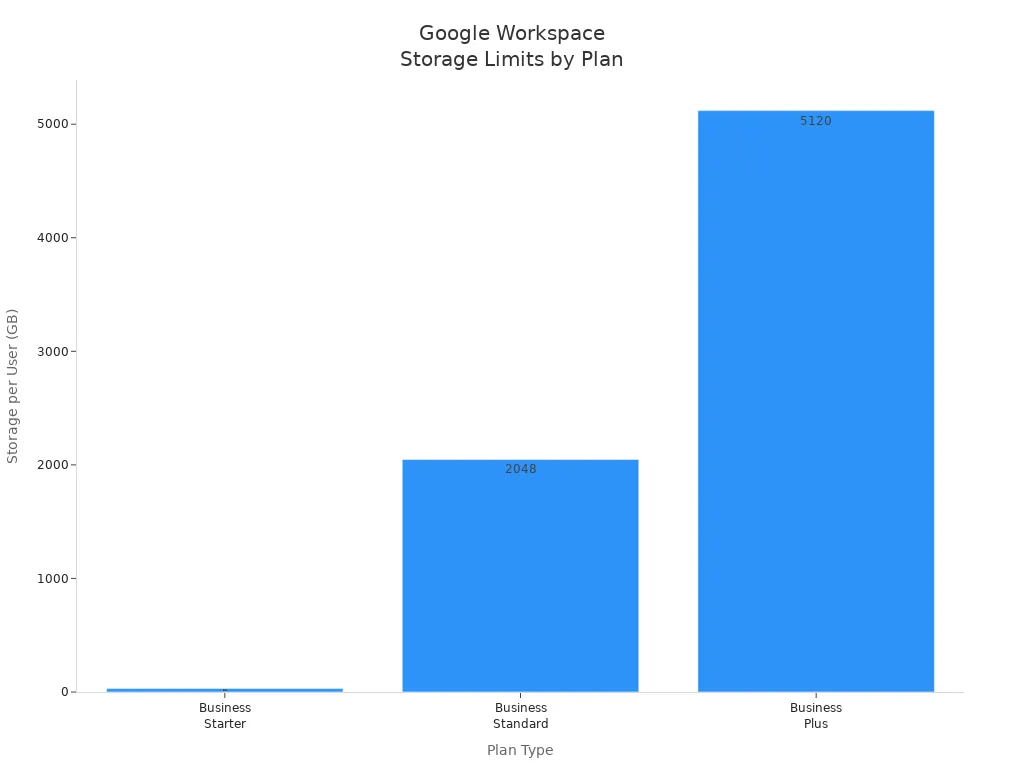
Google Workspace Storage gives safe and flexible storage for companies. Each plan has a different limit for each user. This helps companies pick what fits best.
Plan Type | Storage Limit per User | Total Storage for 10 Users |
|---|---|---|
Business Starter | 300GB | |
Business Standard | 2TB | 20TB |
Business Plus | 5TB | 50TB |
Google Workspace Storage has strong safety features. It warns about strange emails, blocks spam, and can lock risky devices. All users must use two-step checks. These things help keep company data safe.
Microsoft OneDrive for Business
Microsoft OneDrive for Business works well with company IT systems. It gives safe storage and follows rules like GDPR. OneDrive for Business uses AES 256-bit encryption for stored and moving data. Multi-factor checks make sure only allowed users get in. Data Loss Prevention rules help keep important data safe.
Strong safety with AES 256-bit encryption.
Multi-factor checks for safe access.
Follows GDPR and other rules.
OneDrive for Business helps companies store, share, and control files safely. It works in hybrid setups and helps teams work together.
Dropbox Business
Dropbox Business gives easy and safe storage for companies. It lets teams share files, work together, and connect with other apps. Dropbox Business uses strong encryption and can recover files to keep data safe. It has team folders, set permissions, and tracks activity.
Dropbox Business grows with your company and works in hybrid setups. Companies pick Dropbox Business for its easy use, strong safety, and good performance.
Storage Solutions Comparison

Enterprise data storage solutions have different strengths. People who choose storage must look at many things. They should check scalability, performance, reliability, data protection, cost, and return on investment. This part shows the main differences between the top 10 enterprise storage solutions.
Scalability & Performance
Scalability lets a company grow without limits. Performance means you get data quickly. Some solutions, like Sangfor aStor, can grow to exabytes. They give strong performance and protect data well. Dell PowerScale can use up to 252 nodes and hold 58PB. It uses NVMe all-flash for fast speed. Huawei OceanStor gives flexible choices. It has all-flash and hybrid models. It uses AI and machine learning to work better. NetApp FAS gives high performance with the ONTAP operating system. DDN is great for scaling and fast data. It helps AI apps in the data center.
Storage Solution | Scalability Features | Performance Features |
|---|---|---|
Sangfor aStor | Strong performance and data protection | |
Dell PowerScale | Uses 252 nodes and 58PB | NVMe all-flash for fast speed |
Huawei OceanStor | Flexible all-flash and hybrid models | AI/ML boosts efficiency, saves energy |
NetApp FAS | High performance with ONTAP OS | Strong data management and protection |
DDN | Great scaling and fast data | Fast for AI apps in data centers |
Reliability & Data Protection
Reliability keeps data safe and ready to use. Data protection means business keeps running and data stays correct. Backup systems help fix problems and keep data safe. Most enterprise storage stops downtime with high-availability systems. They help backup and restore old data copies. Media flexibility lets you store data on different types and far away. Keeping backup data away from main storage adds safety.
Feature | Description |
|---|---|
Business Continuity | Always-on systems stop outages and downtime |
Data Integrity | Keeps data safe and ready when needed |
Backup Infrastructure | Puts backups together for easy control |
Disaster Resilience | High-availability and backup protect data |
Data Recovery | Brings back old data after loss or damage |
Media Flexibility | Stores data on many types and far places |
Physical Separation | Keeps backup data away from main storage |
Tip: Enterprises should pick solutions with strong disaster recovery and backup. This keeps important data safe.
Cost & ROI
Cost and return on investment are important for every company. Some storage solutions let you pay as you grow. This helps control spending. Energy-efficient hardware and easy management lower costs. Hybrid options use cloud to save money. Companies should compare hardware, software, and support costs. Good solutions help companies get more value for their money.
Pay-as-you-grow models help save money for growing companies.
Energy-efficient systems lower costs for running storage.
Hybrid solutions use cloud to work better and save money.
Easy management means less work and lower costs.
People who choose storage should look at these things. This helps them pick the best server storage for their company.
Choosing the Right Server Storage
Assessing Needs
Enterprises need to think about many things before picking server storage. Every business has its own needs for data, speed, and growth. The best choice helps with daily work and future plans. Here are some important things to look at:
Application requirements: Find out what your main apps need for CPU, memory, storage, and network speed.
Scalability: Make sure storage can grow as your business and users get bigger.
Security and data backup: Pick solutions with strong security and regular backups to keep data safe.
Price and budget: Compare prices and choose what fits your budget.
Tip: Making a clear list of needs helps match storage to business goals.
Implementation Tips
Setting up storage for a business needs good planning. Good steps help keep data safe and systems working well. Follow these steps for better results:
Figure out what you need for space, power, cooling, networking, and security.
Plan where racks and cables will go in the data center.
Add extra power, cooling, networking, and storage to stop downtime.
Leave room for future growth with more space and capacity.
Use cooling systems that work well to keep equipment safe.
Build power systems that are reliable and have backups.
Set up strong security to keep important data safe.
Put in fire safety systems to protect equipment.
Use tools to watch performance and find problems early.
Note: Monitoring and management tools help things run better and stop problems.
Common Challenges
Enterprises often have problems when using new data storage. The table below shows some common issues and what they cause:
Challenge | Description |
|---|---|
High Server Resource Idle Rates | Many servers, about 43%, work below 30% use. This wastes money and lowers efficiency. |
Increased Operational Complexity | Handling different brands and types of hardware makes work harder and workloads bigger. |
Conflict Between Upgrade Cycles and Business Needs | Upgrading hardware often needs downtime, which can stop business work. |
Enterprises can lower these problems by picking flexible, hybrid solutions and planning upgrades carefully.
Enterprise leaders need to pick storage that fits their goals. They should check what their business needs. They must look at different choices and think about future growth. The table below lists steps that help companies make storage better.
Recommended Step | Benefits |
|---|---|
Transition to all-Ethernet storage | Faster reading and writing for new workloads |
Implement Huawei’s CloudFabric 3.0 | Moves data better and manages things automatically |
Adopt lossless Ethernet architecture | Stops packet loss and makes computers work harder |
Teams should talk to vendors and check what they need. Technology changes fast, so checking systems often keeps them current.
FAQ
What is the difference between cloud and on-premises server storage?
Cloud storage keeps data on servers far away. A provider manages these servers. On-premises storage keeps data in the company’s building. Cloud storage is easy to use and can grow fast. On-premises storage gives more control and better security.
How often should a company back up its data?
Companies should back up data every day or every week. Backups help protect data from accidents or attacks. IT teams pick backup times by how much data changes.
Which server storage option works best for fast growth?
Dell PowerScale and Sangfor Enterprise Storage grow fast. These options let companies add space when they need it. Fast growth needs storage that can expand without stopping work.
How does server storage keep data safe from hackers?
Server storage uses encryption and access controls. It also does regular security checks. These tools help block hackers and keep data safe. Companies use firewalls and strong passwords too.
Can server storage connect with other business tools?
Most enterprise storage works with business apps and cloud platforms. Integration helps teams share data and work together. IT teams check if storage fits with other tools before choosing.