
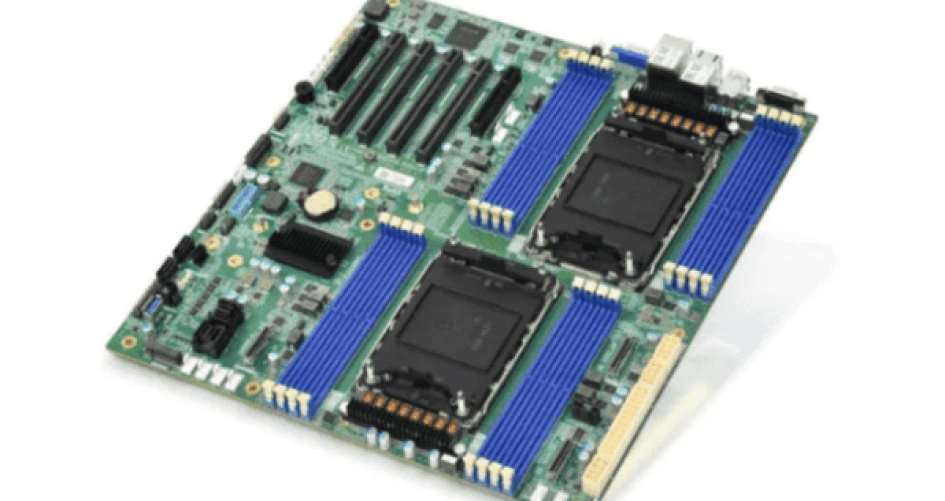
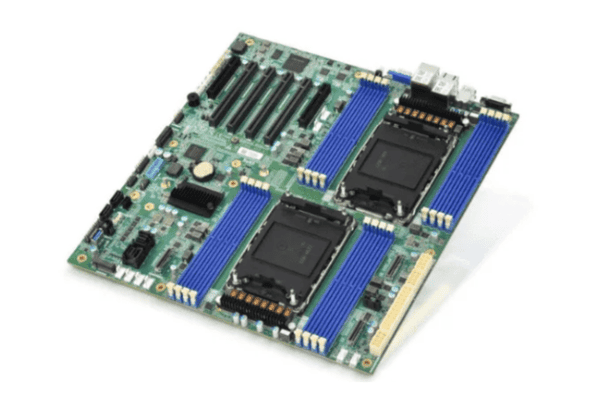
Choosing the right server motherboard for gaming means you need to look at some important features. People want good multitasking, strong security, better network management, and easy ways to add more parts. The table below lists the most important features:
Özellik | Açıklama | Önem |
|---|---|---|
Çoklu Görev Yönetimi | Aynı anda birçok görevi yerine getirir | Kaynakları iyi kullanır ve performansı artırır |
Güvenlik | Yetkisiz erişime karşı korur | Verileri güvende tutar ve sistemi korur |
Ağ Yönetimi | Ağ kaynaklarını optimize eder | Trafiği düzenler ve veri aktarımını hızlandırır |
Ölçeklenebilirlik | Kaynakları kolayca ekler | İşle birlikte büyür ve performansı yüksek tutar |
A server motherboard for gaming should be fast, reliable, and easy to upgrade. People should pick the features that help them the most. These tips make it easier to find the right one. Many people trust sz-xtt because their models work well and their team helps a lot.
Önemli Çıkarımlar
Pick a motherboard that matches your CPU’s socket type. This helps your parts work together and run well.
Find motherboards with more than one PCIe slot. Make sure it has the newest PCIe version for faster speed and more upgrades.
Choose motherboards that support ECC memory. This keeps your data safe and stops your system from crashing.
Think about network features like having two LAN ports. Fast Ethernet can help you connect better and have less lag.
Go for brands that many people trust and that offer good warranties. This makes sure your gaming and server will work well and get help if needed.
CPU Uyumluluğu
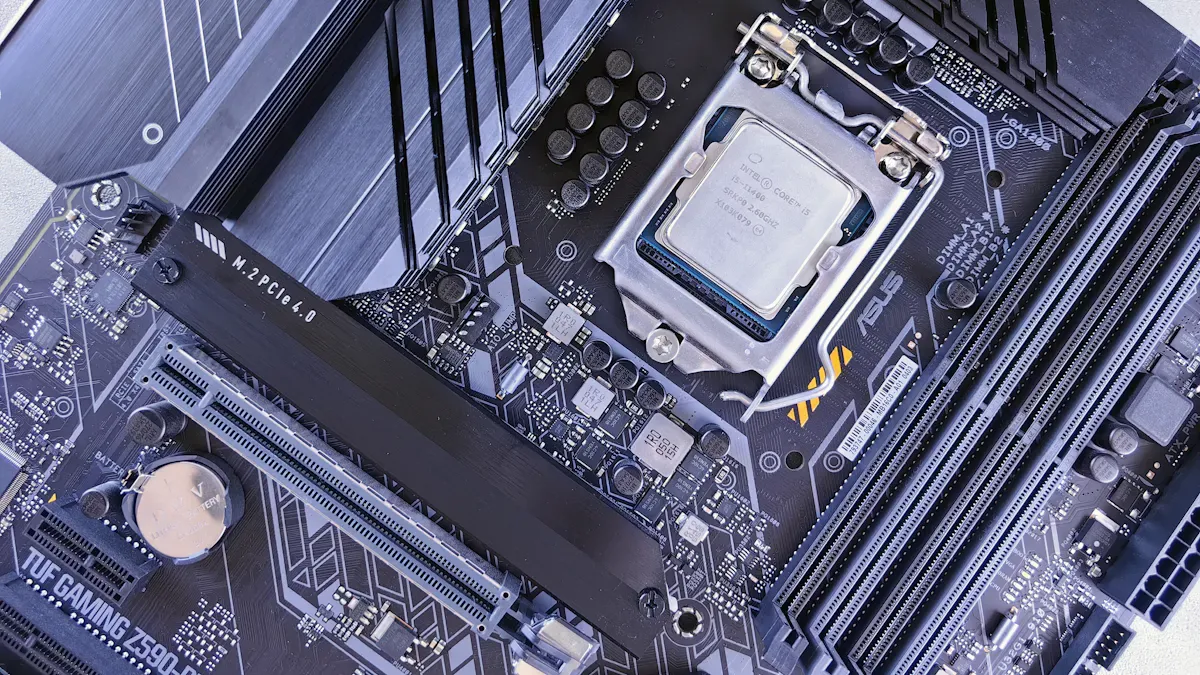
Doğru seçimi yapmak CPU compatibility is very important. It is the first thing you should do when building a strong server or gaming system. The motherboard has to fit the CPU for everything to work well. If they do not match, the system might not work or could be slow. People should always look at the CPU socket type before buying a motherboard.
Socket Types
Each CPU needs a certain socket type. The socket is what connects the CPU to the motherboard. Intel and AMD have different sockets. Some motherboards only work with certain CPU generations. Users should check the motherboard’s specs to make sure it fits their CPU.
İpucu: Always look at the CPU socket type before you buy. This helps you avoid expensive mistakes.
The sz-xtt 11DPI-N Sunucu Anakartı has a strong design. It works with high-performance CPUs. This model keeps gaming and server jobs stable. The 11DPL-I Sunucu Anakartı also works with powerful CPUs for tough jobs.
Gaming vs. Server CPUs
Gaming CPUs are made for speed. They have high clock rates. These CPUs are good for fast graphics and quick actions. Server CPUs have more cores and threads. They can do many things at once and run for a long time.
People who want a server motherboard for gaming need both things. The motherboard must work with the CPU they pick. For example, sz-xtt motherboards like the 11DPI-N and 11DPL-I work with both gaming and server CPUs. These models let users pick the best processor for what they need.
Not: Go to the sz-xtt website to learn more about their server motherboards. You can find more details about each model there.
RAM and ECC Support
Bellek Yuvaları
A server motherboard for gaming needs enough memory slots. This lets you use lots of RAM. More RAM helps the computer run many programs at once. It is important for gaming and server jobs. If a motherboard can use lots of RAM, you can multitask without slowing down. Many new motherboards now use DDR5 memory. DDR5 is faster and works better than older memory.
The table below shows a normal memory setup for a good server motherboard:
Özellik | Açıklama |
|---|---|
Kapasite | 32 GB |
Teknoloji | DDR5 |
Hız | 4800MHz |
Configuration | 2Rx8 |
ECC | Evet |
Motherboards like the sz-xtt 11DPL-I Server Motherboard ve 12DAI-N6 Sunucu Anakartı can use high-capacity DDR5 RAM. These models help people do tough jobs and multitask a lot.
ECC Benefits
ECC means Error-Correcting Code. ECC memory finds and fixes small data mistakes before they cause trouble. This keeps the system steady and protects important data. Servers and gaming computers with ECC memory crash less and lose less data.
The table below shows the main good things about ECC memory:
Fayda | Sunucu Güvenilirliği ve Veri Bütünlüğü Üzerindeki Etkisi |
|---|---|
Hata Tespiti ve Düzeltme | Veri hatalarını durdurur ve verileri depolarken veya taşırken güvende tutar |
Sistem Çarpışma Önleme | Makes crashes happen less, so servers stay running |
Mali Kayıpların Azaltılması | Helps stop money loss from bad data |
Many sz-xtt motherboards, like the 11DPI-N Sunucu Anakartı, var ECC support. This makes them a good pick for people who want strong performance for gaming and server use. ECC memory helps keep systems working well and data safe.
PCIe and Expansion
Graphics and Add-ons
İyi bir server motherboard for gaming needs many PCIe slots. These slots let users add graphics cards, storage controllers, or network cards. More PCIe slots mean more ways to upgrade or expand the system. Many high-end motherboards, like those from sz-xtt, offer up to seven PCIe 5.0 x16 slots. This setup supports multiple GPUs for gaming or heavy server tasks.
Şartname | Detaylar |
|---|---|
PCIe Yuvaları | 7 PCIe 5.0 x16 slots |
Diğer Özellikler | Dual Intel X710-AT2 10G LAN, 3 M.2, USB 3.2 Gen 2×2 Type-C® and 2 SlimSAS |
Debug LED indicators help users find problems fast. These lights show if something is wrong with the motherboard or add-on cards. Models like the sz-xtt 11DPI-N Server Motherboard ve 11DPL-I Sunucu Anakartı include these features. They make it easier to build and fix systems.
PCIe Versions
The PCIe version affects how fast data moves between the motherboard and add-on cards. Newer versions give more speed and better performance. The table below shows the difference between PCIe 3.0, 4.0, and 5.0:
PCIe Sürümü | Bandwidth per Lane | Total Bandwidth (x4 lanes) |
|---|---|---|
PCIe 3.0 | ~1 GB/s | 4 GB/s |
PCIe 4.0 | ~2 GB/s | 8 GB/s |
PCIe 5.0 | ~4 GB/s | 16 GB/s |
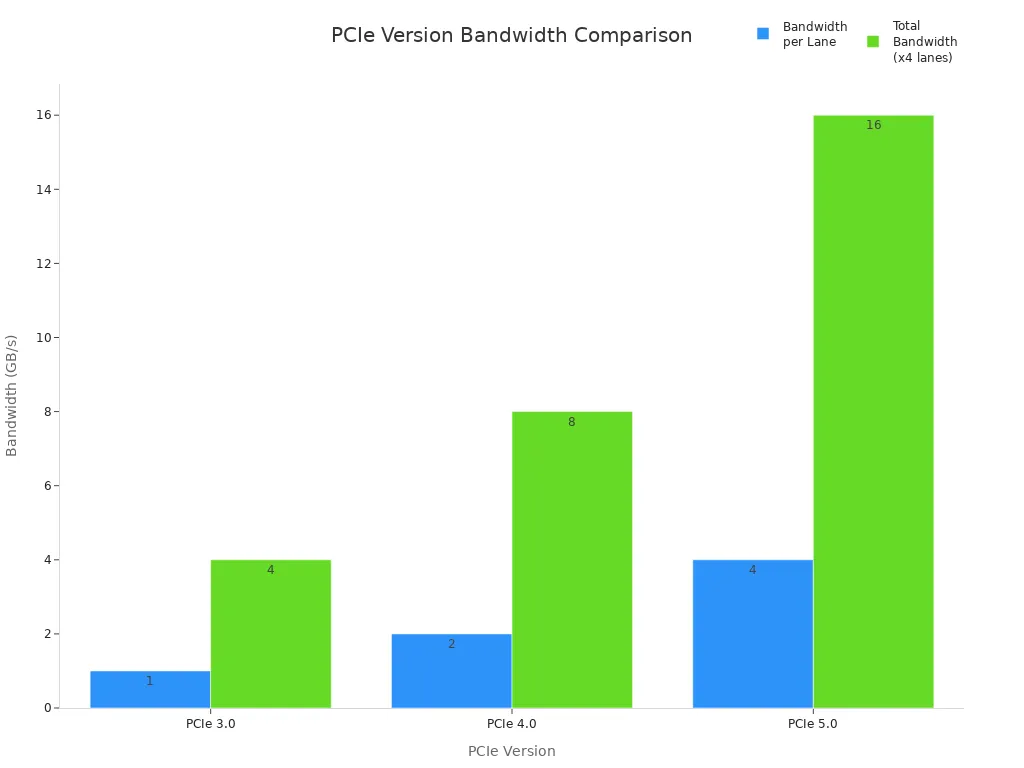
PCIe 4.0 and 5.0 versions help games load faster and make editing videos smoother. NVMe drives using PCIe 5.0 can reach speeds up to 14,000 MB/s. This means less waiting and more doing. The sz-xtt 12DAI-N6 Server Motherboard supports these fast PCIe standards, making it a strong choice for both gaming and server needs.
İpucu: When picking a server motherboard for gaming, look for models with many PCIe slots and the latest PCIe version. This gives the best speed and room to grow.
Depolama Seçenekleri
SATA and NVMe
Storage speed is very important for gaming and server jobs. Fast storage makes games start quickly. It also helps servers move data fast. Server motherboards have different ways to connect storage. SATA is an old way to connect hard drives and SSDs with cables. M.2 is a newer slot that fits thin SSDs. M.2 can use SATA or PCIe (NVMe) to connect. NVMe uses PCIe lanes and is much faster.
Arayüz Tipi | Açıklama | Maksimum Hız |
|---|---|---|
SATA | Sabit sürücüleri ve SSD'leri kablolarla bağlar | 600 MB/s (SATA III) |
M.2 | SSD'ler için ince yuva, SATA veya PCIe (NVMe) kullanır | Türe göre değişir |
SATA has been used for a long time. Most SATA SSDs today use SATA III. This can go up to 600 MB/s. NVMe drives use PCIe lanes and are much faster than SATA. NVMe also makes data move with less waiting. The sz-xtt 11DPL-I Server Motherboard ve 12DAI-N6 Sunucu Anakartı work with both SATA and NVMe. These motherboards let users connect fast drives for gaming and server work.
İpucu: NVMe drives make games load fast and servers answer quickly.
RAID Desteği
RAID means Redundant Array of Independent Disks. RAID lets you use more than one drive for better speed or safer data. Many server motherboards have RAID. This helps keep data safe and makes things faster.
RAID keeps data safe by copying it to more than one drive.
It can make data move faster by splitting files between drives.
Some motherboards, like the WS X299 PRO/SE, use Intel® VROC to set up RAID with NVMe drives. This uses CPU PCIe lanes and does not have the slowdowns of old systems.
RAID can go up to 128Gbps, which is much faster than old ways.
Bu sz-xtt 12DAI-N6 Server Motherboard has strong RAID support. Users can build systems that keep data safe and run fast. Sz-xtt motherboards help users get both speed and safety for gaming and server jobs.
Network Features

Ethernet and Wi-Fi
Good network features make a server motherboard for gaming work well. Many people want fast and steady internet. New motherboards often have both wired and wireless ways to connect. Ethernet ports give a strong and quick link for gaming or server jobs. Some motherboards use Intel® 2.5Gb Ethernet. This makes LAN speeds up to 2.5 times faster than normal ports. Faster LAN means less lag and quicker data movement.
Wi-Fi is also important for many users. New motherboards use WiFi 7. WiFi 7 works on the 6 GHz band. It can use a 160 MHz bandwidth. This keeps the internet steady, even with many devices. Antennas are better now too. For example, ASUS WiFi Q-Antenna can make the wireless signal up to 18% stronger. This gives users a better and more steady wireless connection.
Özellik | Açıklama |
|---|---|
Çift LAN | Intel® 2.5Gb Ethernet makes LAN speeds up to 2.5 times faster. It helps with more bandwidth and less lag. |
Wi-Fi | WiFi 7 uses 160 MHz bandwidth in the 6 GHz band. This keeps connections steady on many bands. |
Antenna Technology | New antennas give up to 18% better wireless signal than old ones. |
Sz-xtt motherboards, like the 11DPL-I Sunucu Anakartı, have great network features. These motherboards support fast Ethernet and new Wi-Fi. Users can count on these motherboards for smooth gaming and strong server links.
Çift LAN
Dual LAN ports give more ways to connect. They let a computer use two networks at the same time. This can help balance network traffic or give a backup if one network stops working. High-end server motherboards often have dual 10-Gigabit Ethernet ports. These ports move lots of data very fast. Some motherboards also have 2.5Gbit Ethernet for even more speed.
With dual LAN, users can use link aggregation. This means two network links work together for better speed. It also keeps the system online if one cable comes out. Sz-xtt has motherboards with dual LAN and good network features. The 12DAI-N6 Sunucu Anakartı is one example. It lets users move data fast and keep connections steady for gaming and server work.
İpucu: Pick a server motherboard for gaming with dual LAN and good Wi-Fi. This gives you fast, steady, and flexible network connections.
Uzaktan Yönetim
IPMI Support
IPMI means Intelligent Platform Management Interface. It lets people control servers from far away. Many server motherboards for gaming, like ones from sz-xtt, var IPMI support. With this feature, users can manage their systems without being close by. IPMI gives tools to check hardware health, restart servers, and fix problems fast.
The table below shows how IPMI helps with remote management:
Fayda | Açıklama |
|---|---|
Remote Power Management | Users can turn servers off or on from anywhere. |
Hardware Monitoring | IPMI checks things like temperature and fan speed. |
System Recovery | It helps users fix and recover systems quickly, so there is less downtime. |
Güvenlik | IPMI uses safe methods to protect remote actions. |
Many sz-xtt motherboards, like the 11DPI-N Sunucu Anakartı, have strong IPMI support. These models help users keep servers working well and safe. The sz-xtt team answers support questions fast, so remote management is easier for everyone.
İpucu: IPMI makes it easy and safe to manage servers, even if you are not close to them.
Home Server Needs
Home servers need good remote management features. People want to control their systems from anywhere. Server-grade IPMI remote management gives control over hardware and software. Many sz-xtt motherboards have a special LAN port with the AST2600 BMC controller. This setup lets users reset or turn their systems on and off from far away.
The table below lists important remote management features for home servers:
Özellik | Açıklama |
|---|---|
Server-grade IPMI remote management | Hardware and software control with a special LAN port and BMC controller. |
ASMB9-iKVM for remote management | Built-in BMC lets users reset or turn the system on and off from far away. |
ASUS Kontrol Merkezi Express | Software that helps watch and manage IT in real time, making things safer and faster. |
BMC remote management | BMC helps connect software and hardware, so users can fix problems from far away. |
Sz-xtt motherboards, like the 12DAI-N6 Sunucu Anakartı, support these advanced features. Users can count on sz-xtt for quick help and fast quotes. The company helps people build home servers that are safe and easy to use.
Not: Remote management features save time and help keep servers running well, even if you are not near them.
Yapı Kalitesi
Dayanıklılık
Durability is very important when picking a server motherboard for gaming or server use. Strong materials like stainless steel and aluminum make motherboards last longer. These materials protect the parts inside from dust and moisture. Industrial motherboards can work in tough places. They keep working even when things get hard.
Öznitelik | Açıklama |
|---|---|
Güvenilirlik ve Kararlılık | Güçlü parçalar ve dikkatli testler zor işlerde yardımcı olur. |
Ölçeklenebilirlik | Daha fazla işlemci, bellek ve depolama için alan. |
İşlemci Desteği | Gelecekteki ihtiyaçlar için kolay yükseltmeler. |
Ağ Bağlantısı | Hızlı Ethernet bağlantı noktaları verileri hızla taşır. |
Sz-xtt uses high-quality materials to build motherboards. Models like 2SEEP Sunucu Anakartı, 3DE Sunucu Anakartı, ve 3DGQ Sunucu Anakartı are very strong. These motherboards are tested carefully to make sure they work well for gaming and server jobs.
Güç ve Soğutma
Power delivery and cooling are important for build quality. Good power delivery keeps the system steady and efficient. High power efficiency, sometimes up to 90%, saves money and helps the planet. Servers often use hot-swappable power supplies. This lets users change power modules without turning off the system.
Cooling stops the motherboard from getting too hot. Airflow and heat sinks protect the motherboard and other parts. Server motherboards need strong cooling to handle heavy work. Bigger and faster fans help keep things cool, even in crowded server racks.
Some advanced systems use immersion cooling. This method controls heat from powerful processors and lowers energy use. It works well in data centers that support AI and high-performance computing. Immersion cooling can make Power Usage Effectiveness (PUE) almost 1.0, which is better than regular air cooling.
Sz-xtt motherboards, like the 3DE Sunucu Anakartı ve 3DGQ Sunucu Anakartı, have strong power delivery and cooling systems. These features help users build gaming and server setups that stay steady under pressure.
Brand and Support
Reputation
Brand reputation is important when you pick a server motherboard for gaming. People like brands that work well and last a long time. Intel is known for making motherboards that are steady and trusted. AMD has gotten better, especially with its EPYC processors. Users should check how well the brand did before and what kind of help they offer. A good brand makes people feel sure their server motherboard for gaming will not break under heavy use.
Sz-xtt is known for making good products and giving great support. Many people buy sz-xtt server motherboards for gaming because they work well and the company helps fast. The 11DPI-N Sunucu Anakartı ve 12DAI-N6 Sunucu Anakartı show that sz-xtt cares about strong performance and keeping things steady.
If a brand is trusted, you do not have to worry as much. You can trust your server motherboard for gaming to keep working.
Garanti
Warranty rules protect buyers if something goes wrong. Top brands give different warranty times for server motherboard for gaming products. The table below shows some normal warranty times:
Product | Standart Garanti | Remarks |
|---|---|---|
Motherboard | 3 Yıl | Applies to products bought after Nov 1, 1999; void if serial sticker removed |
TUF Gaming | 3 Yıl | Same as above |
TUF Series | 5 Years | Same as above |
Tinker Board | 1 Yıl | Same as above |
Sz-xtt gives strong warranty support for its server motherboard for gaming products. The company helps users fix problems fast and keeps computers working well.
Server Motherboard for Gaming
Good customer service is important when picking a server motherboard for gaming. Sz-xtt gives fast price quotes and answers questions quickly. Users can talk to the team and get a reply in one day. This help lets users build and take care of their server motherboard for gaming without waiting too long.
Sz-xtt sells products that work well for gaming and servers.
The company gives quick help and clear answers.
Users can learn more about sz-xtt’s server motherboard for gaming on the website.
Good support and a strong warranty make buying a server motherboard for gaming a smart choice.
Picking the right server motherboard for gaming or server use is important. It helps people get good performance and makes the system last longer. If you pick features that fit your needs, your computer will work better and cost less to run. The table below explains why these things matter:
Özellik | Açıklama |
|---|---|
High-Quality Components | Made to last a long time and stay steady. This is very important for servers. |
24/7 Reliability | Tested to work well all the time, even with heavy use. |
Buyers can follow this easy checklist:
Make sure the CPU socket and power connectors match.
Check if there are enough PCIe slots for supporting upgrades.
See if you need ECC or remote management.
Look at the brand’s reputation and warranty.
A lot of people trust sz-xtt because their server motherboards work well for both gaming and server jobs.
SSS
What makes a server motherboard good for gaming?
A server motherboard for gaming should support fast CPUs. It also needs lots of RAM and strong PCIe slots. Sz-xtt models like 11DPI-N have these things. These features help games run smoothly and let you do many things at once.
Why is ECC memory important in server motherboards?
ECC memory checks for mistakes and fixes them. This keeps your data safe and stops crashes. Sz-xtt motherboards, like 11DPL-I, use ECC to make sure everything works well.
How does remote management help server users?
Remote management lets people control servers from far away. IPMI on sz-xtt motherboards helps you watch and fix problems fast. This saves time and keeps the server working.
Which network features should buyers look for?
Buyers should pick motherboards with two LAN ports and fast Ethernet. Sz-xtt motherboards, such as 12DAI-N6, give strong network choices for gaming and server jobs.
Where can buyers find more information about sz-xtt motherboards?
Buyers can go to the sz-xtt resmi web sitesi for all server motherboard models and help. The website has lots of details and quick answers.


