
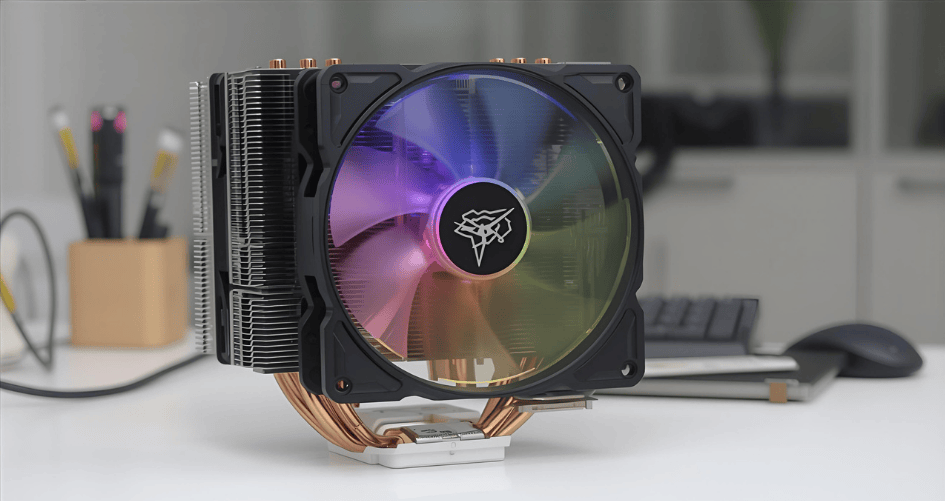
Yüksek performanslı bilgi işlem dünyasında Merkezi İşlem Birimi (CPU) sistemin tartışmasız kalbidir. Intel ve AMD'nin modern işlemcileri çekirdek sayılarının ve saat hızlarının sınırlarını zorladıkça, önemli miktarda ısı üretirler. Bu termal çıktıyı yönetmek yalnızca bir öneri değil; sistem kararlılığını, performansını ve uzun ömürlülüğünü korumak için kritik bir gerekliliktir. Yetersiz bir soğutma çözümü şunlara yol açabilir termal kısma, CPU'nun aşırı ısınmayı önlemek için performansını otomatik olarak düşürdüğü ve böylece pahalı donanımınızın yeteneklerini ortadan kaldıran koruyucu bir mekanizmadır.
Seçmek en iyi cpu soğutucusu İhtiyaçlarınıza uygun bir PC kurmak en önemli kararlardan biridir. Piyasa, devasa hava soğutmalı kulelerden sofistike Hepsi Bir Arada (AIO) sıvı soğutuculara kadar çeşitli seçeneklerle doludur. Bu kılavuz, 2025'te mevcut olan en iyi CPU soğutucularının kapsamlı bir analizini sunacak, çalışmalarının arkasındaki bilimi inceleyecek ve sizi masaüstü bilgisayarınız ve hatta özel sunucu ortamlarınız için bilinçli bir karar verme bilgisiyle donatacaktır.
CPU Soğutmanın Temel Prensipleri
Belirli modelleri karşılaştırmadan önce, bir CPU soğutucusunun temel amacını anlamak önemlidir: ısı transferi. Bir CPU'nun gerçekleştirdiği her işlem elektrik enerjisini termal enerjiye dönüştürür. Bir soğutucunun görevi, bu ısıyı CPU'nun Entegre Isı Dağıtıcısından (IHS) verimli bir şekilde uzaklaştırmak ve onu çevreleyen havaya dağıtmaktır.
Bir CPU'nun ısı çıkışını ölçmek için kullanılan birincil metrik Termal Tasarım Gücü (TDP), Watt cinsinden ölçülür. TDP'nin tam tanımı üreticiler arasında farklılık gösterse de, soğutucu seçiminde önemli bir ölçüt olarak hizmet eder. Bir soğutucu, özellikle oyun, içerik oluşturma veya bilimsel bilgi işlem gibi zorlu görevler sırasında, tasarlandığı CPU'nun TDP'sine eşit veya daha yüksek bir termal yayma kapasitesine sahip olmalıdır.
Ana Yarışmacılar: Hava Soğutma vs Sıvı Soğutma
Hava ve sıvı soğutma arasındaki tartışma, PC yapım topluluğunda uzun süredir devam eden bir tartışmadır. Her iki yöntem de etkilidir, ancak amaçlarına farklı mekanizmalarla ulaşırlar ve farklı avantajlar ve dezavantajlar sunarlar.
Hava Soğutucular: Denenmiş ve Gerçek Titanlar
Hava soğutucular, CPU soğutmanın en geleneksel şeklidir. Tasarımları iletim ve konveksiyon prensiplerine dayanır.
- Nasıl Çalışıyorlar? Tipik olarak bakırdan yapılmış iletken bir taban plakası, CPU'nun IHS'si ile doğrudan temas kurar (bir tabaka termal macun arasında). Isı, taban plakasından bir dizi ısı boruları. Bu borular buharlaşan bir sıvı içerir ve ısıyı yukarıya, aplikatör olarak bilinen geniş bir ince metal kanat dizisine taşır. yüzgeç yığını veya soğutucu. Kanatçık yığınına bağlı bir fan daha sonra kanatçıklar boyunca daha soğuk ortam havasını üfleyerek ısıyı metalden uzaklaştırır ve PC kasasına atar.
- Avantajlar:
- Güvenilirlik: Daha az hareketli parçaya (sadece fan) sahip olan hava soğutucuları son derece güvenilirdir ve daha uzun bir çalışma ömrüne sahiptir.
- Maliyet-Etkinlik: Yüksek performanslı hava soğutucular genellikle daha düşük bir fiyat noktasında giriş seviyesi AIO'larla karşılaştırılabilir performans sağlar.
- Basitlik: Montaj genellikle daha basittir ve sıvı sızıntısı riski yoktur.
- Dezavantajlar:
- Boyut ve Açıklık: Üst düzey hava soğutucular son derece hantal olabilir ve uzun RAM modülleri veya anakart VRM soğutucuları ile etkileşime girebilir. Yükseklikleri de daha küçük kasalar için sorun yaratabilir.
- Isı Dağılımı: Isıyı dağıtırlar içeride Kasa hava akışı optimize edilmezse genel ortam sıcaklığını yükseltebilir.
Hepsi Bir Arada (AIO) Sıvı Soğutucular: Şık ve Güçlü
AIO soğutucular, bir zamanlar özel döngüler oluşturan hardcore meraklılara ayrılmış bir alan olan sıvı soğutmaya bağımsız, kullanıcı dostu bir yaklaşım sunar.
- Nasıl Çalışıyorlar? AIO bir kapalı döngü sistemi. CPU üzerine monte edilen bir su bloğundan (bir taban plakası ve küçük bir pompa içerir) oluşur. Bu blok iki tüp ile bir su bloğuna bağlanır. radyatör. Sıvı soğutucu bloktan pompalanarak CPU'dan gelen ısıyı emer. Daha sonra radyatöre gider ve burada fanlar sıvıyı soğutmak için radyatörün geniş yüzey alanı boyunca hava üfler. Soğutulan sıvı daha sonra işlemi tekrarlamak için su bloğuna geri döner.
- Avantajlar:
- Üstün Termal Verimlilik: Sıvı, ısı transferi için havadan daha etkili bir ortamdır. AIO'lar, büyük miktarda ısıyı CPU'dan hızlı bir şekilde uzaklaştırma ve radyatör fanları aracılığıyla doğrudan kasadan dışarı atma konusunda mükemmeldir.
- Estetik ve Mekan: AIO'lar daha temiz, daha modern bir görünüm sunar ve CPU soketinin etrafındaki alanı açık bırakarak anakart ve RAM'in daha iyi görünmesini sağlar.
- Daha Sessiz Çalışma: Bir AIO'daki radyatör fanları, aynı soğutma seviyesini elde etmek için genellikle benzer bir hava soğutucunun fanından daha düşük RPM'lerde dönebilir ve bu da yük altında daha düşük gürültü seviyelerine neden olur.
- Dezavantajlar:
- Maliyet: AIOs are generally more expensive than their air-cooled counterparts.
- Complexity and Failure Points: With a pump, tubing, and multiple seals, there are more potential points of failure, including pump malfunction or, in very rare cases, leaks.
- Installation: While more straightforward than custom loops, installation requires mounting both the block and the radiator, which can be more involved.
Key Factors for Choosing the Best CPU Cooler
Selecting the right cooler involves balancing several critical factors against your specific build and usage patterns.
- Thermal Performance (TDP Rating): Ensure the cooler can handle your CPU’s power draw, with headroom for potential overclocking.
- Noise Levels (Acoustics): Measured in decibels (dBA), this is crucial for users who prioritize a quiet system. Check reviews for noise-normalized performance data.
- Socket and Case Compatibility: The cooler must support your CPU’s socket type (e.g., AMD AM5, Intel LGA 1700/1851). You must also verify that your case has sufficient clearance for the cooler’s height (for air coolers) or radiator size (for AIOs).
- Boyut ve Açıklık: For air coolers, check RAM clearance. For AIOs, ensure your case supports the radiator size (e.g., 240mm, 280mm, 360mm) in your desired mounting location (top, front, or rear).
- Aesthetics and RGB: For many builders, visual appeal is important. Many coolers offer customizable RGB lighting and unique designs.
- Price and Value: Determine your budget. The most expensive cooler is not always the best choice for every build.
Deep Dive: Analyzing the Top CPU Coolers of 2025
Based on extensive testing and market analysis from sources like Tom’s Hardware and Corsair, here is a breakdown of the leading CPU coolers, categorized by their strengths.
Table 1: Comparative Analysis of Top Air Coolers
| Model | Tip | Temel Özellikler | Estimated Price | Noise Profile | Verdict |
|---|---|---|---|---|---|
| Thermalright Peerless Assassin 120 SE | Dual-Tower Air | 6 heat pipes, dual 120mm fans, exceptional value | $35 – $45 | Very Quiet | The undisputed king of value, offering performance that rivals much more expensive coolers with minimal noise. |
| Noctua NH-D15 | Dual-Tower Air | Legendary performance, 6-year warranty, premium build quality | $100 – $120 | Extremely Quiet | A long-standing benchmark for high-end air cooling, known for its silent operation and superb reliability. |
| Scythe Mugen 6 | Single-Tower Air | Full RAM compatibility, low noise focus, affordable | $40 – $50 | Whisper Quiet | An excellent mid-range choice for users who prioritize acoustics without sacrificing significant performance. |
| Noctua NH-P1 | Passive (Fanless) | Completely silent operation, massive heatsink | $110 – $120 | Silent (0 dBA) | A niche product for silence-focused builds. Requires good case airflow but offers a unique, fanless solution. |
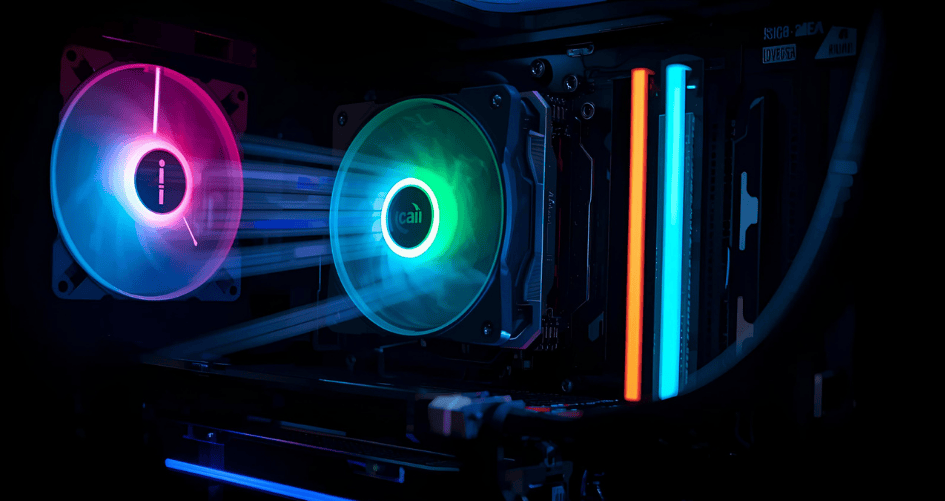
Table 2: Comparative Analysis of Top AIO Liquid Coolers
| Model | Radiator Size | Temel Özellikler | Estimated Price | Noise Profile | Verdict |
|---|---|---|---|---|---|
| Arctic Liquid Freezer III 360 | 360mm | Top-tier thermal performance, VRM fan, excellent value | $120 – $140 | Moderate to Loud | Offers some of the best raw cooling performance on the market, easily taming the hottest CPUs. A performance-first choice. |
| Corsair iCUE H170i Elite LCD XT | 420mm | Massive radiator, customizable IPS LCD screen, iCUE software | $300+ | Quiet to Moderate | The ultimate choice for performance and aesthetics, but requires a large case and a significant budget. |
| Lian Li Galahad II LCD 280 | 280mm | Stronger than many 360mm AIOs, vibrant LCD display, low noise | $220 – $240 | Very Quiet | A perfect blend of high performance, compact 280mm size, and premium aesthetics. Ideal for many mid-tower builds. |
| ID-Cooling FX360 INF | 360mm | Strong performance, low noise, budget-friendly price | $70 – $90 | Quiet | Delivers incredible value in the 360mm AIO space, making liquid cooling more accessible without major compromises. |
Beyond the Desktop: Cooling in Specialized Environments
While this guide focuses on consumer PCs, the principles of thermal management are even more critical in professional and enterprise settings. Server CPU heatsinks must be designed for 24/7 reliability and fit within specific chassis constraints.
In high-density data centers, form factor is paramount. Coolers like 1U server heatsinks ve 2U server heatsinks are engineered with a low profile to fit into slim rack-mounted servers. These coolers often prioritize raw heat dissipation and durability over the acoustic performance and aesthetics found in consumer products. For enterprise-grade applications, where reliability and specific form factors are non-negotiable, specialized solutions are required. Companies like XTT offer a range of products, including some of the en iyi cpu soğutucusu options designed specifically for server environments, from AI servers to storage servers, ensuring optimal performance under continuous, heavy workloads.
Installation and Best Practices
- Thermal Paste Application: Whether using pre-applied paste or a third-party tube, ensure a thin, even layer covers the CPU’s IHS. A pea-sized dot in the center is a widely accepted and effective method.
- AIO Radiator Orientation: To prevent air bubbles from getting trapped in the pump (which can cause noise and reduce efficiency), mount the radiator so that the highest point of the loop is the radiator itself, not the pump on the CPU block. Front-mounting with tubes down is ideal.
- Airflow is Key: Ensure your case fans are configured for a clear airflow path—intake from the front/bottom and exhaust out the back/top. This prevents hot air from stagnating inside the case.
Sıkça Sorulan Sorular (SSS)
1. Air cooling vs. AIO liquid cooling: which is truly better?
Neither is definitively “better”; they serve different priorities. Air cooling is superior for reliability and value. AIO liquid cooling is superior for peak thermal performance and aesthetics. The best choice depends on your budget, case, CPU, and personal preference.
2. Do I need to replace the pre-applied thermal paste on a new cooler?
No. The thermal paste that comes pre-applied on most coolers is of good quality and sufficient for excellent performance. You only need to apply new paste if you are remounting an old cooler or if the pre-applied paste gets smudged.
3. How often should I clean my CPU cooler?
You should inspect your cooler’s heatsink and fans for dust buildup every 3-6 months. Use compressed air to clean the fins and fan blades to maintain optimal performance. A dusty cooler is an inefficient one.
4. Can a better cooler increase my FPS in games?
Indirectly, yes. If your current cooler is inadequate and causing your CPU to thermal throttle, upgrading to a better cooler will prevent this performance loss, allowing the CPU to maintain its maximum boost clocks for longer, which can lead to higher and more stable frame rates (FPS).
5. What is TDP and why does it matter for my cooler?
TDP, or Thermal Design Power, is the maximum amount of heat a CPU is expected to generate under a typical heavy workload. Your cooler must be rated to dissipate at least this much heat to prevent overheating. High-end CPUs have high TDPs and require more powerful coolers.
6. Are more expensive coolers always better?
Not necessarily. Price often correlates with features like RGB lighting, LCD screens, or premium materials, not just raw performance. As shown in our tables, many mid-priced coolers, like the Thermalright Peerless Assassin, offer performance that punches far above their price class.
7. How do I know if a cooler will fit in my case?
Check three specifications: 1) The cooler’s CPU socket compatibility (e.g., LGA 1700, AM5). 2) For air coolers, check the “CPU Cooler Height Clearance” of your case. 3) For AIOs, check the “Radiator Support” (e.g., 240mm, 360mm) of your case. These details are available on the manufacturers’ websites.
8. What’s the difference between a CPU cooler and a heatsink?
A “heatsink” is a specific component of a cooler—the metal fin stack that absorbs heat. A “CPU cooler” is the entire assembly, which includes the heatsink, the baseplate, and the fan(s) or pump/radiator system. The terms are often used interchangeably, but “cooler” is more accurate for the complete product.
Sonuç
The journey to selecting the perfect CPU cooler in 2025 is one of balancing performance, acoustics, aesthetics, and budget. For the vast majority of users, a high-quality air cooler like the Thermalright Peerless Assassin 120 SE offers an unbeatable combination of performance and value. For those pushing the limits with high-end CPUs, or who desire the clean look of a modern build, an AIO liquid cooler from brands like Arctic, Corsair, or Lian Li provides the ultimate in thermal management.
Ultimately, the best CPU cooler is the one that meets the demands of your processor, fits within your chassis, and aligns with your personal goals for the system. By understanding the fundamental technologies and considering the key factors outlined in this guide, you are now well-equipped to make a choice that will keep your system running cool, quiet, and at peak performance for years to come.
Referanslar
- PCMag. (n.d.). Definition of CPU cooler.
- Corsair. (n.d.). CPU Cooling.
- Corsair. (n.d.). What is an AIO cooler? Do you actually need one?.
- Amazon. (n.d.). CPU Cooler Search Results.
- Intel. (n.d.). CPU Cooler: Liquid Cooling Vs. Air Cooling.
- Safford, M. (2025). Best CPU Coolers 2025: AIO and Air Coolers. Tom’s Hardware.
- Intel. (n.d.). PC Cooling: The Importance of Keeping Your PC Cool.
- Asetek. (n.d.). How AIO Coolers Work and Tips to Improve Performance.
- Crucial. (n.d.). Water cooling vs. air cooling for your PC.


